- Published on
Connecting Make and Reddit: The Full OAuth 2.0 Tutorial
- Authors

- Name
- Chris
- @molehillio
Introduction
Make has a large array of app modules at its disposal, and among those is the Reddit app module. While this module has a bunch of different functionality, such as watching a user's posts, or listing comments in a subreddit, it is also quite limited. For instance, while writing a tutorial for building a Reddit scraper in Make I spent a lot of time trying to figure out how to get posts from a subreddit.
As it turns out, the best way is to connect to the Reddit API manually, so that you get the full functionality of the API. However to do that, you will need to set up an OAuth 2.0 connection to Reddit! In this tutorial, we will walk you through setting up the connection, and how to use it to get access to the full Reddit API. If your goal is building the full workflow afterward, continue with our Make Reddit scraper tutorial.
WARNING
Reddit changed API access in late 2025, and self-service key creation is no longer broadly available for new users. Before starting, read our Reddit API policy update guide to confirm which path applies to your use case.
This article contains affiliate links. If you sign up through our links, we may earn a commission at no extra cost to you.
Table of Contents
- Creating a Reddit App
- Creating a Reddit OAuth 2.0 Connection
- Using the API
- Conclusion
- Frequently Asked Questions
- What is the Reddit OAuth 2.0 redirect URI for Make?
- What Reddit API scopes do I need to read subreddit posts?
- Why do I need to create a Reddit app just to read posts?
- What should my Reddit User-Agent header contain?
- How do I generate the base64 authorization value for Reddit in Make?
- Does the Reddit OAuth access token expire in Make?
- Appendix: Reddit API Scopes
Creating a Reddit App
In order to use the full API, we need more than just a user account. We need to create an "app". Apps in Reddit are commonly used for special tools, such as the bots or automoderator tools you occasionally see. Luckily for us, anyone can create a bot.
Log into your Reddit account, and head to the apps page.
Once there, click Create App, and you will be presented with a form to fill out. Make sure to choose script as the app type. There are a couple of other fields here, but the most important one is the redirect url. This is the URL that Reddit will use to redirect you back to Make, so use the following:
https://www.integromat.com/oauth/cb/oauth2
The rest of the fields can be filled out however you like. Give your app a descriptive name. If you have a URL for your project you can put that in the about url, but if you are just making a script, use https://make.com.
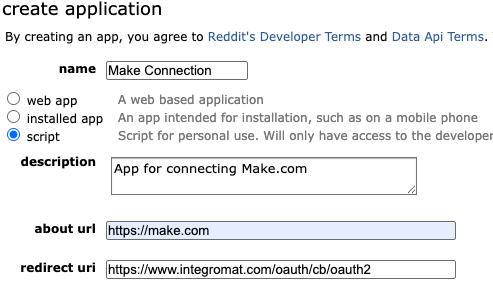
Once you are done, click Create App. What you should see next is your created app. From this page, we need two important pieces of information. Your Client ID and your Secret. See the labels on the image below to find these, and make a note of them somewhere safe as we will need them later.
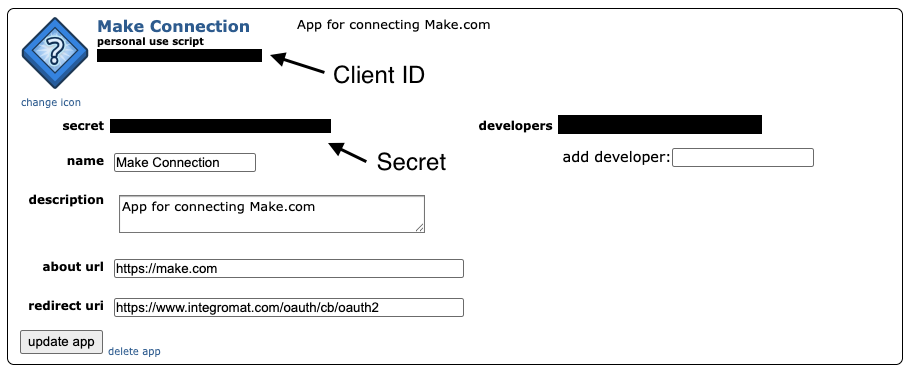
We are now done with creating the Reddit app. If you made any mistakes, you can always correct them on this page by clicking update app.
Creating a Reddit OAuth 2.0 Connection
Now that we are done with creating our app on Reddit, we now need to configure Make to use this credential. Reddit uses an authorization protocol called OAuth 2.0 in order to allow you to connect and use their API. The specifics are somewhat technical, but roughly speaking you will use your Client ID and Secret to call Reddit and get an Access Token. This token can be temporary or permanent, but once you have it, you can use it to call the Reddit API.
Let's start by creating a HTTP module in Make, and choosing the Make an OAuth 2.0 Request sub-type. In the pop up dialog, click the Create a Connection button.
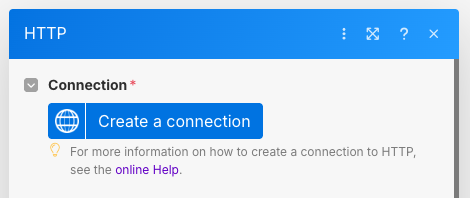
Now we need to set up the connection. Pay close attention here, as it is important to get all of these fields right. For some of the more obscure ones, we will explain what their meaning is.
WARNING
Make has a bit of an annoying habit where if you get anything wrong in your connection configuration, it will fail to work, and promptly reset the whole form forcing you to fill in everything again. Therefore, we suggest taking care to get it right the first time!
We start by setting up the connection name, and the Authorize and Token URLs. You can choose any name you want (I just went with "Reddit Connection"), but the URLs must be the ones below. These will be used by Make to authorize your account, and to get an access token respectively. You should also keep the Flow type as Authorization Code.
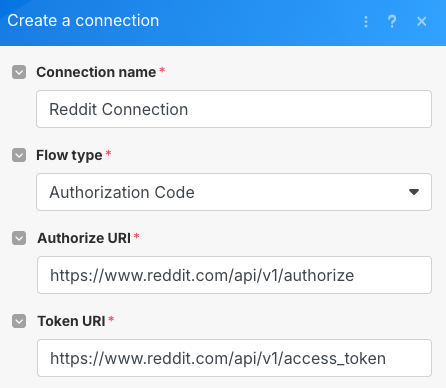
Make sure to use the following for the URLs:
Authorize URI: https://www.reddit.com/api/v1/authorize
Token URI: https://www.reddit.com/api/v1/access_token
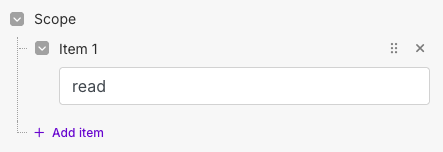
Next, we will set up the scopes. In OAuth 2.0, scopes represent what actions we want to take as a user once we have access. There are a variety of different actions such as reading data, creating posts, commenting, voting, etc. You can see the full list in the appendix below.
In our case, we just want the read scope, as we want to read the posts from the subreddit. Click the Add item under the Scope section, and add read to it. If you need more scopes, just add more items and add them one by one.
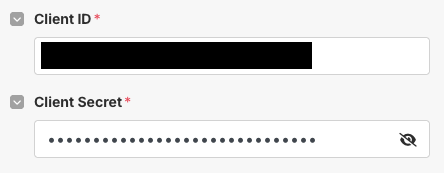
Now we need to add our Client ID and Secret. Grab the values from the Reddit app we created, and fill in the two fields.
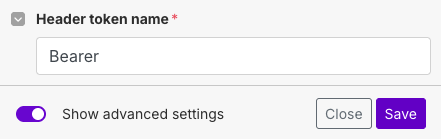
We are not done yet. Now we need to add some more details to our connection. On the bottom left of the dialog, click the Show advanced settings slider to reveal more options
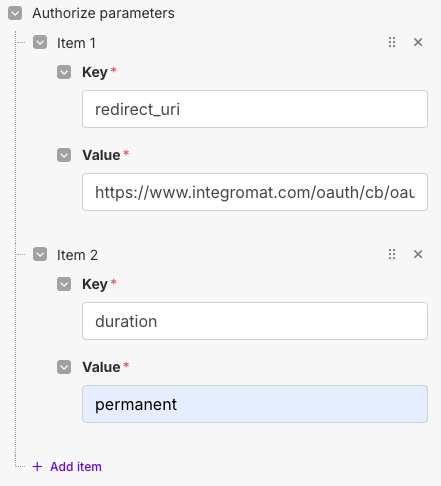
Under the Authorize Parameters we need to add in our redirection URL. This is the URL that make provides that Reddit will redirect to once we have logged in. We will use the same URL as before, and put it under the key redirect_uri. Click the Add item button to add an entry and fill it in.
https://www.integromat.com/oauth/cb/oauth2
We also can optionally add another parameter which will control how long our access token is valid for. If no duration is provided, the token will be valid for 1 hour. That means that every time your workflow runs, after an hour, you will need to refresh the token manually. Alternatively, you can choose a duration of permanent to make the access token permanent.
WARNING
Using a permanent access token does make life easier, but it can also be problematic if it falls into the wrong hands. Since it never expires, a malicious actor might gain permanent access to your app until you delete your app on Reddit!
To make your token permanent, add a duration key, with the value permanent.
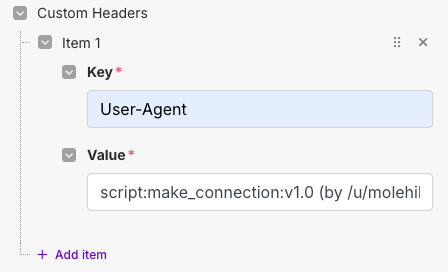
Lastly, we need to set up our Custom Headers. These are additional headers that are required as part of the auth process. To start with, we need to add our User-Agent. This is a piece of text that represents who we are and what our app does. Reddit is quite strict about this if you read their API rules, so, in general, any request you make to Reddit should have this header, and it should be descriptive.
Our User-Agent needs to follow this format:
<platform>:<app ID>:<version string> (by /u/<reddit username>)
We will use the following for our connection, but you should customize your own:
script:make_connection:1.0 (by /u/molehill_io)
Click Add item under Custom Headers and fill in the header.
Lastly, we need to add our Authorization header. This part is a little bit complicated, so some care needs to be taken. Reddit requires adding an additional authorization header on certain requests. This header, however, is a value that is derived from both the Client ID and Secret, and is encoded in base64.
We need to add an Authorization header with the value:
Basic base64({clientID}:{secret})
There are two ways to do this. If you are familiar with Python, you can do this by running the steps below individually in the Python shell. This is assuming that your Client ID is clientid and your Secret is secret. Replace these as you need to:
import base64

"Basic " + base64.b64encode("clientid:secret".encode("ascii")).decode('ascii')
Alternatively, you can use Make itself. Open up your scenario in a new tab (don't use the same one, as otherwise you will lose your progress!). Add a new module to the scenario, and choose the Set Variable module.
Call the variable "Auth Token", and in the value put the following, replacing the Client ID and Secret with your own ones.
Basic base64(clientid:secret)
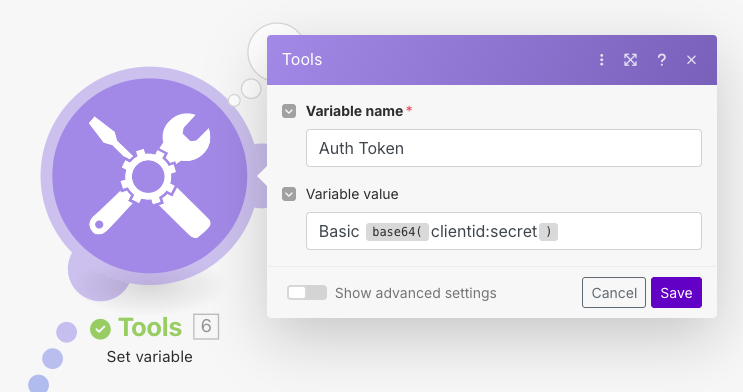
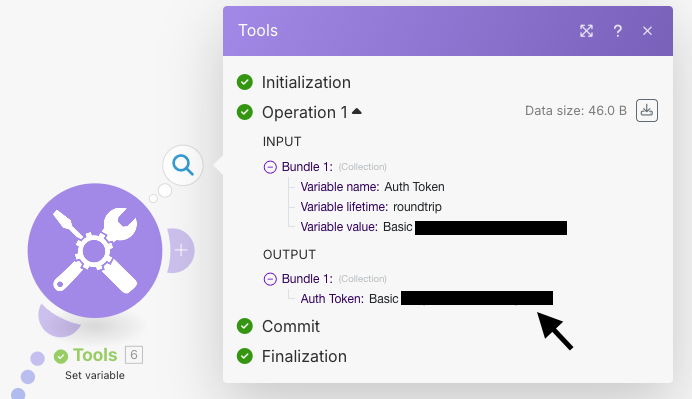
Right click on the module, and click Run this module only. This will generate your Authorization header, and you can copy paste it from the output.
CAUTION
There are websites online that can encode text to base64. In this case however, you should not use them! Never paste your client ID, secret, API key, etc into an unknown online tool. You have no idea who might see your secrets!
Once you have this token written down, you can delete the module as it is no longer needed, and switch back to the HTTP module. Take the value you calculated and add it as a custom header like so:
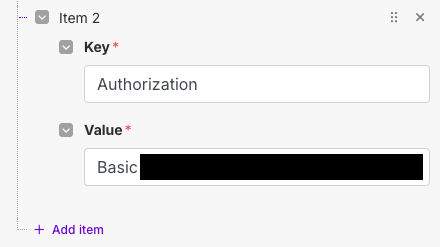
The remainder can stay as is. Double check everything, and when you are ready, click Save at the bottom. Assuming everything went well, you should see a small browser window pop up, asking you to allow the app. Review what it says, and click allow.
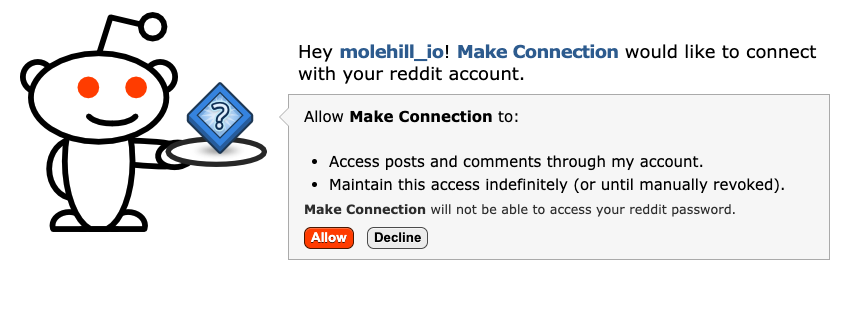
Once this is done, you should be redirected back to Make, where your Connection field should now show your reddit connection. If you got an error, check what it says (for instance, "Bad client ID", etc) and try and correct it. If nothing else helps, feel free to ping me on social media.
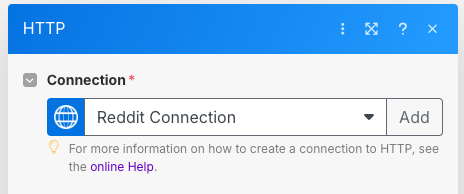
We have now successfully added the Reddit OAuth connection, and can proceed to actually making useful API calls.
Using the API
With our credentials set up, we can use the connection to call the Reddit API. To do that, we need to configure the actual HTTP Module. The Reddit API provides a wide range of routes that can be called to carry out various functions, and you can find the full list in their documentation.
As an example, we will use the API to get the posts from the r/news subreddit. To do this, we need to set the URL in the HTTP module. Keep the Method as GET, and set the URL to:
https://oauth.reddit.com/r/news
You might notice that the URL for the API is different from the regular Reddit URL (it has the oauth subdomain). It is important not to forget this; otherwise, you will get a rejection.
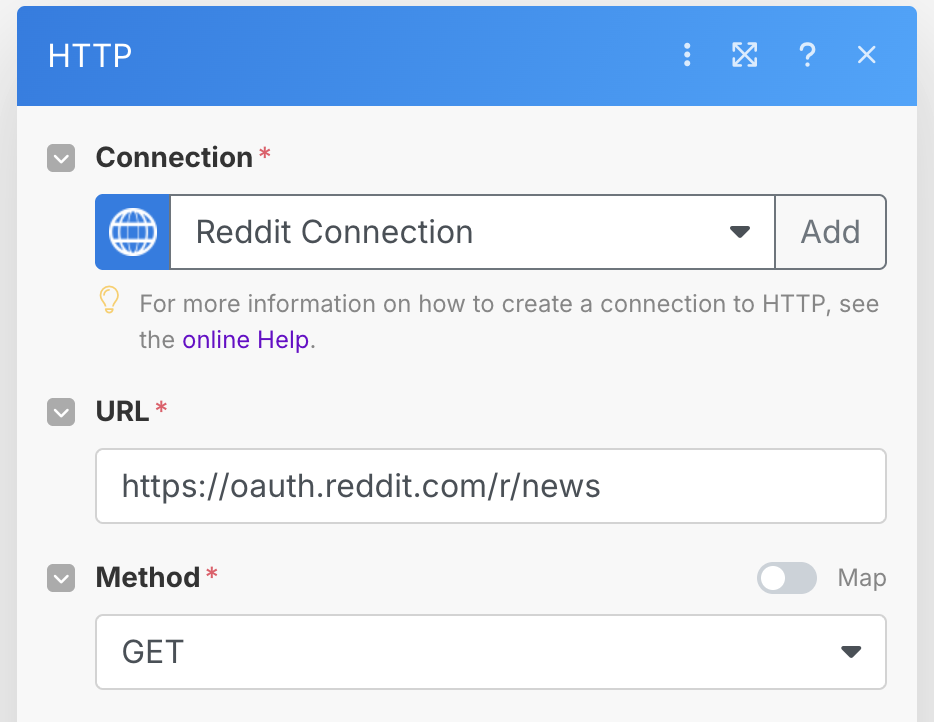
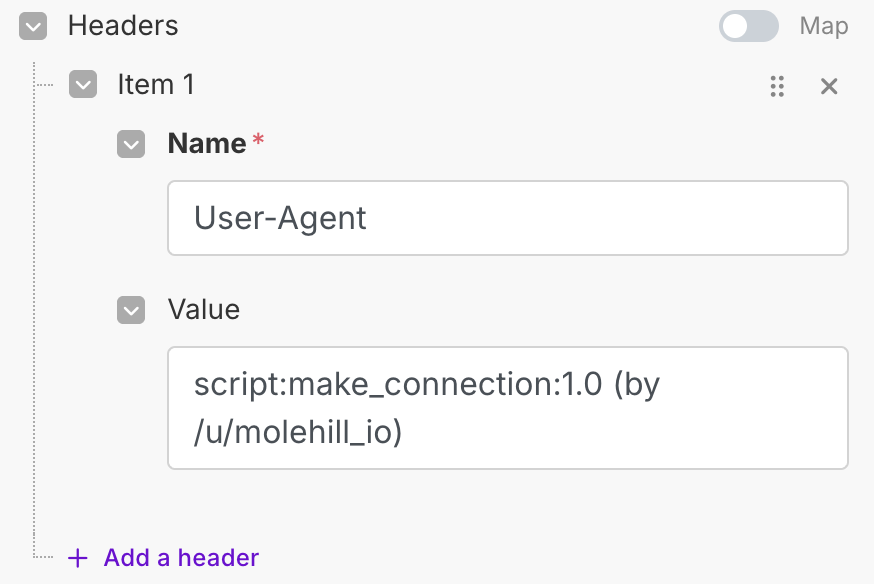
We mentioned earlier that we need to always provide the User-Agent header with every call, and this is no exception. Open the HTTP module dialog, click Add item on the Headers section, and add in the same User-Agent as last time.
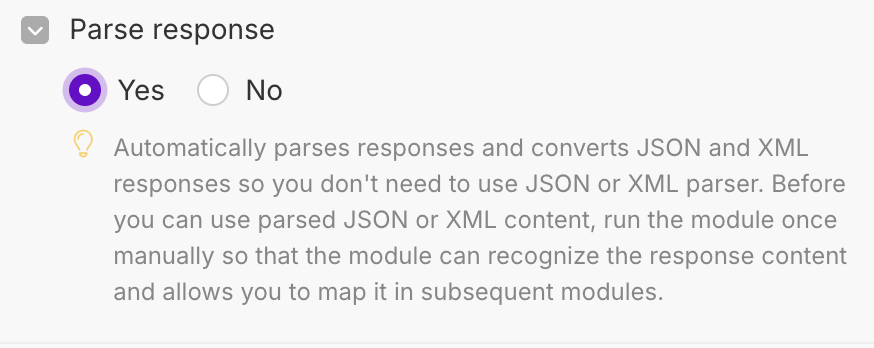
Finally, we set up our HTTP module to parse the response, as it will be returned as JSON.
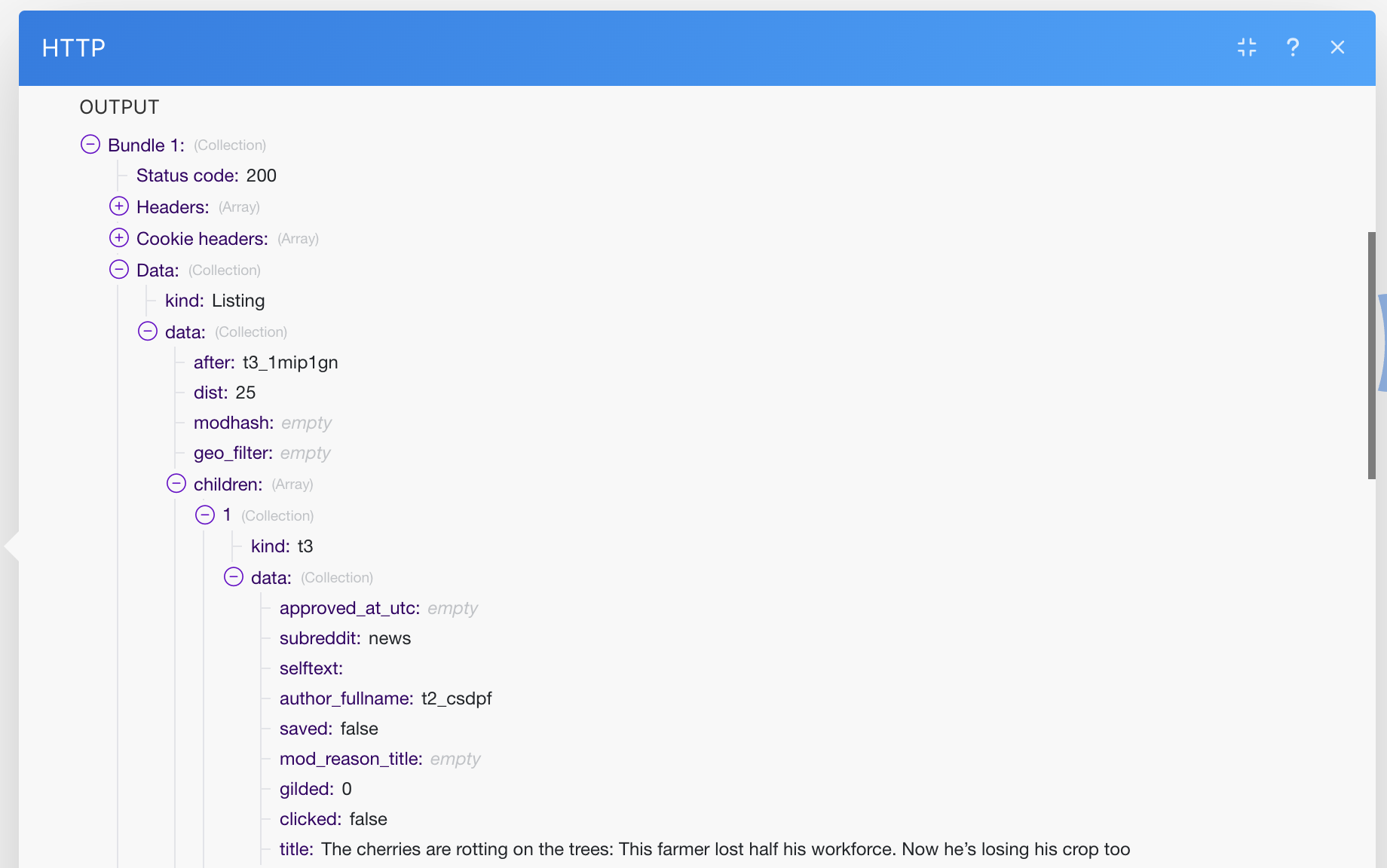
Once you are done, click Save, and run the workflow! You should see the result fetched successfully in the module output. Drill down into the JSON result to see the individual posts.
Conclusion
As you can see, setting up the Reddit connection and HTTP module is somewhat involved. However, once done it is relatively easy to use as long as you remember to add in the right headers!
I also want to credit some sources we used to piece together the full process:
- Make Community: Request failed due to failure of previous request: Connecting 2 reddit with HTTP “Make an OAuth 2.0 request”?
- TabsOverSpaces: Oauth2 With Reddit Api
Frequently Asked Questions
What is the Reddit OAuth 2.0 redirect URI for Make?
When creating your Reddit app for use with Make, the redirect URI must be set to https://www.integromat.com/oauth/cb/oauth2. This is Make's OAuth callback URL (Make was formerly known as Integromat, hence the domain). If you use a different URL, Reddit will refuse to redirect back to Make after authorization.
What Reddit API scopes do I need to read subreddit posts?
For read-only access to public posts and comments, you only need the read scope. This allows you to access posts, comments, and subreddit data through your account. If you need additional capabilities such as submitting posts, commenting, or voting, you will need to add the relevant scopes (submit, vote, etc.) to your OAuth connection. The full list of available scopes is in the appendix of this article.
Why do I need to create a Reddit app just to read posts?
Reddit requires OAuth authentication for API calls made from known data-center IP ranges (which cloud platforms like Make use). Without OAuth, requests from Make's servers return a 403 Forbidden error. Creating a Reddit app gives you a Client ID and Secret that can be used to obtain an access token, which then authenticates your API calls. For personal scripts running from a home IP, the unauthenticated JSON endpoints often work fine, but for cloud automation platforms, OAuth is necessary.
What should my Reddit User-Agent header contain?
Reddit is strict about User-Agent strings and requires them to be unique and descriptive. The recommended format is <platform>:<app ID>:<version> (by /u/<your reddit username>). For example: script:my_make_automation:1.0 (by /u/your_username). Using a generic or empty User-Agent can result in your requests being blocked or rate-limited more aggressively.
How do I generate the base64 authorization value for Reddit in Make?
The Authorization header value is Basic followed by the base64 encoding of clientID:secret. You can compute this in Make itself by using the Set Variable module with the expression Basic base64(clientid:secret), running it once to get the result, then copying the output. Do not use online base64 encoders for this, as you would be pasting sensitive credentials into an unknown third-party tool.
Does the Reddit OAuth access token expire in Make?
By default, Reddit OAuth tokens are valid for one hour. Once expired, you would need to manually refresh the connection in Make. To avoid this, you can add a duration parameter set to permanent in the Authorize Parameters when setting up the connection. This gives you a long-lived token that does not require regular renewal. The trade-off is that a permanent token is more sensitive if it is ever compromised, since it never expires on its own.
Appendix: Reddit API Scopes
This is a list of scopes that we pulled from https://www.reddit.com/api/v1/scopes. This table was created in August 2025, so it may be out of date.
| id | description |
|---|---|
| creddits | Spend my reddit gold creddits on giving gold to other users. |
| modnote | Access mod notes for subreddits I moderate. |
| modcontributors | Add/remove users to approved user lists and ban/unban or mute/unmute users from subreddits I moderate. |
| modmail | Access and manage modmail via mod.reddit.com. |
| modconfig | Manage the configuration, sidebar, and CSS of subreddits I moderate. |
| subscribe | Manage my subreddit subscriptions. Manage "friends" - users whose content I follow. |
| structuredstyles | Edit structured styles for a subreddit I moderate. |
| vote | Submit and change my votes on comments and submissions. |
| wikiedit | Edit wiki pages on my behalf |
| mysubreddits | Access the list of subreddits I moderate, contribute to, and subscribe to. |
| submit | Submit links and comments from my account. |
| modlog | Access the moderation log in subreddits I moderate. |
| modposts | Approve, remove, mark nsfw, and distinguish content in subreddits I moderate. |
| modflair | Manage and assign flair in subreddits I moderate. |
| announcements | Access to inbox announcements. |
| save | Save and unsave comments and submissions. |
| modothers | Invite or remove other moderators from subreddits I moderate. |
| read | Access posts and comments through my account. |
| privatemessages | Access my inbox and send private messages to other users. |
| report | Report content for rules violations. Hide & show individual submissions. |
| identity | Access my reddit username and signup date. |
| livemanage | Manage settings and contributors of live threads I contribute to. |
| account | Update preferences and related account information. Will not have access to your email or password. |
| modtraffic | Access traffic stats in subreddits I moderate. |
| wikiread | Read wiki pages through my account |
| edit | Edit and delete my comments and submissions. |
| modwiki | Change editors and visibility of wiki pages in subreddits I moderate. |
| modself | Accept invitations to moderate a subreddit. Remove myself as a moderator or contributor of subreddits I moderate or contribute to. |
| history | Access my voting history and comments or submissions I've saved or hidden. |
| flair | Select my subreddit flair. Change link flair on my submissions. |