- Published on
Tutorial & Review: Building a Reddit Question Scraper Using Make
- Authors

- Name
- Chris
- @molehillio
Introduction
In recent years the topic of automation has become... well... more topical. Though automation as a theme dates far back into history, web based automation tools have been around since around 2010. Starting with early pioneers such as If This Then That (IFTT) and Zapier, all the way to the current year, where newcomers such as Make and n8n have jumped onto the scene.
Web based automation platforms are a type of "no code" (or "low code" in some cases) platform designed around visually building workflows and automations to carry out some specific task. This could be anything, but common modern examples include:
- Downloading recent orders from an e-commerce platform, and sending out confirmation emails
- Downloading recent transactions from accounting software, and calculating financial or sales metrics
- Sorting through customer complaint emails, and prioritizing them based on urgency
and many more, in various combinations.
In this series, we will be trying out several different automation platforms by building the same workflow in each of them, to see what their individual strengths and weaknesses are. In the previous article, we covered building a workflow in n8n. In this specific article, we will cover another recent addition to the automation pantheon: Make.
This article contains affiliate links. If you sign up through our links, we may earn a commission at no extra cost to you.
Table of Contents
- What is Make?
- Workflow Specification
- Building the Workflow
- Conclusion
- Frequently Asked Questions
- Can I scrape Reddit posts with Make without OAuth credentials?
- Does Make support running custom JavaScript code in a scenario?
- How does Make handle deduplication in a scenario?
- How does Make's credit pricing work compared to Zapier tasks?
- Can I use AI models other than OpenRouter in a Make scenario?
- What is the Make Router module used for?
What is Make?
Make, formerly known as Integromat, is a visual automation platform that allows users to connect various applications and services to create automation workflows. It's often described as a more advanced alternative to more established tools, such as Zapier. Make models its automations (called "Scenarios") using individual actions called "modules", which can be connected to each other.
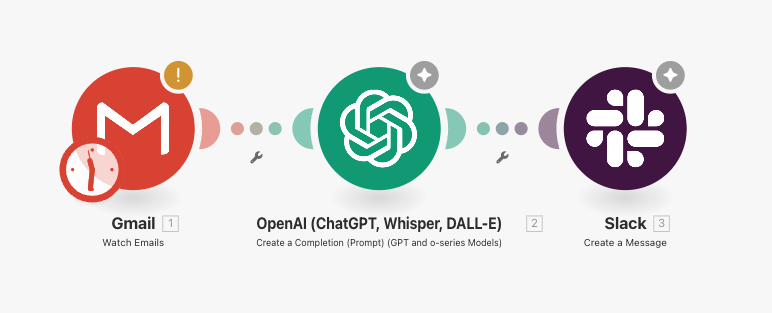
It's worth defining some terminology before we start.
- Scenario: A series of steps that are executed in order to carry out some high level task.
- Module: A single step in a workflow. This could be for instance downloading some data, filtering or manipulating data, or writing data to a database, or sending a message on Slack. There is a distinction between tools which are modules that control flow, or filter etc, and apps that are used to connect to external services such as e.g. Google Sheets.
- Connection: A connection between modules, signifying that the output of one module, becomes the input of another.
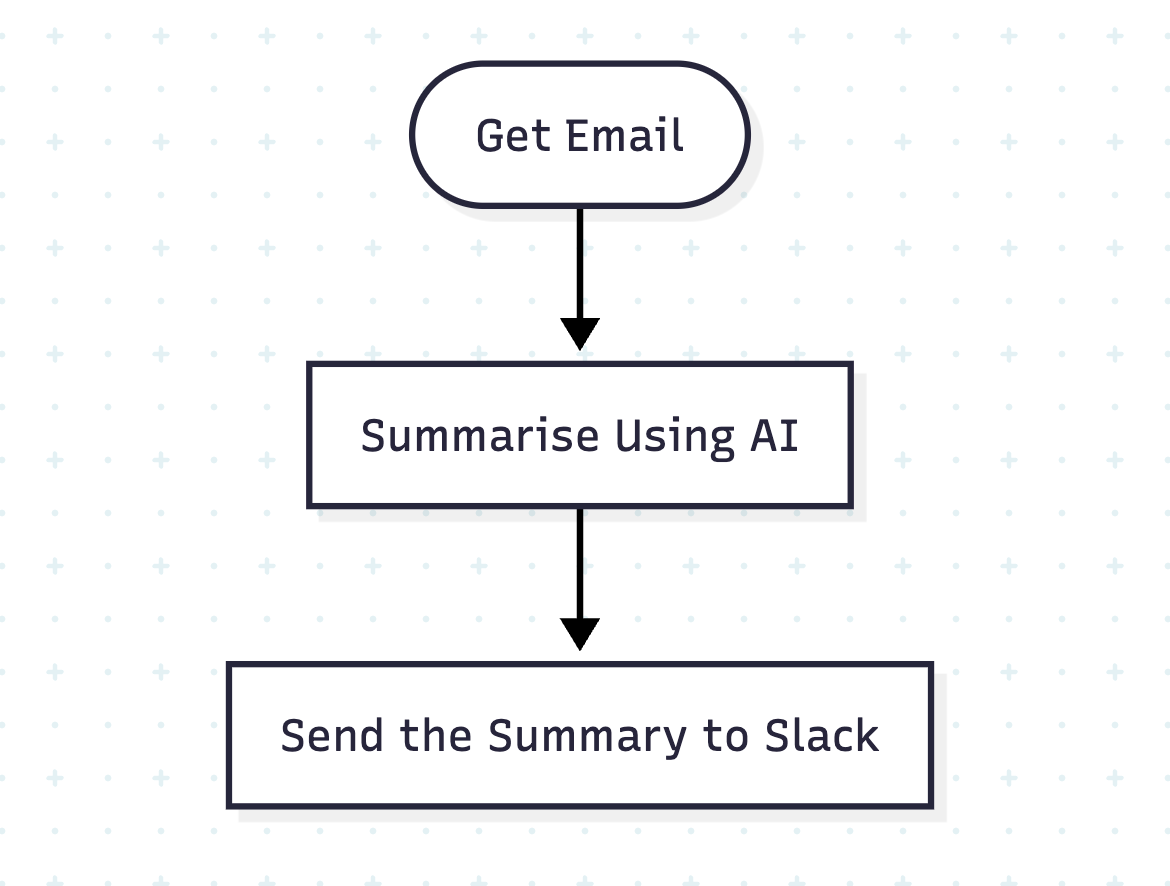
We will be learning the specifics of the system as we go, but for now it is worth thinking of workflow automation as a flowchart. The flowchart below represents the earlier scenario.
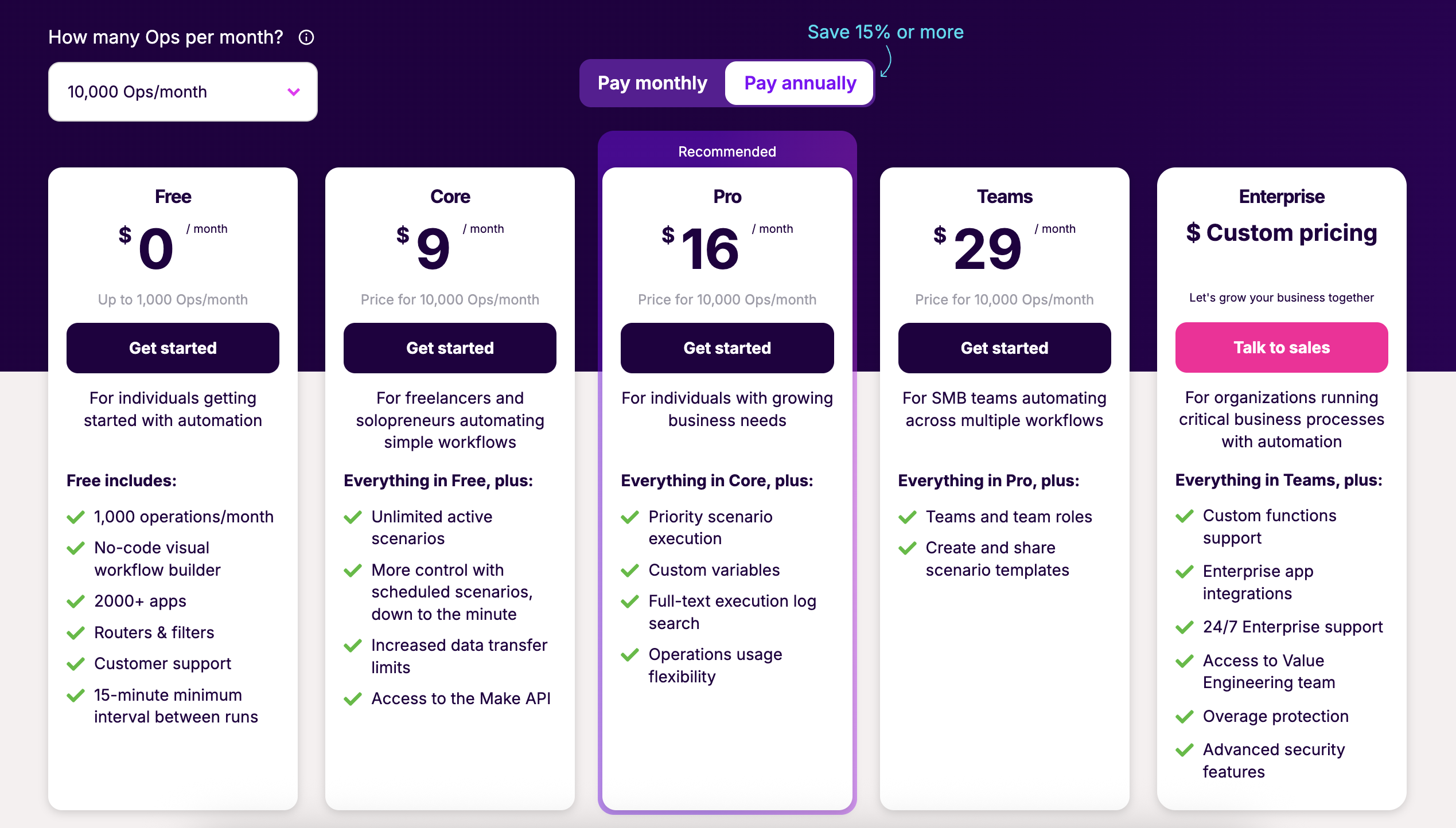
Make is hosted on the cloud, and a variety of plans are available to choose from. Other than extra features such as log searching, API access and scheduling, one of the main differences in plans is the number of operations that you can do. An operation is a single action such as calling an API, or adding a row to a Google Sheet. The free tier for instance comes with 1,000 operations a month, while the "Core" tier provides 10,000 operations a month. For an up to date version see their Pricing page.
This per-execution pricing model differs from n8n, which instead prices based on workflow/scenario executions, rather than individual steps. For those who have workflows with many steps, possibly the per execution model might be more cost efficient. There is currently no self-hosting option, so cloud hosting is the only way to run scenarios. For a deeper breakdown of n8n's cloud vs self-hosted costs, see our complete n8n pricing guide.
Workflow Specification
In order to give a proper overview of Make, we will design an example real world workflow, and use the product to automate it.
Consider that you are the brand manager of a pet food company. Now, because I am a cat owner, we will be going with cat food. As the brand manager, you want to keep an eye out for relevant discussions on Reddit, as these can be a treasure trove of customer information, as well as an opportunity for your brand to engage with its customers. In order to limit the scope, let's assume that we are interested in knowing when someone asks a question about cat food on the r/catadvice. Indeed, we are especially interested when someone asks for a cat food recommendation or suggests any specific brand.
We therefore can write out the requirements for our workflow:
- Look at recent posts AND comments on the r/catadvice subreddit.
- Identify any posts that are a question or contain a question, and ignore the rest.
- For each question post, determine if it is related to cat food in any way.
- For each cat food question post, extract (if any) the brand mentioned, and a summary of the users post.
- Save these to a google sheet for review.
- Send a message to slack with a summary of the message, and a link if we want to see more.
This workflow, while relatively simple, represents a realistic business requirement, and also provides ample opportunity to test out different types of technique, such as HTTP calls, filtering, custom code, and even AI usage.
Building the Workflow
We will assume that you already have an account on Make set up. If you don't, you can do so here. This tutorial / review is written in "real time", so you will be learning how the workflow is built along with me!
First we will create a new scenario by clicking the Create a new Scenario button. We are given the option to use an existing template, but in this case we will use Build from Scratch.
To start, we need to create our first module. There are many ways to start a workflow, such as manually running it, triggering it on a schedule (e.g. every hour), or reacting to some sort of event like a Telegram message or a webhook. For now, we will be running our workflow manually, so we can start with a module to get our initial posts from Reddit.
Scraping the Initial Posts
To fulfill our first requirement, we are going to need to scrape some posts for the r/catadvice subreddit. Searching through our module options, we can find that Make already provides us a Reddit App. Looking at the documentation, we can use this app to get posts from Reddit, which is great.
But... we won't be using it. The reason for this is that we want to do the work a bit more manually to really test things out, so we will instead be doing things the old school way, by using HTTP. Not everyone knows, but Reddit has a (not so) hidden feature that allows us to change any page into structured Reddit data. In addition, the Make Reddit module doesn't seem to be able to get posts for subreddits, so that kind of ruled it out.
By adding .json to the end of any URL, we can in fact get the same data but in pure JSON format, allowing easy access to the data. For instance, consider the following post url: https://www.reddit.com/r/n8n/comments/1m1g9u7/weekly_self_promotion_thread. We can add .json to the end, and we will get back the same post but in easy to parse JSON format: https://www.reddit.com/r/n8n/comments/1m1g9u7/weekly_self_promotion_thread.json.
Originally, I wanted to use the HTTP module to call the Reddit JSON API directly, just like we did in the n8n tutorial. However, when I attempted this I got a 403 Forbidden error from Make. I suspect this is because the IPs that Make uses are well known, and Reddit blocks unauthenticated traffic from them. There is however a solution, and that is to create a Reddit application, and connect via the API.
As it turns out, doing that is not actually that straightforward, which makes it doubly annoying that the main Reddit module cannot do it. We have put together a detailed tutorial on how to set up the Reddit credentials in Make. Follow this guide first, to create the needed credentials. If you are reading this after November 2025, also review our update on Reddit's new API approval requirements, as self-service key creation is no longer generally available.
Click the + icon on the module, and search for the words HTTP and add the HTTP -> Make a request module.
Whenever you create a module, a dialog will come up allowing you to configure it. You can also bring this dialog up by clicking on the module. First, make sure you select the Reddit credentials we set up earlier. Our main aim is to do an HTTP GET request on the r/catadvice URL, which for the Reddit API is https://oauth.reddit.com/r/catadvice/new. Fill out the URL field on the module, and make sure to also set the Parse Response selector to Yes as we want to get the data back as JSON. Click Back to Canvas in the top left to get back to the workspace.
TIP
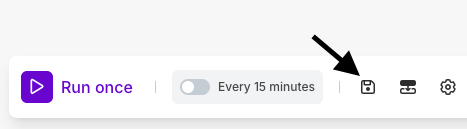
Make sure to save often by clicking the little disk icon in the bottom left. Unfortunately, make does not seem to have an autosave feature which would be a very useful addition. As it stands, it can be easy to forget to save and lose your work!
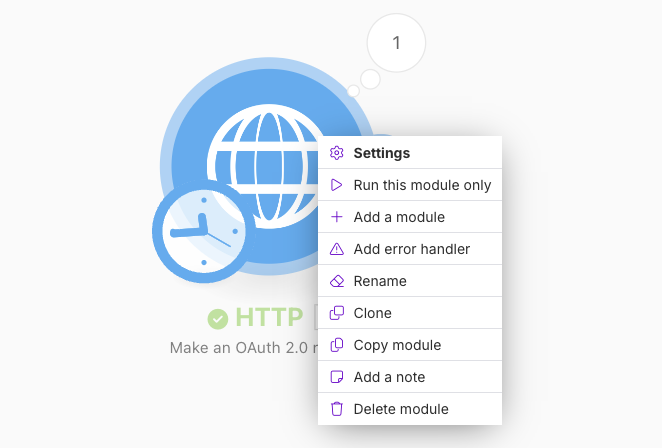
Now that the HTTP request module is set up, let's run it to see if it fetches the data we need. Right click on the module, and click Run this module only. If everything worked, you should see a window pop up showing our parsed post data.
Taking a closer look at our data in the panel that pops up, we can dig into the data following the path data -> children to find that we have 25 posts that we retrieved from the r/catadvice subreddit. That sounds like too many, and we only want to get the first 10 posts to check. However, first we need to get the array of posts (the children array) out in bundles. A bundle in Make, is a piece of data, usually a JSON object. All operations in Make work on a single or list of bundles.
To get the data we need out, we will use the Iterator module to both extract the posts, and limit the amount of bundles we create to 10. To add a new module, click on the little + stub coming out of the right hand side of the HTTP module, which will present you with an option for choosing the next module. Search for and choose the Iterator module.
Inside the Iterator module, we will use the special expression syntax Make provides to pull out the data we want as well as only choose the top 10 items. In the Iterator configuration dialog, enter the following:
{{slice(9.data.data.children + "; 0; 10")}}
NOTE
It is better to select the data manually in Make in order to map the module ID correctly. In this case, mine is 9, but that is not guaranteed to be the same in yours.
Fetching the Comments
Make doesn't allow us to leave the last module in a workflow to be a transformer module. We therefore now need to get the comments. The way to do this is a bit harder, since in order to get the comments, we need to make one HTTP call for each of the 10 posts we fetched.
Connect another HTTP Request module to the Iterator module. The URL that we need will now come from the bundles (posts) that we just extracted. In this case, if we make a call to the URL of the post, we will get the comments. We can find the URL inside each bundle in the data -> permalink field. For instance:
/r/CatAdvice/comments/1mzt16z/anallergenic_treats_for_cats/
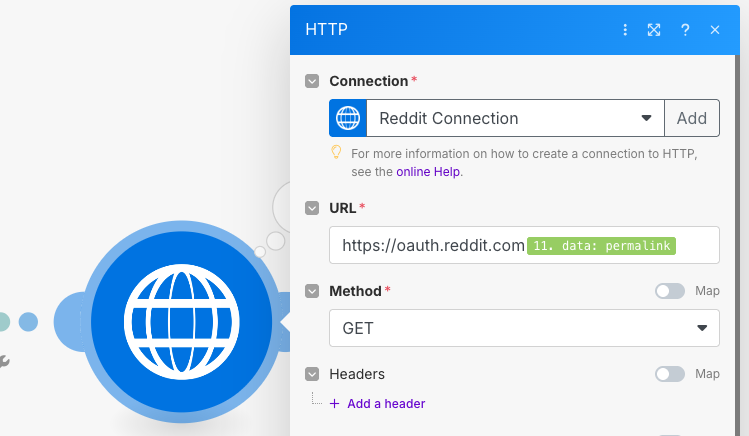
Select the permalink from the bundle, and put it in the URL parameter of the module prepended with the Reddit URL. Make sure to also select Yes for parsing the response.
https://oauth.reddit.com{{11.data.permalink}}
CAUTION
It's a good time to mention rate limits. Most services, such as Reddit, will limit how many times per minute you can make API calls and request data. If you call more frequently than this, you may get "rate limited" meaning you will get a 429 Too Many Requests error back, preventing you from getting more data. For instance, non authenticated accounts can only call the Reddit API ten times per minute.
Be careful, as abusing these limits may get your IP and/or account banned by Reddit! For peace of mind, it is worth reading Reddit's API Terms.
When making multiple calls like this to an API, it is usually a good idea to wait between making the calls (e.g. 1-2 seconds) to prevent getting rate limited. Since we are using the Reddit API, 10 calls should be fine however if needed, you can make use of the Sleep module (documentation here).
Click the Run once button at the bottom of the workspace to run the full workflow. If everything went well, you should see the output of the comment HTTP request module show 10 successful output results.
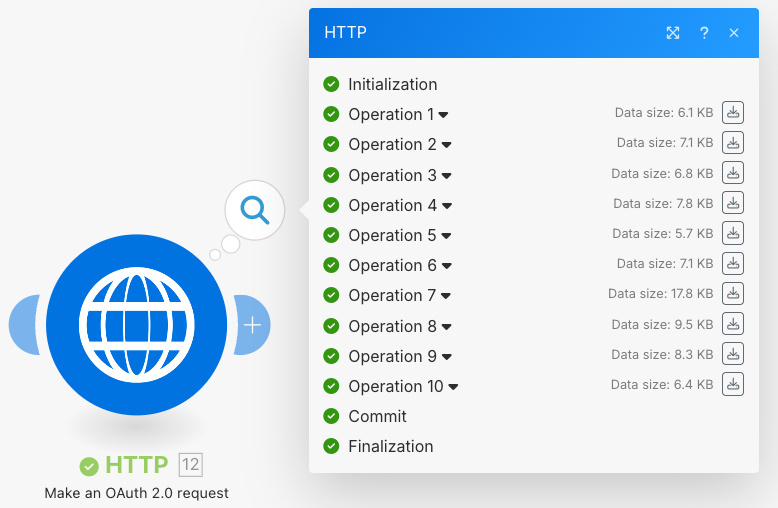
Each of these comment bundles has a children list in it with exactly two items. The first, is the post itself, and the second contains another children list of the individual comments. This is pretty confusing, so we want to get it all into one list containing all of the posts and comments together.
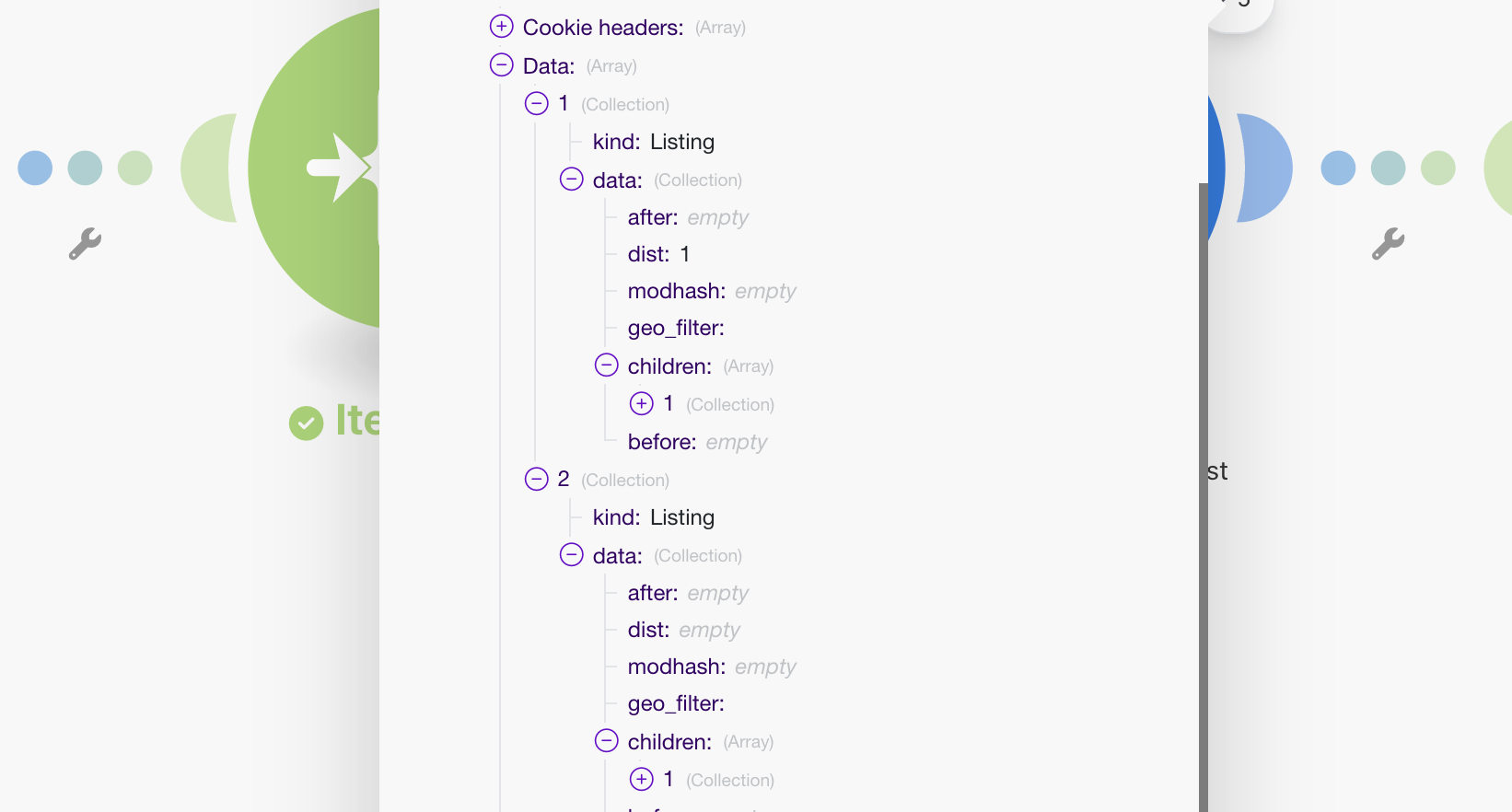
We can again use the expression language to do this. In this case, we can use the merge function to merge the lists together. Add another Iterator module to the end of the HTTP Request module, and set it up in the following way.
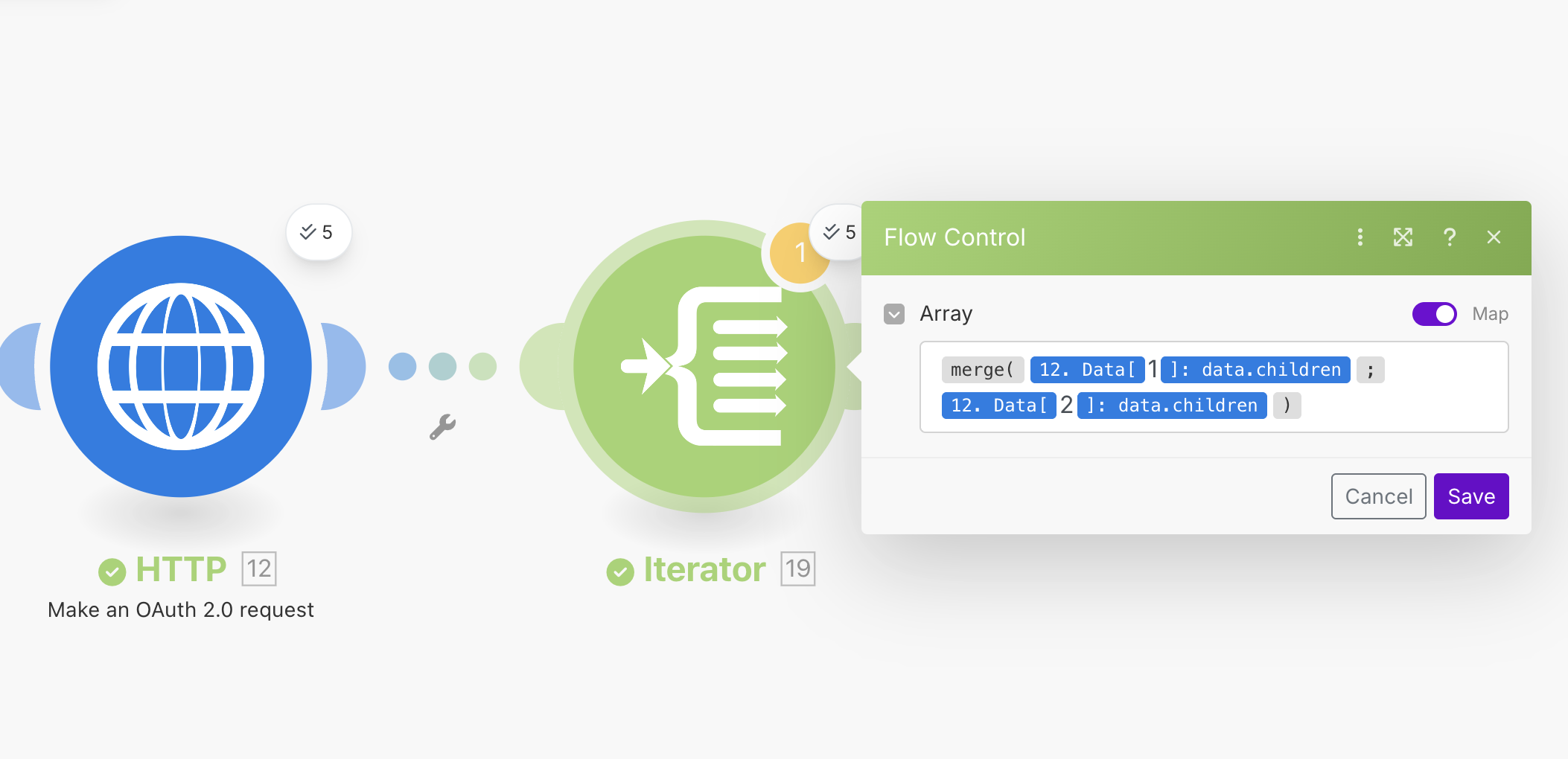
The actual syntax for the Iterator module looks like this:
{{merge(12.data[1].data.children; 12.data[2].data.children)}}
WARNING
If you have a software development background you might (like me) get caught out by the indexing used in Make. Unlike many programming languages, Make uses 1 based indexing rather than 0 based indexing. That means that the first item in a list is 1 rather than 0.
Our full workflow now looks like this:
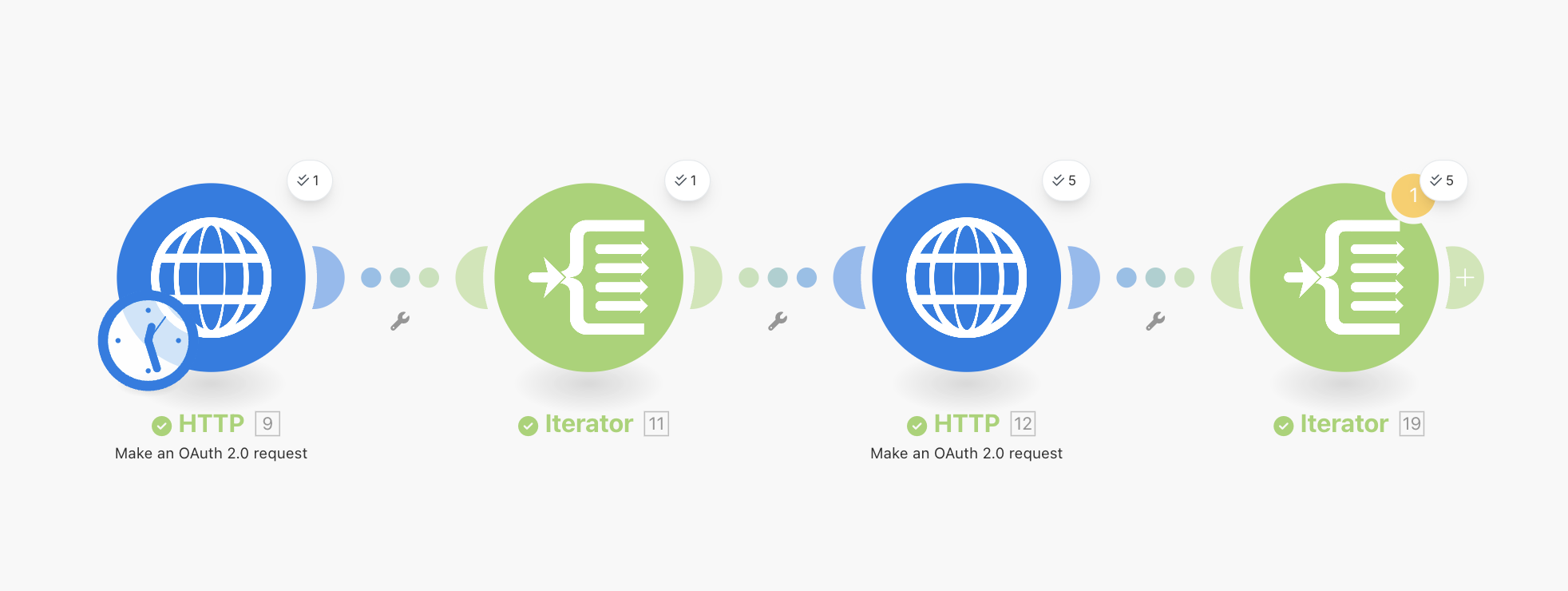
Run the workflow again, and in the output of the last Iterator module you should see a list of bundles with both of our posts and comments. Make might complain that the last module in your workflow shouldn't be a transformer, but it is OK to ignore this for now as we will continue building.
Cleaning Up the Data
Now that we have all of our data, we can see that there is a lot of data that we don't need inside the posts. Let's set up a module to extract only the data that we need for the posts and comments (we'll refer to these all as posts from now on, to keep things simple). We want to extract the following info:
- id: The unique ID of the post from Reddit. This will be useful later for identifying individual posts.
- title: The title of the post.
- body: The main body of text in the post (basically the text post itself).
- url: The URL of the post.
- type: A field that we can use to tell posts and comments apart. For posts this will be
postand for comments this will becomment.
From reading around, it doesn't seem like Make has a JSON transformation module. It seems this was suggested at some point in time. There is a workaround however, and we will use the Create JSON module to extract the fields we want. Add a Create JSON module to the end of the Iterator module. We will first need to define a Data Structure. In the module options, click on Add next to the Data Structure input. Create a new structure called Reddit Post, and add all of the fields above. For each field, you only need to provide the Name and Type which in this case should always be Text.
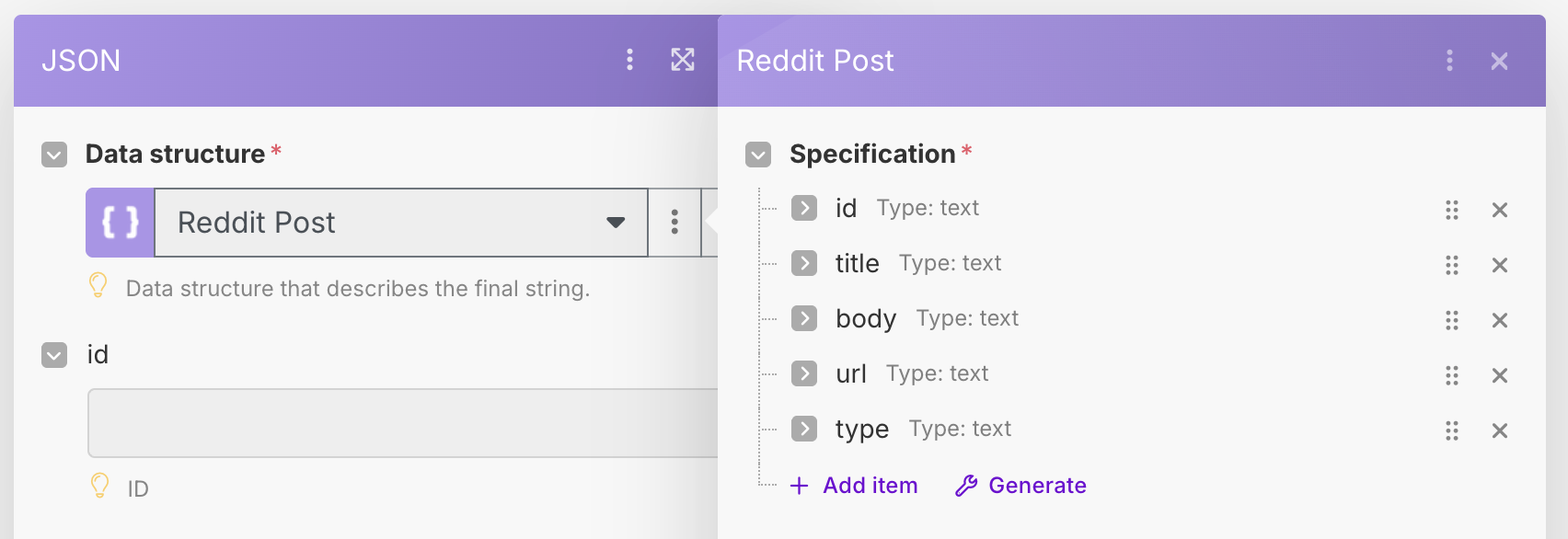
Once this is done, Make will now ask us to "map" our data to the required fields. The below image shows how you can do this.
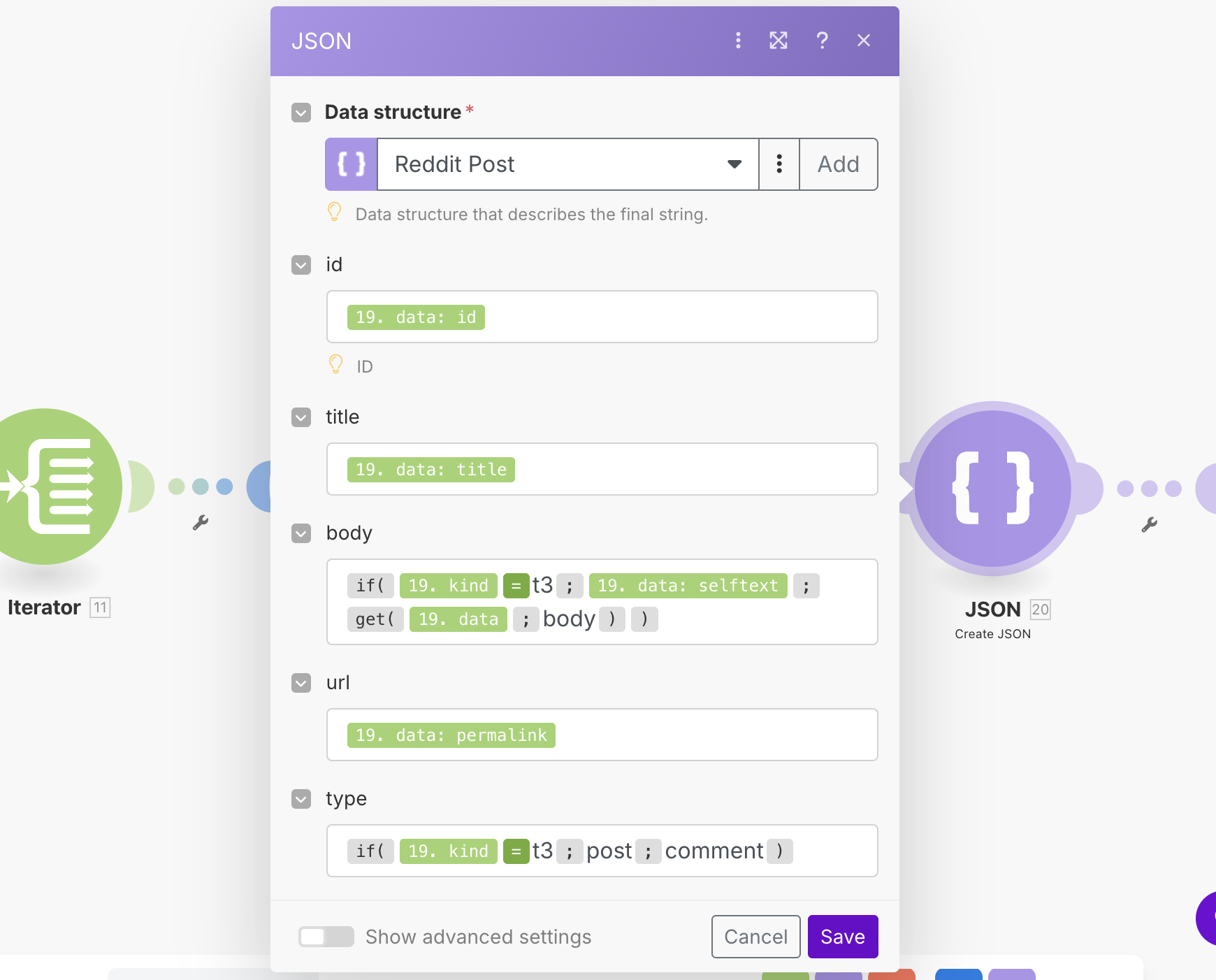
You will notice that we had to do some slightly more complicated logic here. This is because the structure of the Reddit posts and comments is different. There are a couple of tricky things with this setup. Firstly, when trying to access the body key (where the text for comments is held) we were unable to reference it from the menu as it was only showing the keys for posts. In order to do this, we had to use the get function to manually refer to this key like so.
get(19.data;body)
Additionally, the code for the if statement was somewhat confusing. The editor that Make has for the syntax in my opinion could be improved, as with the highlighting and the spacing it can be hard to understand what is going on. This may be my bias due to having a software development background, but I think that it can be a bit counter intuitive to read and write. For instance, to write = for the if statement you actually have to use the = operator, which is a separate function. One useful technique is to use the {{ }} syntax, which allows you to create functions as needed. For instance, to get the = operator you can write {{=}} which will give you the correct operator.
WARNING
Be careful of spaces also. Because Make does not have explicit quotes for strings, spaces between = and similar operators can potentially be interpreted as text, causing a match to fail. For instance kind=t3 is not the same as kind= t3.
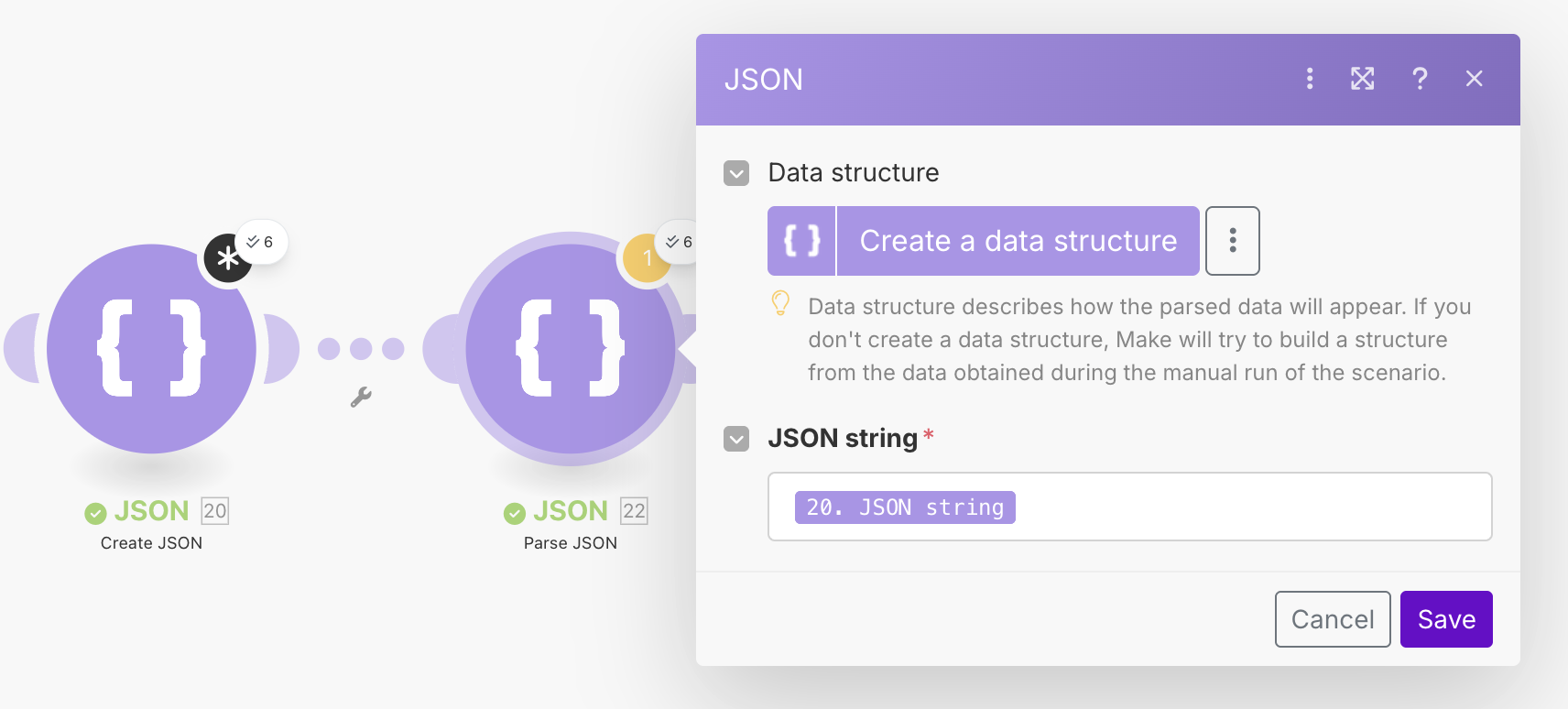
The output of this module will now be a JSON string. To get it back into an object, we will add a Parse JSON module to the end of it, and pass the JSON string as the input parameter. Running the workflow again, should give us the correct data structure. Admittedly, it is a bit annoying having to do this in two modules, so I suspect there may be some other better way of doing it. I have not however been able to find it.
Finding Posts That Are Questions
We now have a big(ish) list of posts, but we need to figure out if they are questions or not. We will ultimately use AI to assess the posts, but since that's expensive, we want to narrow it down first. In the n8n tutorial we used the Code module in order to execute some JavaScript code to figure this out for us. Make does not offer native code execution, however they do offer integrations with providers that offer this service for instance CustomJS.
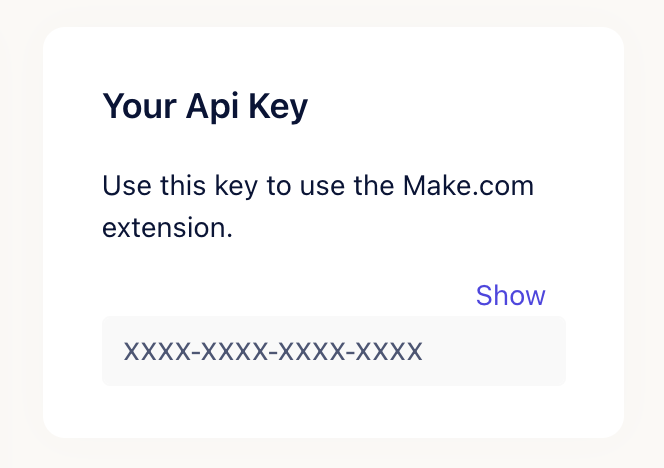
The free plan offers 20 code executions a day, so this should be enough to test out our workflow. If you prefer to use something a bit less accurate, we will show you a simpler (but less effective) filter method after. Sign up for an account with CustomJS (use code MOLEHILL for 10% off!), and copy your API key which is shown on the right.
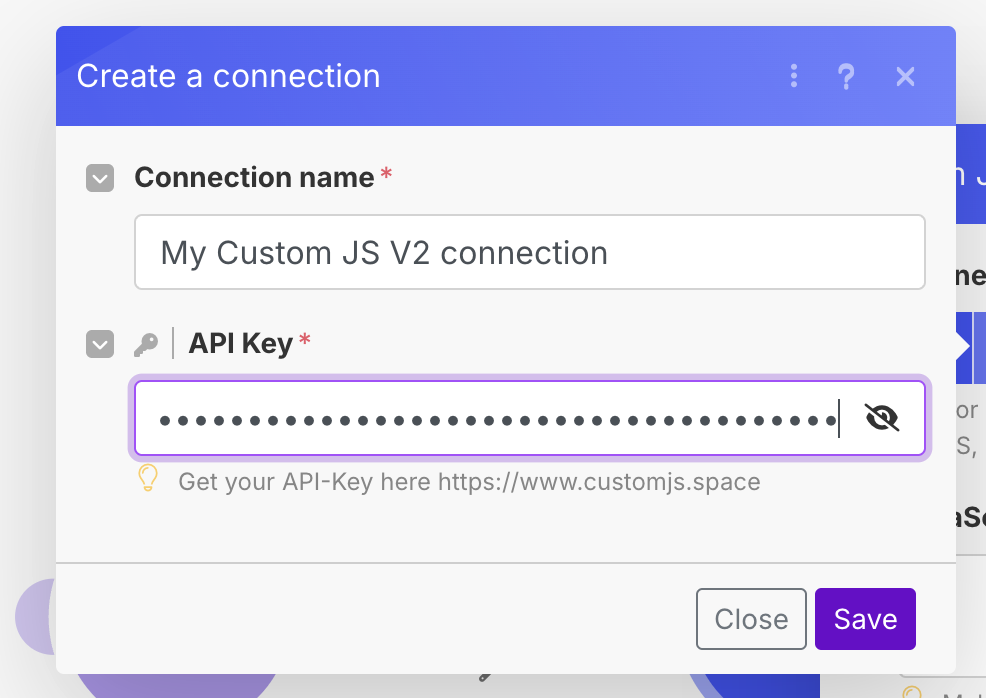
Add a CustomJS -> Execute Inline JavaScript Code module, and then click Create Connection. Paste the API key that you just copied from the CustomJS website in the API Key field, and click save.
From our requirements, our goal is to try and figure out if the post is a question or not. Without AI, there are still ways that we can use to try and figure out if a post is a question or not, even if they might not be the most accurate. For instance:
- Does the title or body end in a question mark?
- Does the post contain any question works (who, what, why, where, how)?
Also, because it's 2025 we can ask AI to write the code for us (which is nice, as we only have to ask the AI once, rather than for every post). I used the following prompt on Google Gemini:
Write a JavaScript function that will be used by Make.com via CustomJS that takes a JSON object "input" that has the "title" and "body" keys and detects if the item is a question or not.
Test for sentences that end in a question mark, and posts that contain question words.
With some minor editing, we get the following function. Note that the input into the function is provided by the input variable which can be used directly in the function. Whatever is returned at the end, will be our output for the CustomJS module.
const questionWords = [
  'what', 'where', 'why', 'how', 'which'
];

const title = input.title || '';
const body = input.body || '';

// Set the value to false initially
input.isQuestion = false;

// Step 1: Check for a question mark at the end of the title or body.
const endsWithQuestionMark = title.trim().endsWith('?') || body.trim().endsWith('?');
if (endsWithQuestionMark) {
  input.isQuestion = true;
}

// Combine title and body for a single check.
const combinedText = (title + ' ' + body).toLowerCase();

// Step 2: Check for the presence of common question words.
const containsQuestionWord = questionWords.some(word => combinedText.includes(word));
if (containsQuestionWord) {
  input.isQuestion = true;
}

// Return the object with the additional field
return input;
Copy paste this code into the CustomJS module, and also add the following input:
{ "title": "{{22.title}}", "body": "{{22.body}}"}
Your module should look like this:
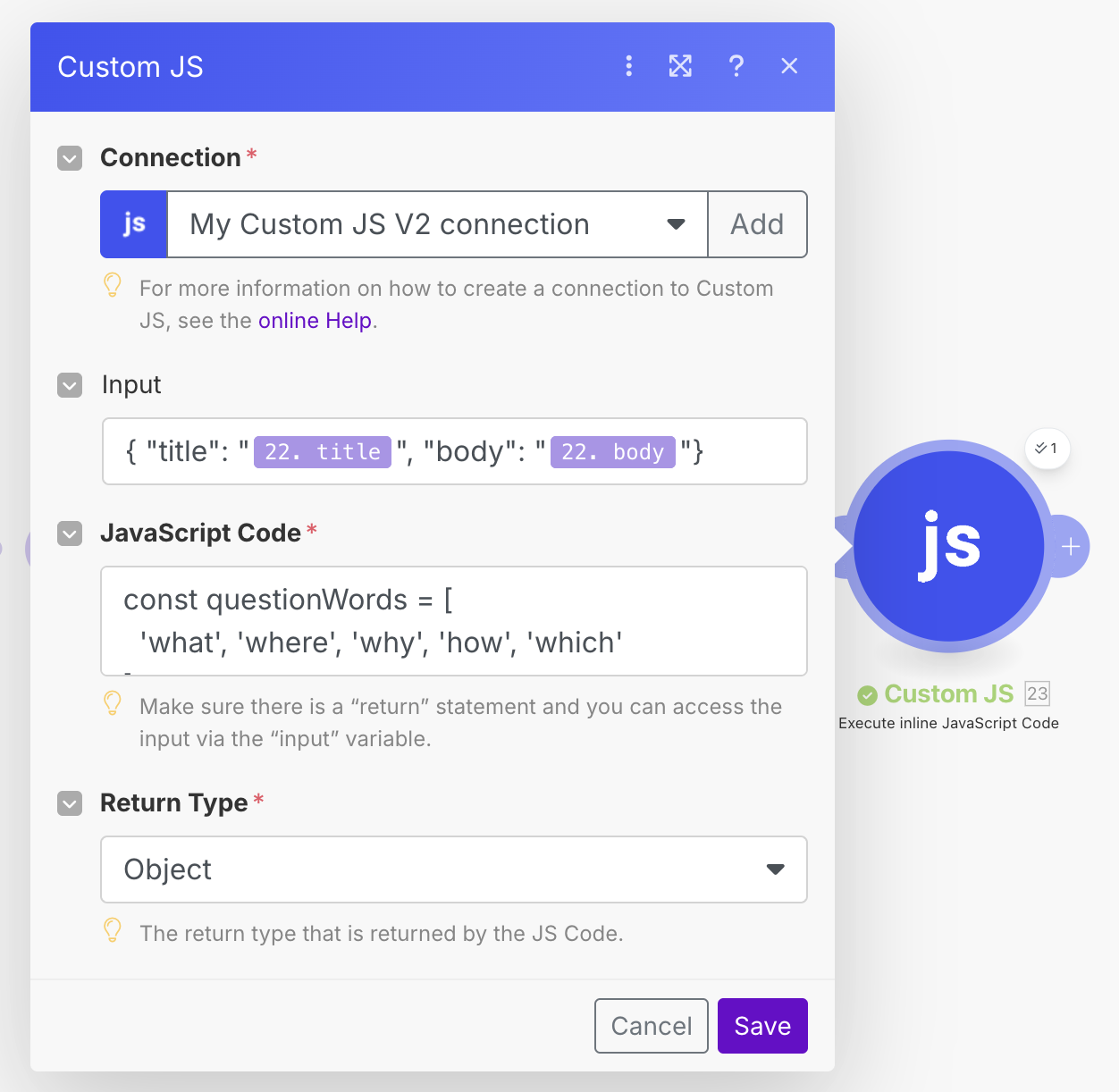
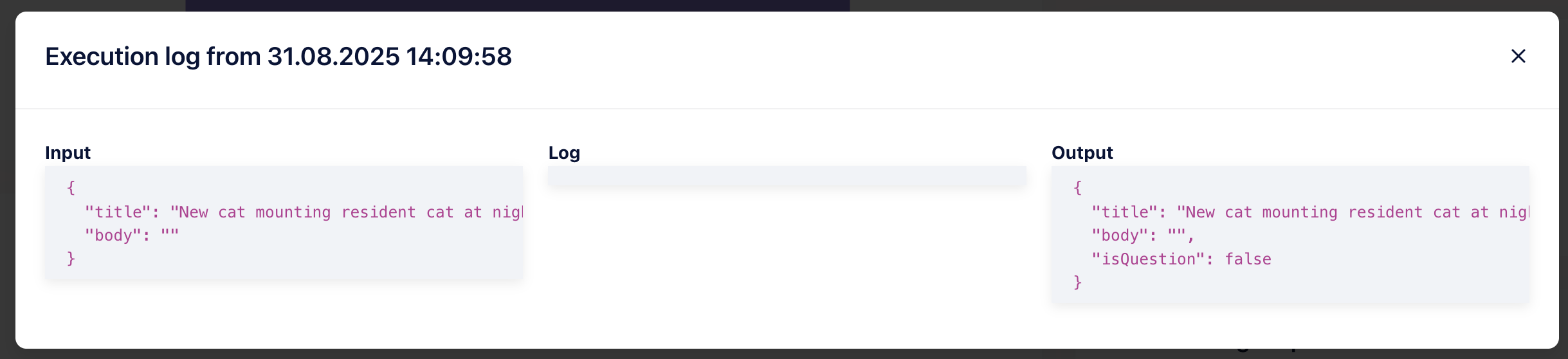
Once done, run your workflow again (I suggest changing the limit on the earliest iterator module to 1 just to save your CustomJS credits). If all is well, you should see the output with the new isQuestion field on the CustomJS module. Looking at our execution logs on CustomJS, we can see the function was executed successfully.
Using AI to Analyze the Posts
We now need to filter out any posts that aren't questions. In order to do this, we need to create the next module first, as filtering is done on the connection level. We will be using AI to extract data from the post, so we will add an AI module next. In this case, we will be using OpenRouter as a provider, as it gives us access to a lot of models with an easy to use API. However, if you have credits on ChatGPT, or Anthropic Claude, etc then these are all available as modules as well, so feel free to use whatever model works for you.
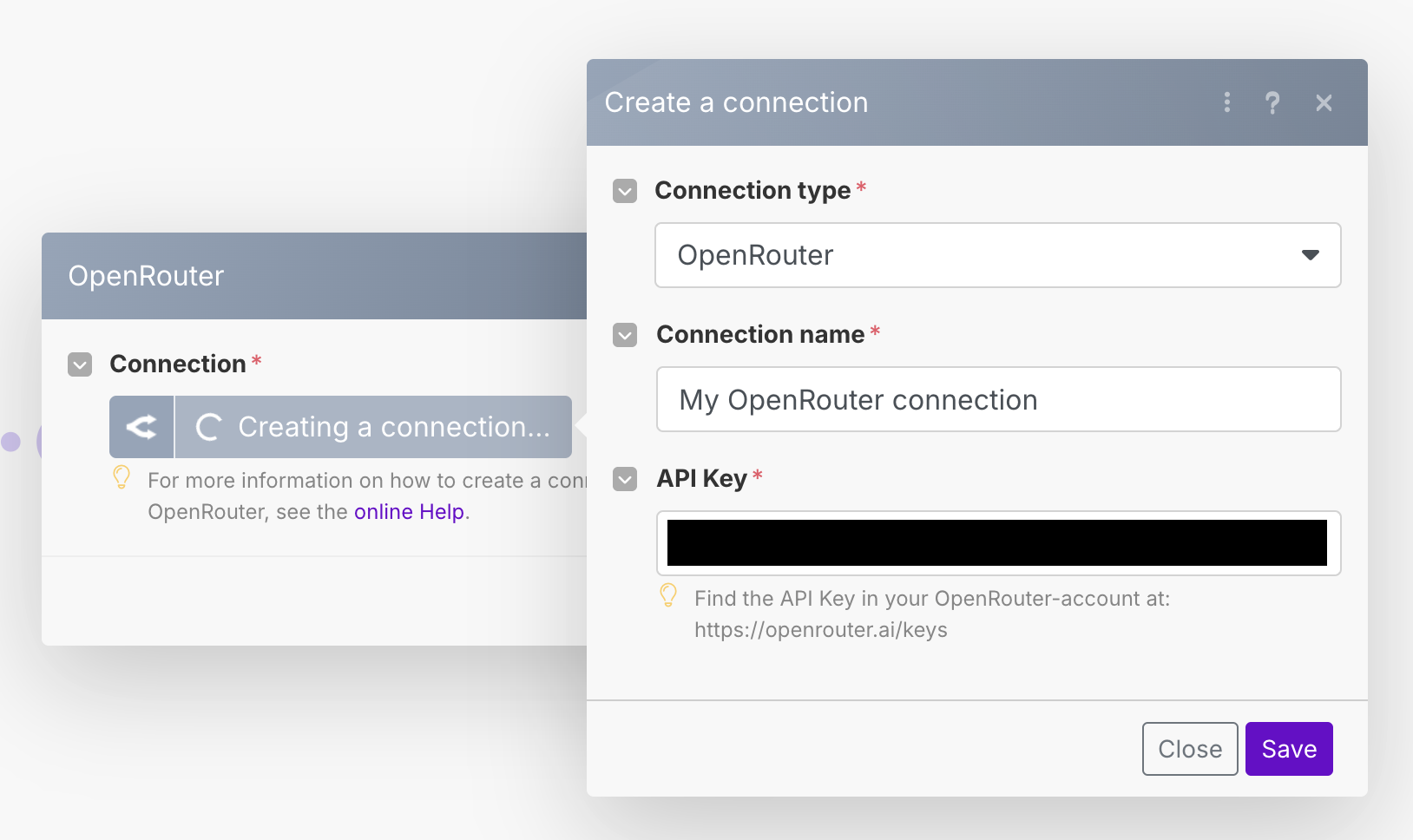
After the CustomJS module, add a new Open Router -> Create a Chat Completion module (or whatever similar module you have chosen). You will need to add a credential for OpenRouter, so create a new API key by going to the Settings -> Keys menu, and creating a new API key. Copy paste it into the API Key box.
As mentioned, because we are using the CustomJS free account we have limited function runs per day. Another option we can do is use the Make connection filter to do this filtering. It is potentially not as versatile and accurate, but it is free so we can use this just for testing. If you want to do it this way, click on the connection between the Parse JSON module, and the OpenRouter module.
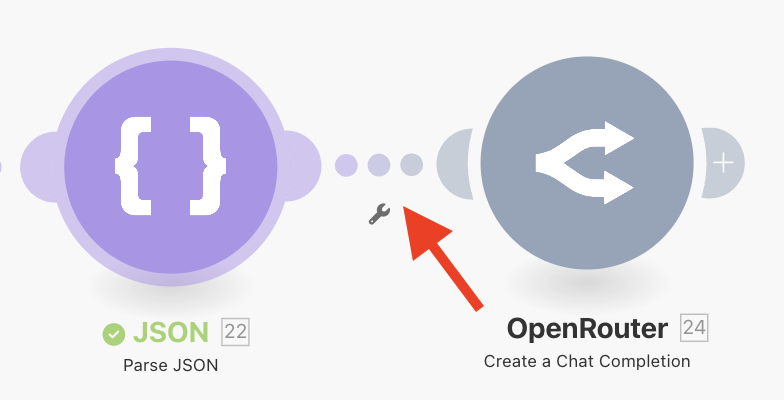
In the filter menu, we need to add individual rules in order to try and figure out if this is a question. We can do this by creating several rules, and using OR conditions so that if any of the conditions match, we will consider this to be a question. The Make expression language is a bit cumbersome for doing large nested functions, however it should be possible to replicate elements of the code above. Doing this, however, is left as an exercise to the reader.
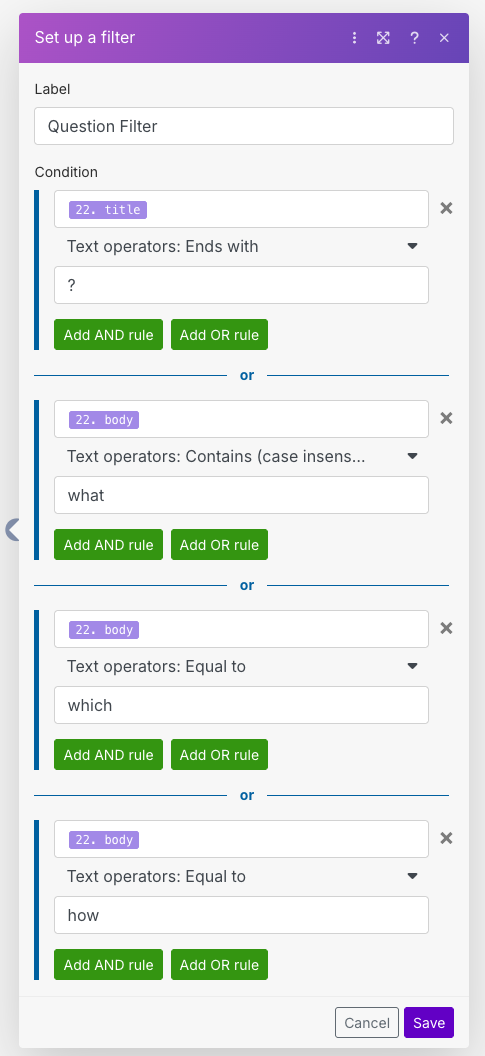
If you used the CustomJS module, then create a filter between the CustomJS module and the OpenRouter module, and put a filter that is looking for isQuestion = true.
Now that our filtering is set up, we can focus on adding our AI analysis. We want to figure out the following information about each post:
- Is the post a question relating to cat food?
- Is a particular brand of cat food mentioned?
- A short summary of the user's post
Open up the OpenRouter module, and first of all choose a Model. This is up to you, but generally this task is fairly simple so a more basic model will be fine. In our case, we will be using Gemini 2.5 Flash. Now we will provide two messages. Add a message item, and give it the System role. This will be our base instructions to the model. Put the following in the content:
You will be provided with a Reddit post that contains both a title and body.
Extract the following information in JSON format:
- isCatFoodRelated: Does the post mention cat food?
- catFoodBrand: If cat food is mentioned, what is the brand?
- summary: A short summary of the post (40 words or less)

Only return a single parsable JSON object, and nothing else. Do not return markdown text such as ``` etc.
Now add another item, this time with the User role. Here we will put our post content, inserting it into the content directly.
Title: {{22.title}}
Body: {{22.body}}
Your OpenRouter module should now look something like this.
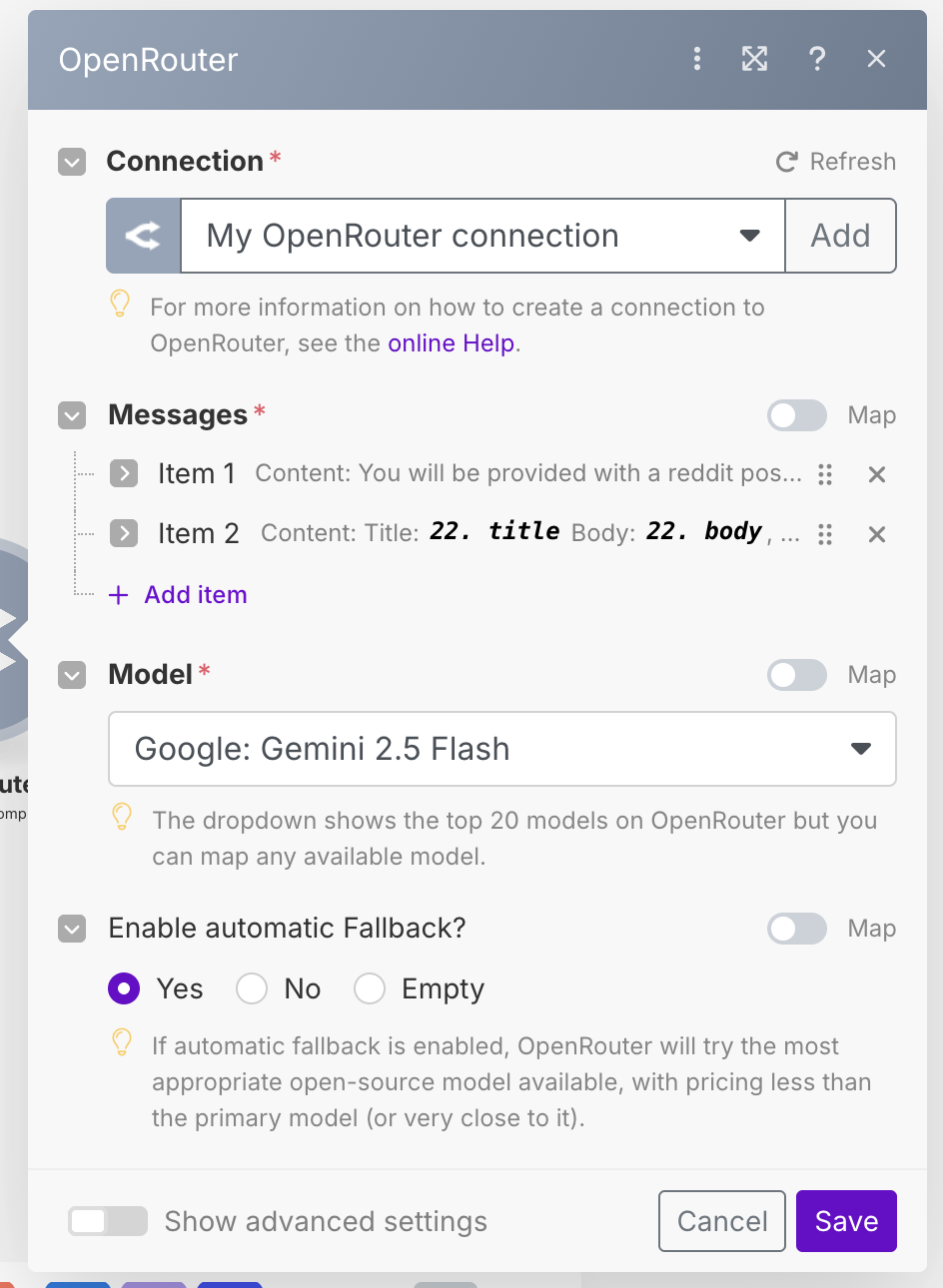
Run the workflow, and take a look at the output. You should see the return data from the model as a JSON object with all of the data we asked for.
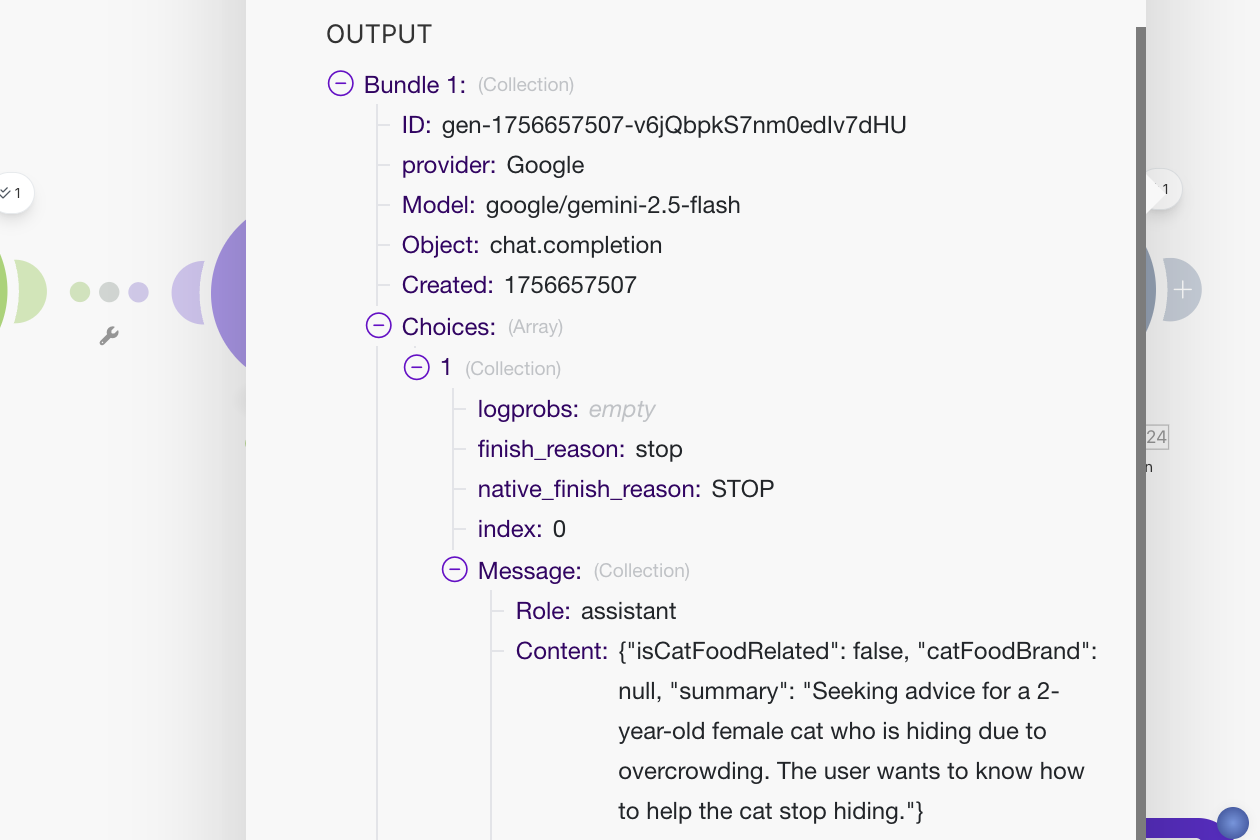
As before, we will use the Parse JSON module to convert the returned JSON string to actual JSON data. Attach a Parse JSON module to the end of the OpenRouter module. We will create a new data structure that contains the three fields that we had the AI extract for us.
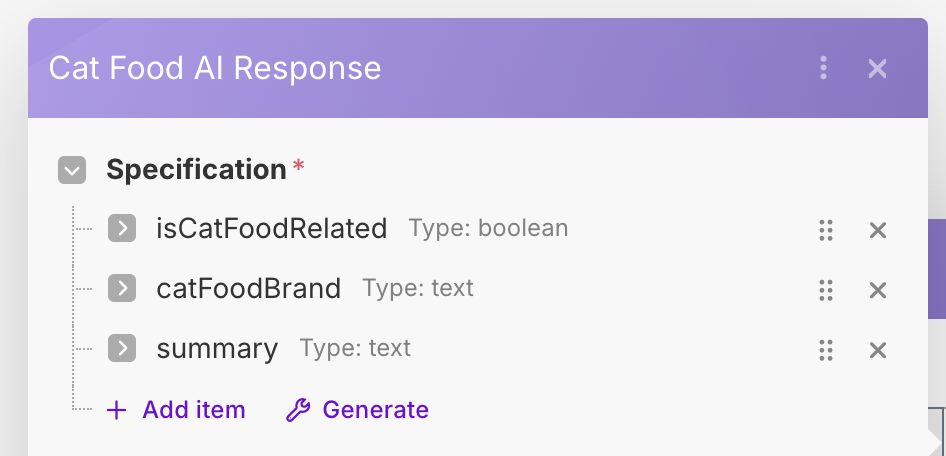
The response from the AI should generally always have one "Choice" that comes back, so we can use 1 as the index into the Choices array.
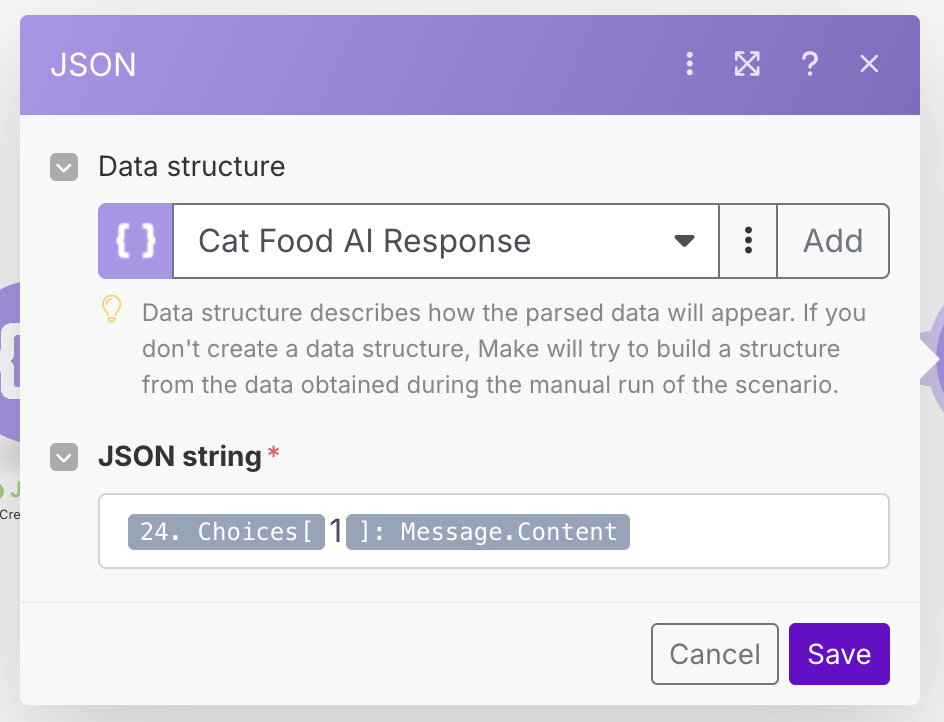
Running the workflow should now give us the correctly parsed results from the AI. We now need to merge these results back in with the original posts. As before, we will use the Create JSON / Parse JSON combo to merge the data into one object. Create an Enriched Reddit Post data structure, which contains keys from both the Reddit post and the AI response. See the configuration below.
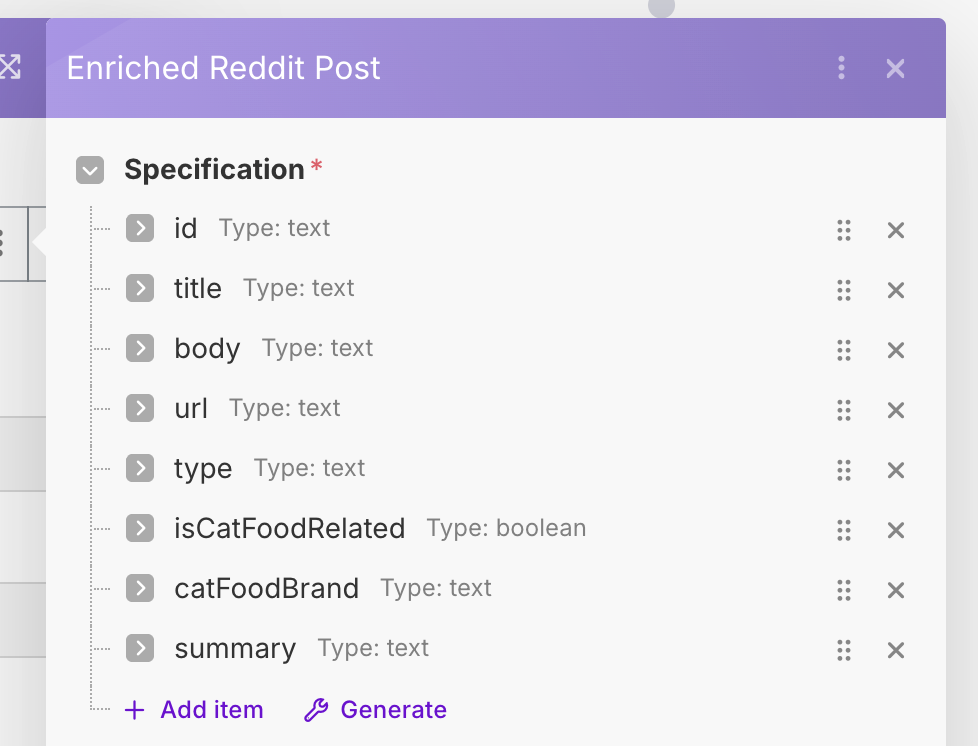
For the mapping, we will map the original fields from an earlier module, namely, the last Parse JSON module just before the OpenRouter module. For the AI response fields, we will use the most recent Parse JSON module.
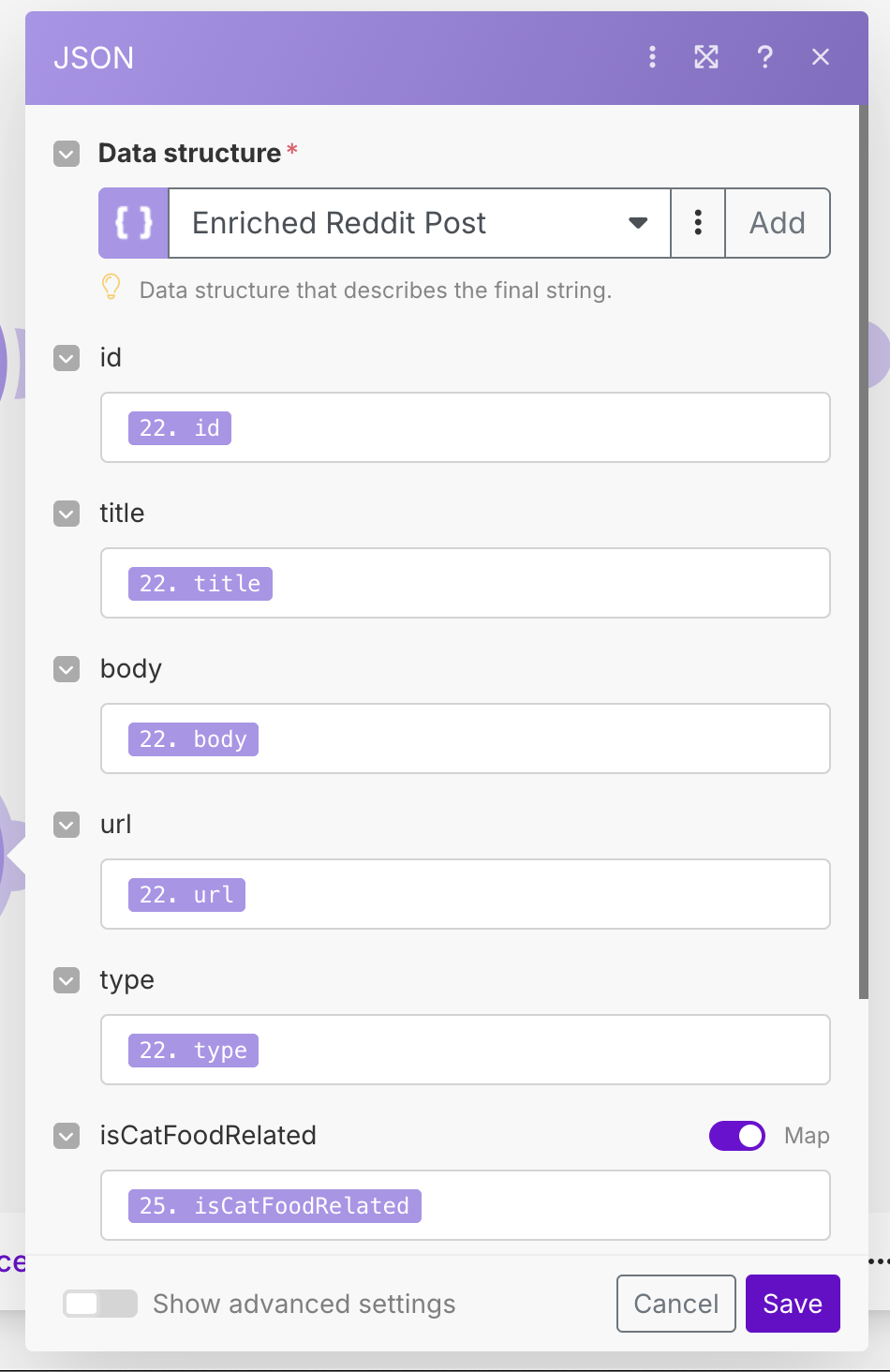
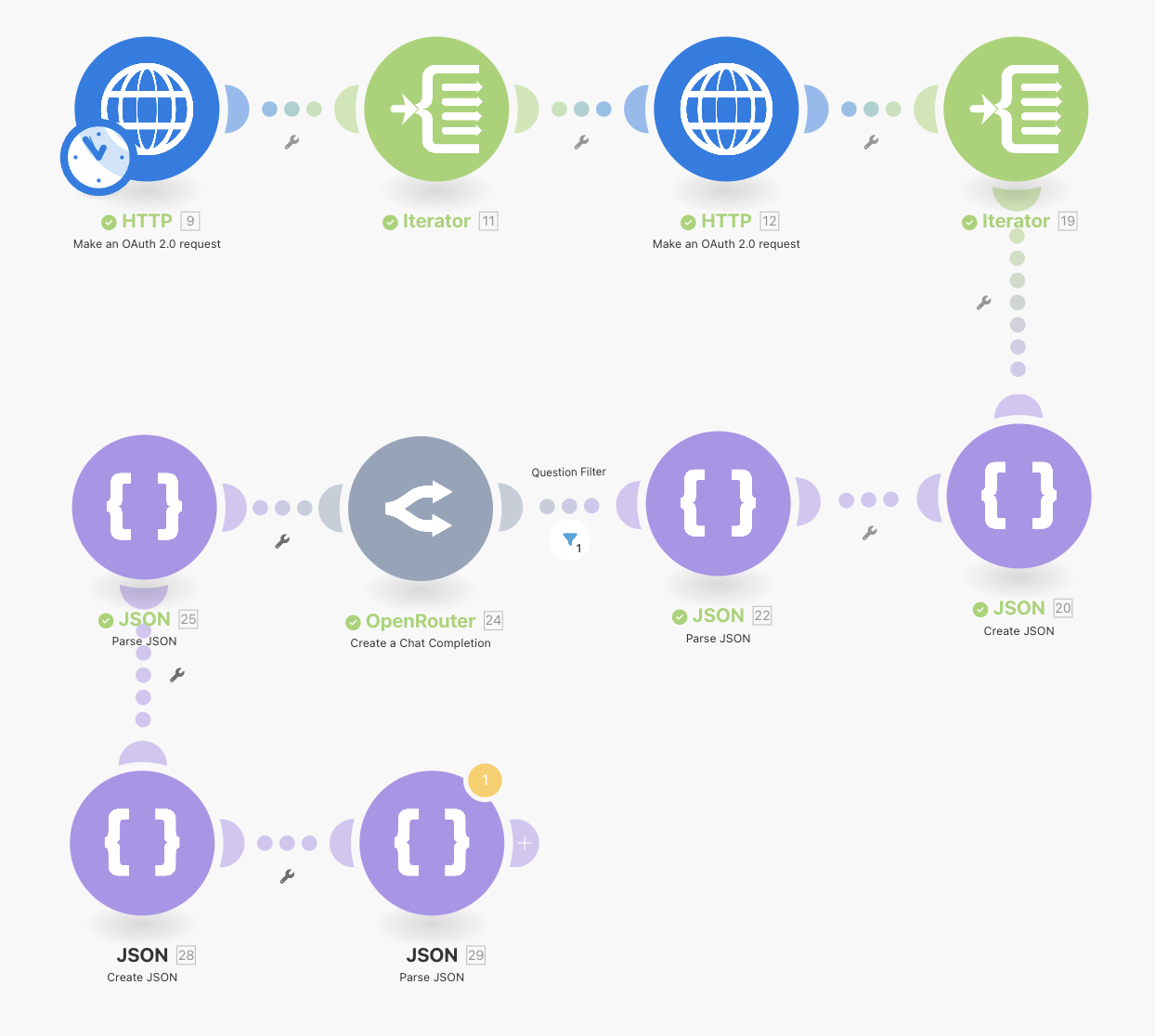
Finally, like before, use the Parse JSON module to map the JSON string back into the structure. As mentioned before, I suspect there must be an easier way to do this, but as it stands I cannot find it! Running the workflow should result in a Reddit post with all of the relevant AI enriched details added. See the image below for our workflow so far. Notice that we have re-arranged some modules to keep things more compact.
Saving the Posts to Google Sheets
We have now finally got our posts captured, filtered and analyzed. Now, we can proceed to saving them in Google Sheets for review. The first thing we will need to do is set up our Google OAuth 2.0 credential for connecting to Google Sheets. Doing this is outside of the scope of this tutorial, but you can find a good tutorial in the Make Documentation.
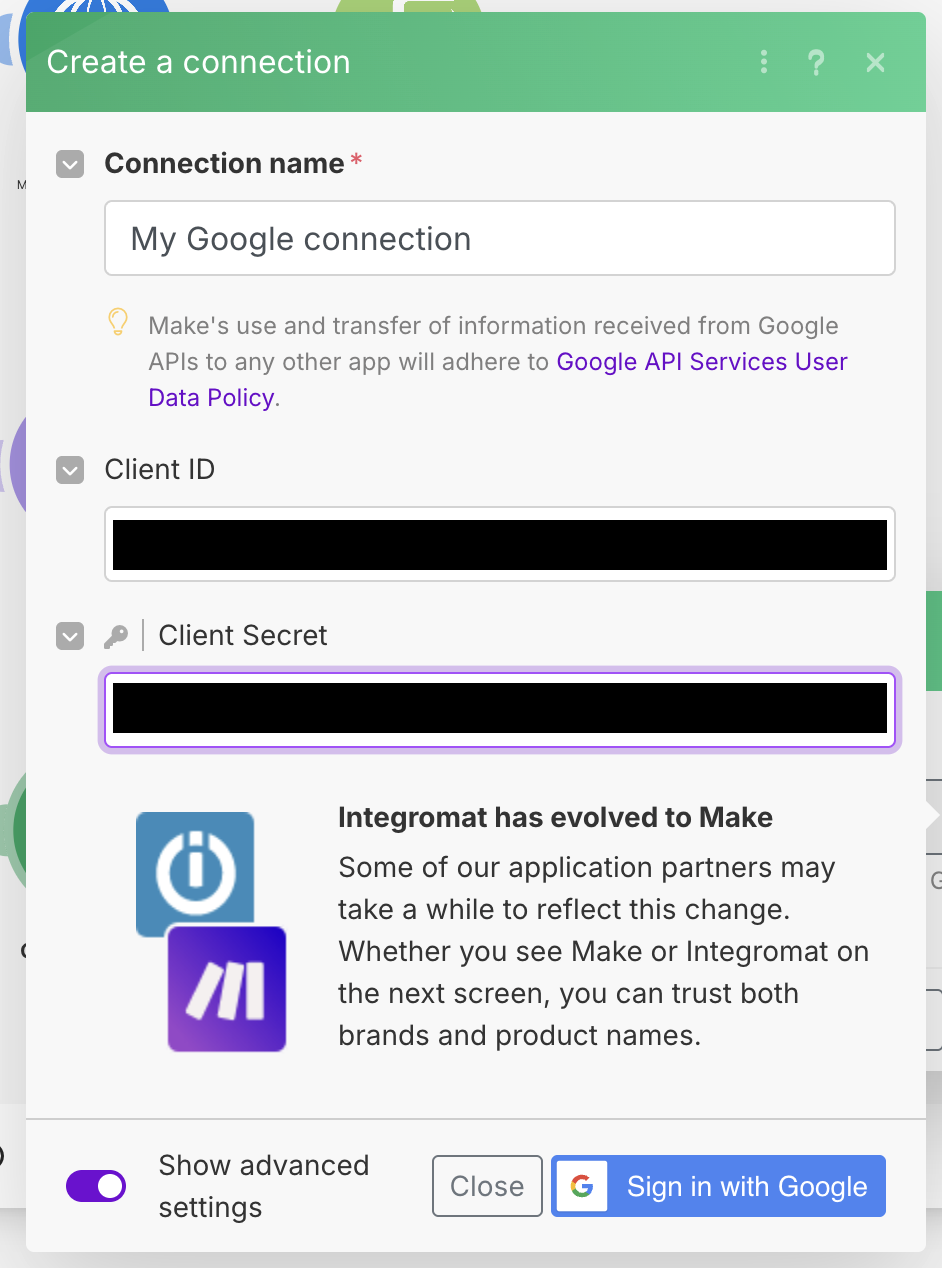
Once the credentials are set up, go to your Google Sheets and create a new spreadsheet. Inside, create the following columns:
id, type, title, body, url, cat food brand, summary
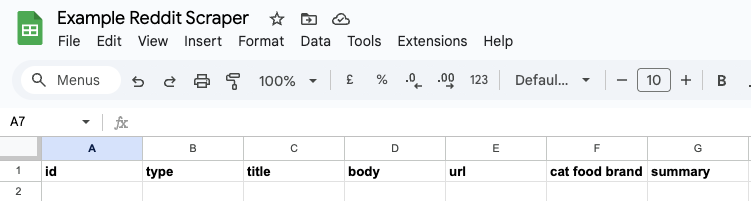
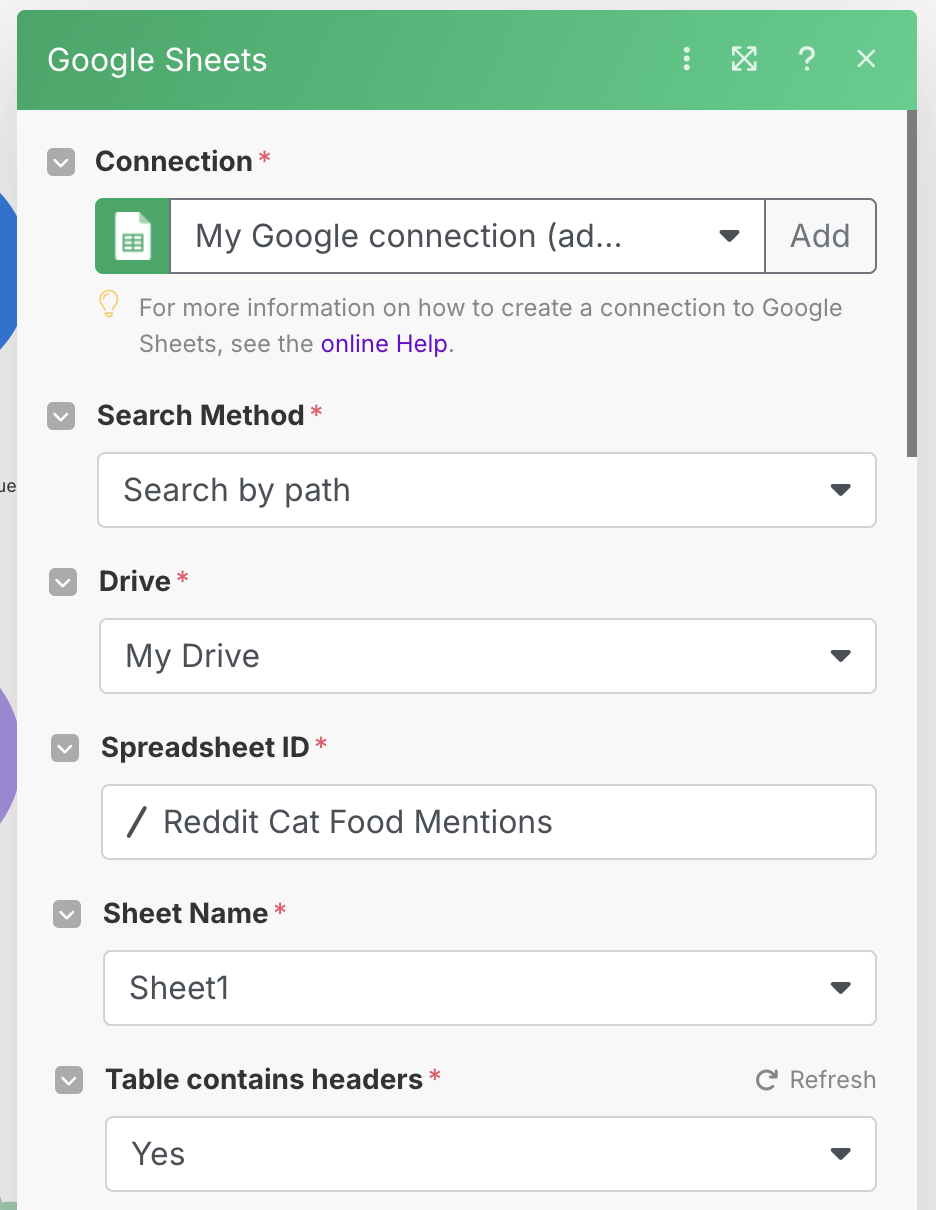
Once the sheet is created, add a Google Sheets -> Add a Row module to the end of the chain, and select your Google credential that you set up earlier. Choose your spreadsheet and sheet name.
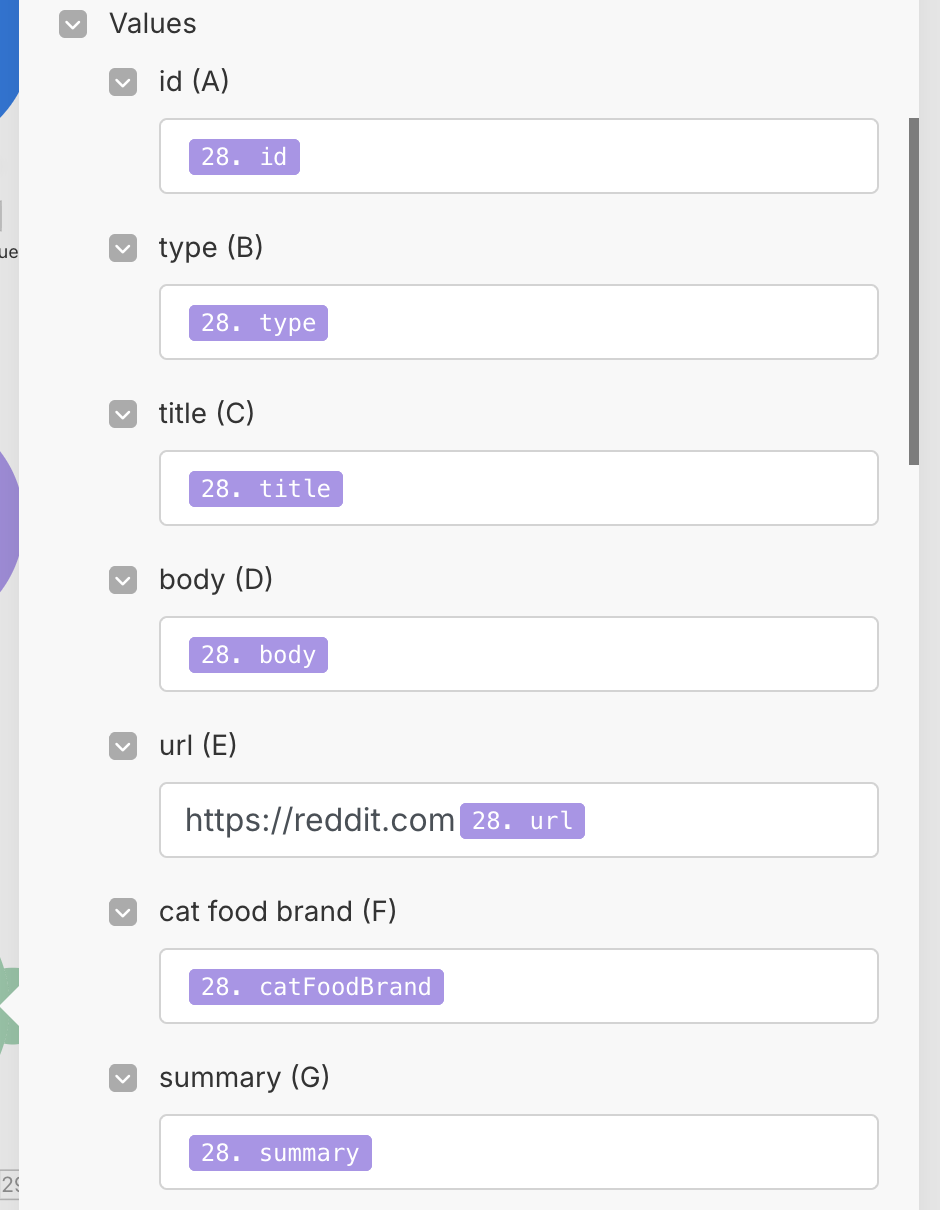
Once this is done, you will be given a set of value fields which you can use to map your output values to the correct columns. Fill this out as shown below:
One thing we need to do, is to actually filter out any posts that are not cat food related, using our isCatFoodRelated field that the AI created for us. Add a filter between the Parse JSON module and the Google Sheets module, and filter on isCatFoodRelated being true.
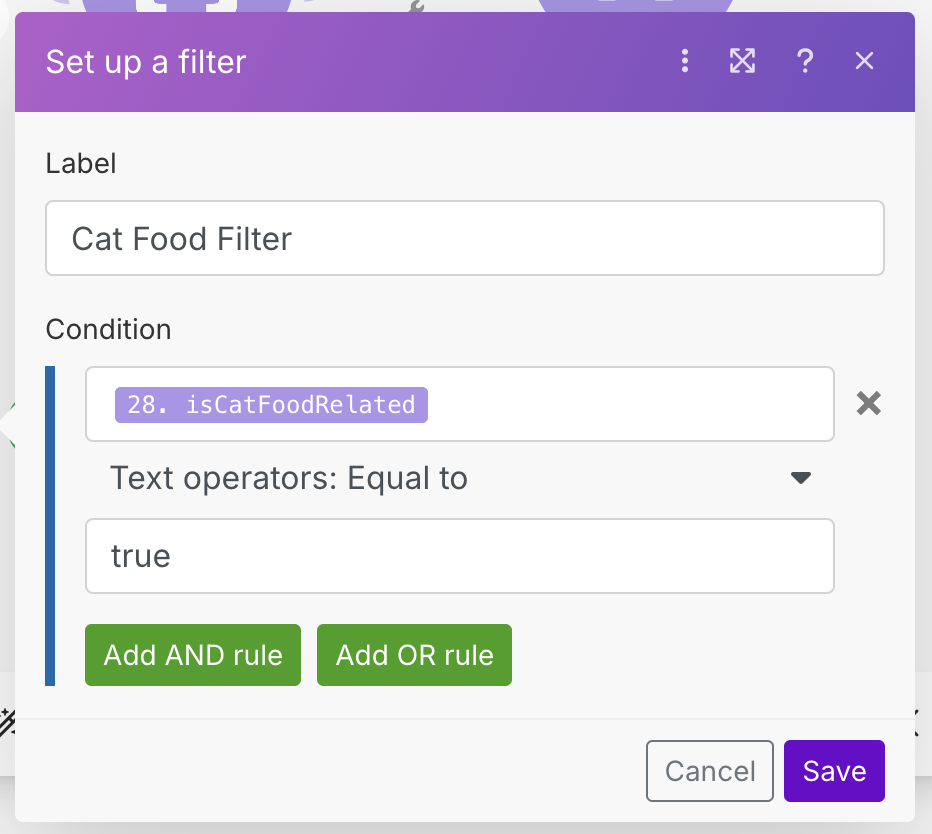
Run your workflow, and watch as it filters through the items. It might take a bit of time, but after a while you should get some hits. Taking a look at our spreadsheet, we can see that we have achieved three hits so far.

Sending Notifications to Slack
Now that we are storing all of our hits, we need to send notifications over Slack to fulfill our requirements. However, we want to use the same data that we used for Google Sheets for sending to Slack. In order to do that, we will use a Router module which allows us to "fork" the data in two directions. Right click on the connection between the Parse JSON and Google Sheets modules, and choose Add a router. Once the router has been added, add a Slack -> Create a Message module to the other fork.
To get Slack working, we will need to create a credential for it. As before, you can view the official tutorial for setting up Slack to connect with Make. Once connected, set up the module to post to a public channel (in my case, this channel is called #reddit-questions). For the Text input, we will use the below text which will create a nicely formatted post with a link to the Reddit post.
*New {{28.type}}*
Click <https://reddit.com{{28.url}}|here> to read.
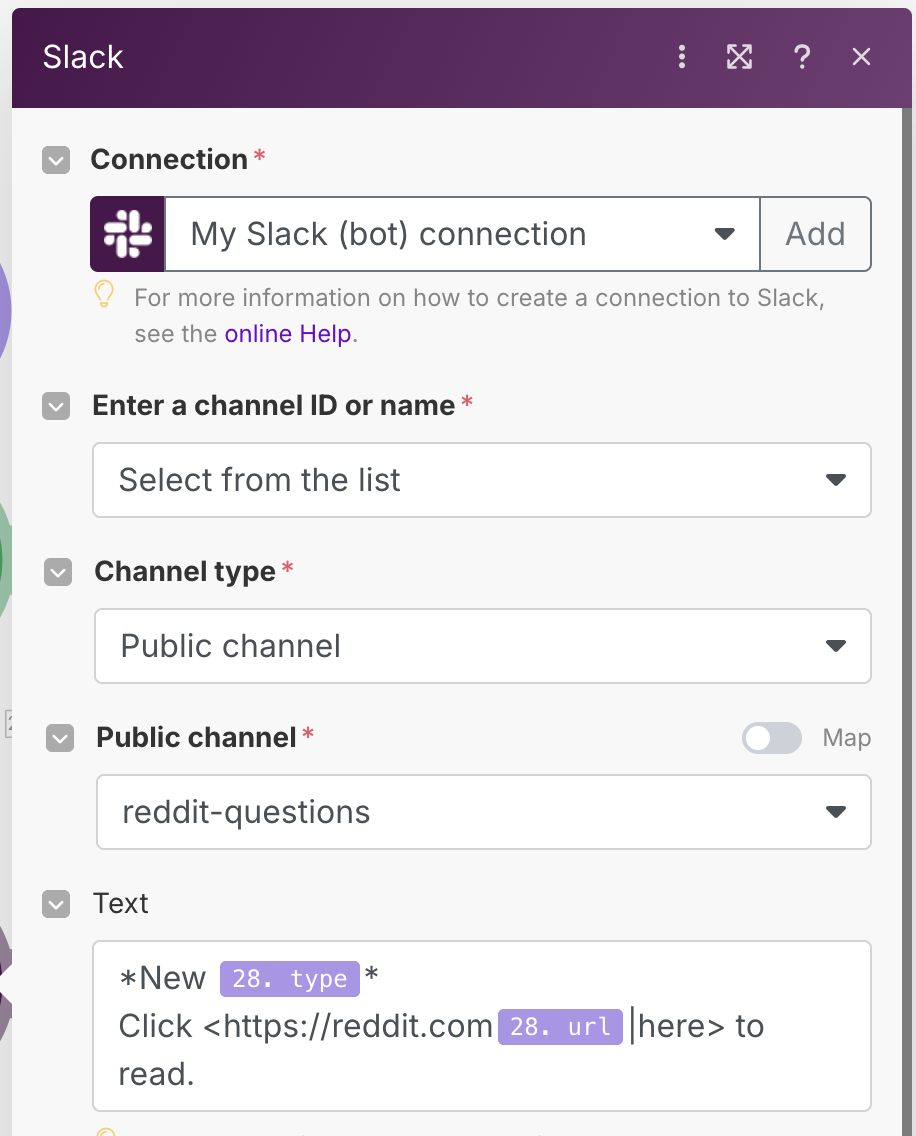
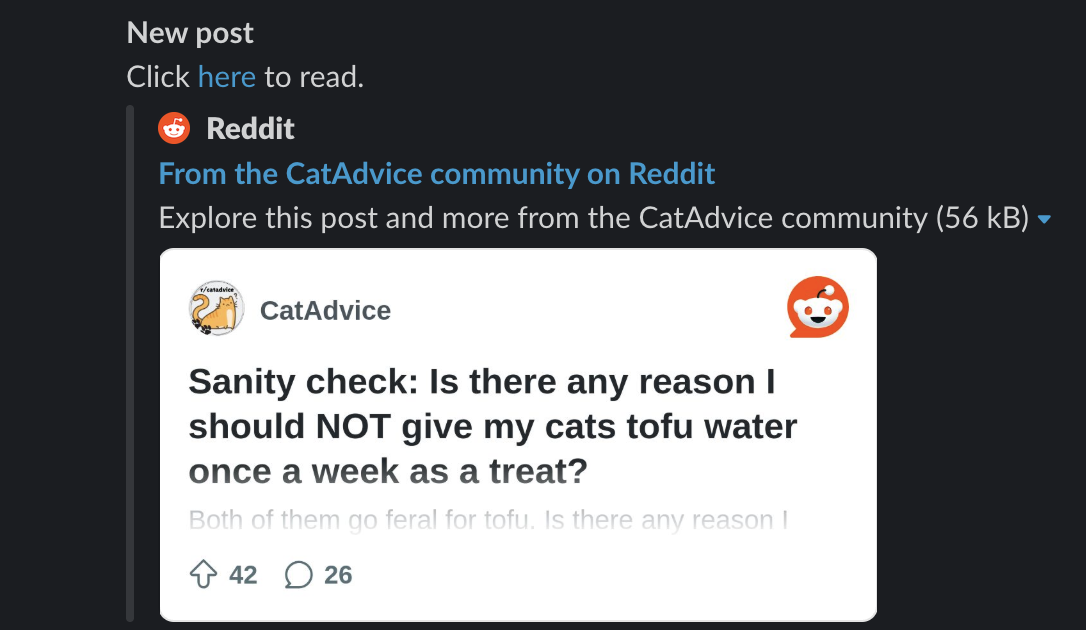
Run the workflow again, and watch your Slack channel. If everything has worked correctly, you should see some Slack messages pop up. You can verify that these messages have also been saved in the spreadsheet as well.
Implementing De-Duplication & Idempotency
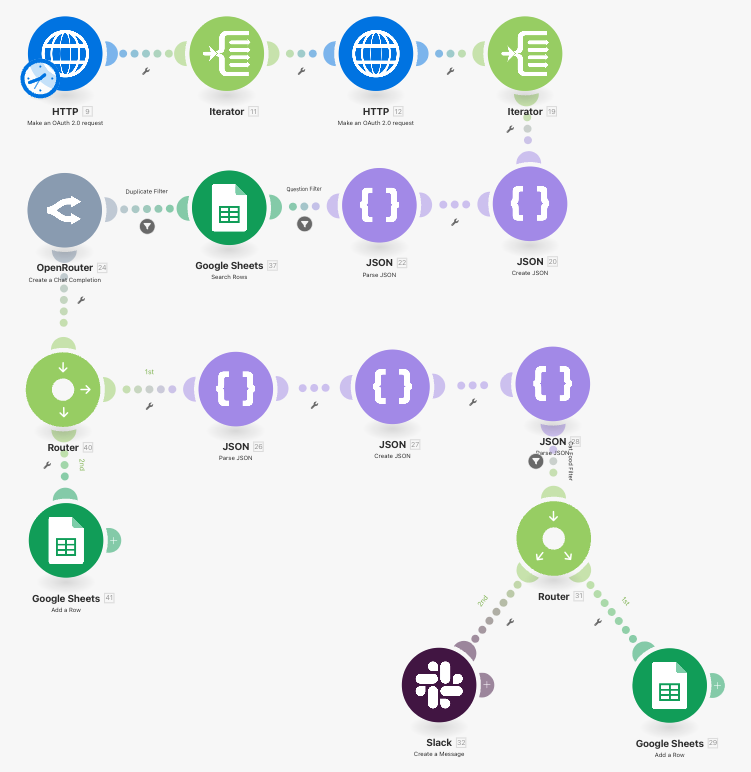
Here is what our workflow looks like right now:
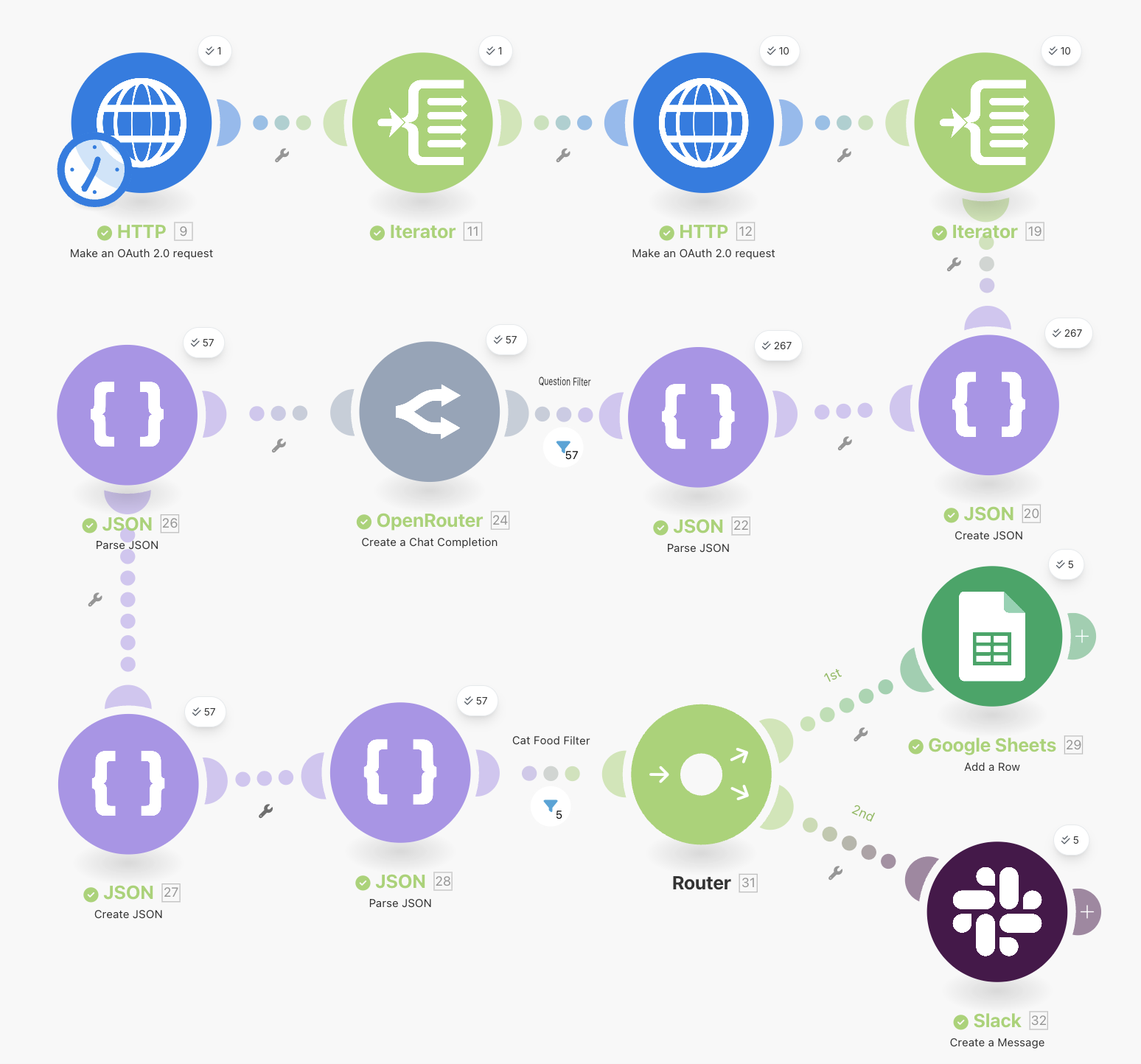
We have achieved everything we wanted, but there is a catch. You might have noticed that when you ran the workflow again a second time, you would get duplicate entries in the spreadsheet and repeat messages. This occurs because we are parsing the same Reddit posts again if not enough time elapses between runs.
In order to prevent this, we need to implement de-duplication which means we will not get duplicate posts. We also want this workflow to be idempotent, meaning that if we run it multiple times with the same posts, it won't affect anything. In order to prevent duplicates, we need to check whether we have seen a post before.
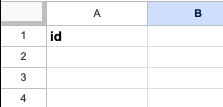
Normally you would do this with some sort of fast key value store such as Redis, however Make does not support this, so instead we will use a simpler (but less flexible) solution, which is to use Google Sheets again. In the spreadsheet we used earlier, create a new sheet at the bottom, and add a single id column.
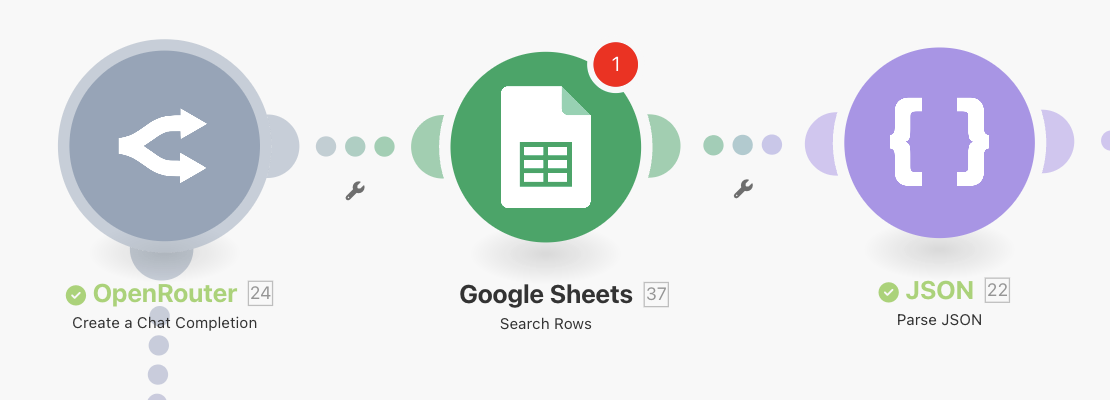
In the section where we put the question filter (between the Parse JSON and OpenRouter modules) insert a Google Sheets -> Search Rows module.
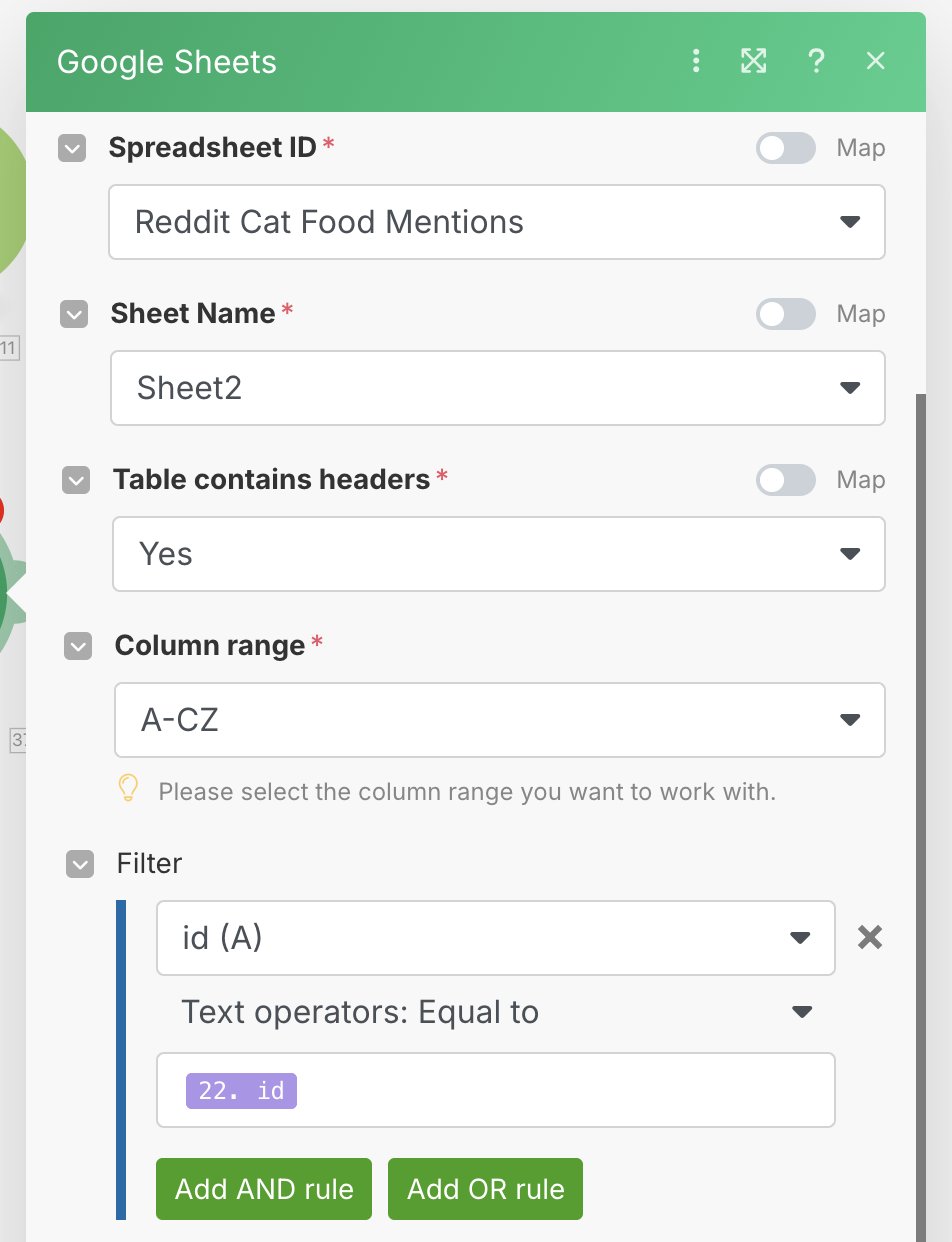
This Google Sheets module will be used to check the second sheet with the single id column to see if we have seen this post ID before. Set up the module as shown below, taking care to choose the SECOND sheet with just the id column.
Every time we get a question coming in, we will check the sheet to see if we have the ID saved. If we do, we want to filter out that post to prevent it from going through the workflow again and creating duplicates. In order to do that, create a new filter between the Google Sheets module, and the OpenRouter module, and set it up as shown.
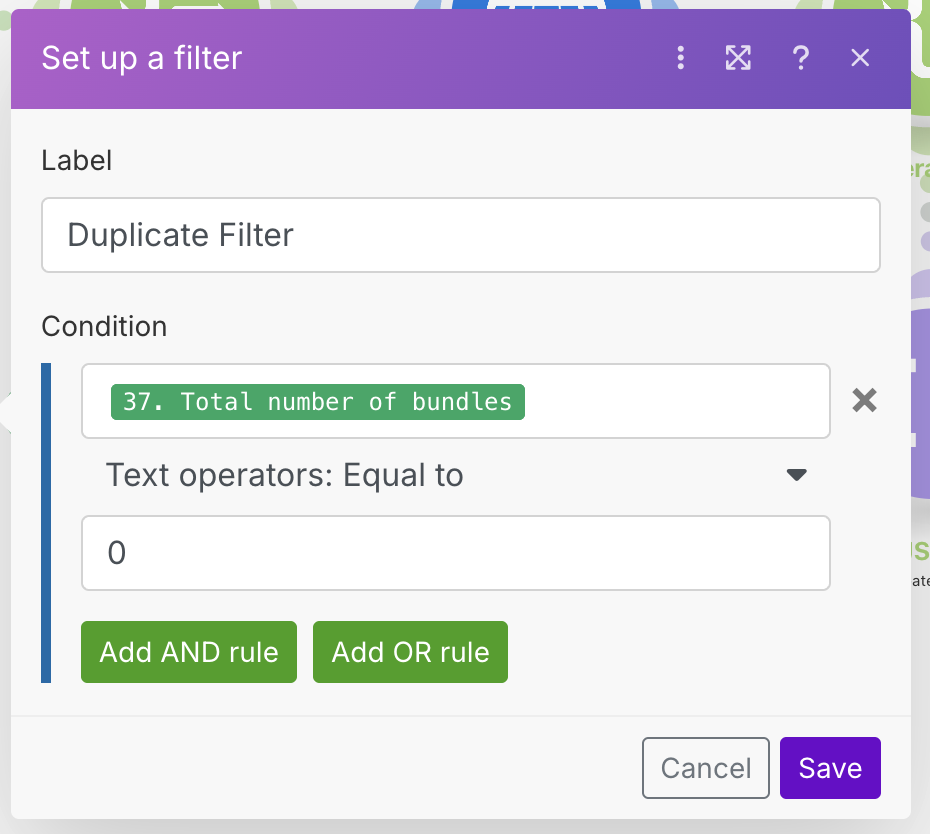
What we are doing here is checking to see if any rows are returned. If no rows are returned, that means we haven't seen this post before, so we can continue.
Now that we have the check in place, we need to set it up so that after we process the post using the OpenRouter module, we will save the ID to the sheet, so that we have a record of having processed it. In order to do this, we are going to have to insert a router with a Google Sheets -> Add Row module forked off just after the OpenRouter module. Check out the video below to see how to set it up.
You might notice that I had to fight Make here trying to keep the modules organized. I found that in some cases this worked well, and in others (like the one in the video) it would do weird things. The purpose of this Google Sheets module will be to track posts that will be processed by the AI. Configure the module as shown below, taking care to make sure that the second sheet with just the id column is the one selected.
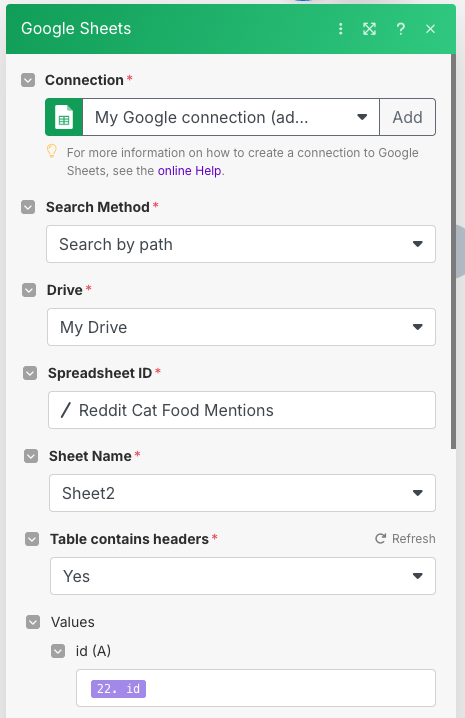
Run the workflow again, and watch what happens. If you run the workflow multiple times, you will notice that posts that we processed and added to the spreadsheet will no longer show up, and will stop at the first Google Sheets module just before the OpenRoutermodule. With this technique, we save both Make and AI credits by not repeating our processing.
Setting Up Scheduling
We are finally (really) done, and the only thing left is to set up our workflow so that it runs periodically. When running in production (for real, not just testing) we need to have things run automatically. As an example, we can set up our workflow to run every 15 minutes.
Go back to the Scenarios main menu and find the scenario we have been working on. On the right, slide the slider to ON, and this will enable the workflow, causing it to run every 15 minutes.
Conclusion
As we have just seen, building even a simple workflow like this shows that even simple things can have surprising depth when you think about all of the compromises and edge cases. Overall I found Make to be a powerful solution to use, which clearly has a focus on clean UI/UX and ease of use for zero-code users.
The amount of modules available was good with all of the basics covered, and the different functionality sensibly organized. I did miss some things such as the Redis module, and most of all the Code module allowing you to run custom code. While there are external solutions, I do think this adds considerable friction to the process. The general feeling here is that modules that are a bit too "technical" have been eschewed for more specific use case modules.
From a UX perspective, Make is very nice and their interface is very sleek. The expression syntax window especially is well designed, and allows users to easily understand how to build up syntax. However, I will admit that as a person with a development background, I was not a big fan of the syntax. Of course, I am biased, but I would have preferred to use an actual programming language to fill in the expressions rather than the hybrid version that Make uses. I do understand it is probably easier for non developers to understand though, so I can see why it is done that way.
From a pricing perspective, Make has a reasonable free and low paid tier. However, you will burn through credits fast, so it is recommended to be smart with how you use them. One thing that I think is really missing here is the ability to run the workflow from a single point onwards, or to run only one module with the previous results. I believe this may be possible somewhere, but I was not able to locate it based on the guidance. Because of this, I used up many more credits than I really needed testing the workflow. There is no self-hosting option either, so this makes this doubly important.
In short, I believe that Make will be a great choice if you are a less technical user, and need a tool that is easy to understand. Make offers a powerful and relatively understandable toolkit for such users. If you are more technical, have a development background, or want more customisation, then the simplicity and somewhat esoteric expression syntax might potentially grate.
If you have any feedback or comments, I'd gladly hear them, so feel free to contact me using one of the options on the about page. Happy automating!
Frequently Asked Questions
Can I scrape Reddit posts with Make without OAuth credentials?
Yes, for reading public data. Reddit exposes structured JSON data on any public URL by appending .json to it (for example, https://www.reddit.com/r/catadvice.json). However, Make's IPs are well-known to Reddit and tend to get blocked when calling these endpoints directly without authentication. The workaround used in this tutorial is to set up a Reddit OAuth 2.0 connection and use the oauth.reddit.com API endpoint instead. Follow our step-by-step Reddit OAuth setup for Make to get the credentials in place.
Does Make support running custom JavaScript code in a scenario?
Make does not have a native code execution module. To run custom JavaScript you need to connect to an external service. CustomJS is the option used in this tutorial. It provides an API that accepts a JavaScript function and an input, executes the code, and returns the result. The free plan offers 20 executions per day, which is enough for testing. For production use, you will want a paid plan or a similar service.
How does Make handle deduplication in a scenario?
Unlike n8n, Make does not have a native Redis module. The workaround shown in this tutorial is to use a second Google Sheet as a simple lookup table: store the IDs of processed posts in a dedicated sheet, and before processing each new post, search that sheet to see if the ID already exists. It is less efficient than Redis but requires no additional services. For high-volume scenarios with thousands of IDs, a dedicated key-value store would be more reliable.
How does Make's credit pricing work compared to Zapier tasks?
Make charges one credit per module action, while Zapier charges one task per action step. The important difference is price per unit: Make's Core plan gives you 10,000 credits for $9/month, while a comparable number of tasks on Zapier costs significantly more. That said, both models mean that a workflow with many steps per run burns through credits or tasks faster than n8n, which charges per execution regardless of step count. For a full cost comparison across all three platforms, see our automation platform comparison.
Can I use AI models other than OpenRouter in a Make scenario?
Yes. Make has native modules for OpenAI, Anthropic (Claude), Google Gemini, and several other AI providers. If your preferred provider is not listed, you can use the HTTP module to call any REST-based AI API directly. OpenRouter is used in this tutorial because it provides access to multiple models (including Gemini Flash, GPT-4, Claude, etc.) through a single API key, which is convenient for testing different models without managing multiple credentials.
What is the Make Router module used for?
The Router module allows you to split the flow of data in a Make scenario into two or more parallel branches. In this tutorial, it is used to send each processed Reddit post to both Google Sheets (for storage) and Slack (for notification) simultaneously, using the same data. This is similar to the "fan out" pattern in n8n, where you can connect multiple nodes to a single output. Without a router, you would have to process the data twice or chain the outputs sequentially.