- Published on
The Complete n8n Pricing Guide: Cloud vs Self-Hosted Cost Breakdown (2026)
- Authors

- Name
- Chris
- @molehillio
Introduction
n8n has become one of the most popular workflow automation platforms out there, and for good reason. It is powerful, flexible, and has a thriving community. But figuring out which pricing tier is right for you? That can actually be surprisingly confusing.
n8n offers everything from a community edition to custom Enterprise contracts, with several cloud tiers in between. Pricing has changed a few times over the years, and may well change again, so this article reflects what is available as of early 2026. Always double check the official pricing page before making a decision.
In this guide, we will break down each tier: what it costs, what you get, how many executions that actually translates to in practice, and most importantly, who each tier is really designed for.
This article contains affiliate links. If you sign up through our links, we may earn a commission at no extra cost to you.
A Quick Note on Executions
Before diving in, it is worth understanding how n8n charges. Unlike tools like Zapier or Make that charge per operation or task (i.e., each individual step in a workflow), n8n charges per execution. An execution is a single run of your entire workflow, regardless of how many steps it contains. For a practical side-by-side comparison in a real project, see our Reddit scraper tutorial in Make and equivalent n8n version.
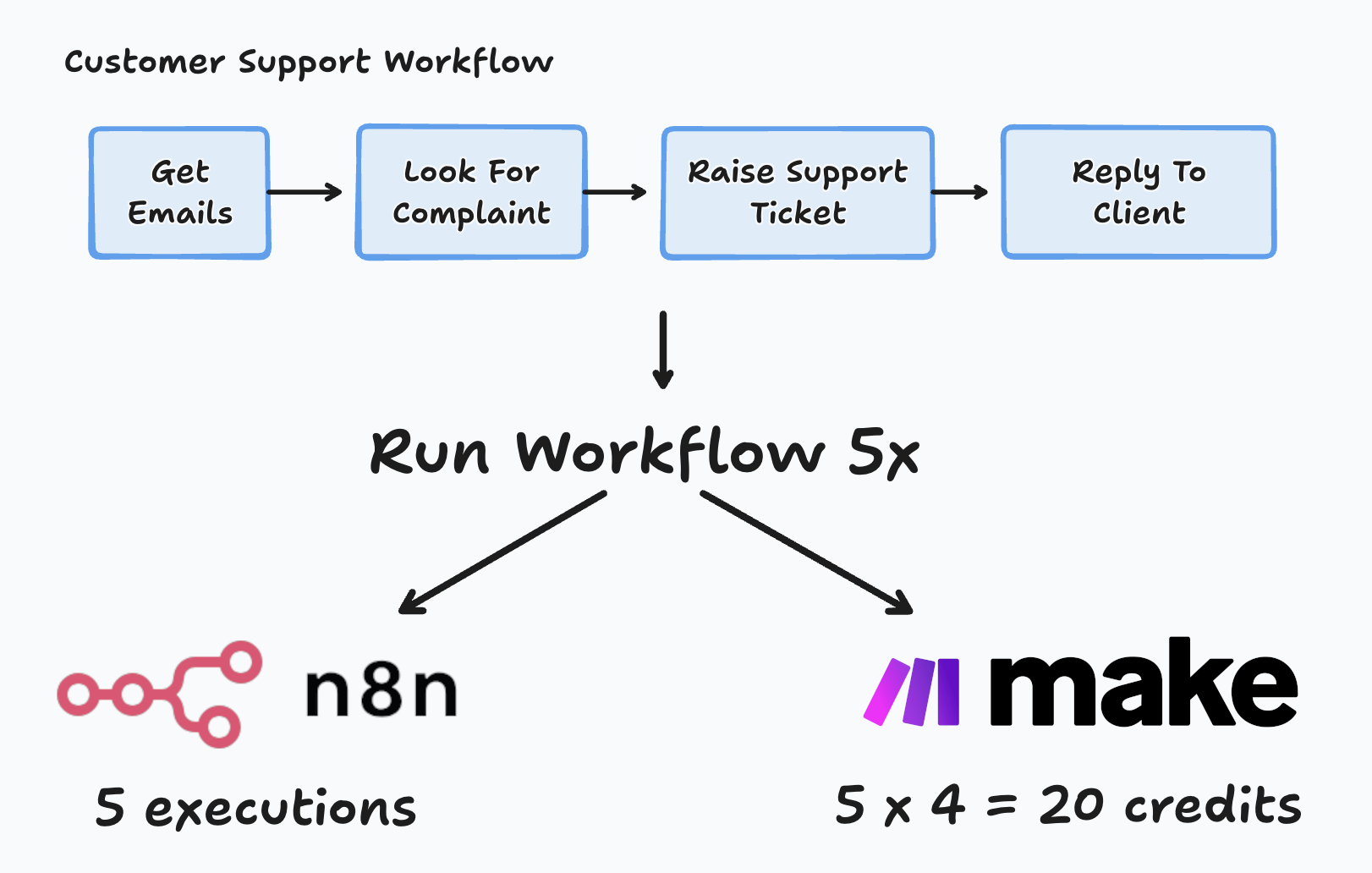
This is a big deal. A workflow with 50 nodes that processes a batch of data still counts as one execution. On other platforms, that same workflow might consume dozens or even hundreds of operations. This makes n8n's pricing significantly more predictable, especially for complex workflows.
All plans also include unlimited users, unlimited workflows, and every integration. The pricing is purely based on how many times your workflows run each month. When it comes to these limits, keeping an eye on them is very important. If you run out of executions, your workflows, cron jobs, webhooks, etc will all stop!
Starter Plan
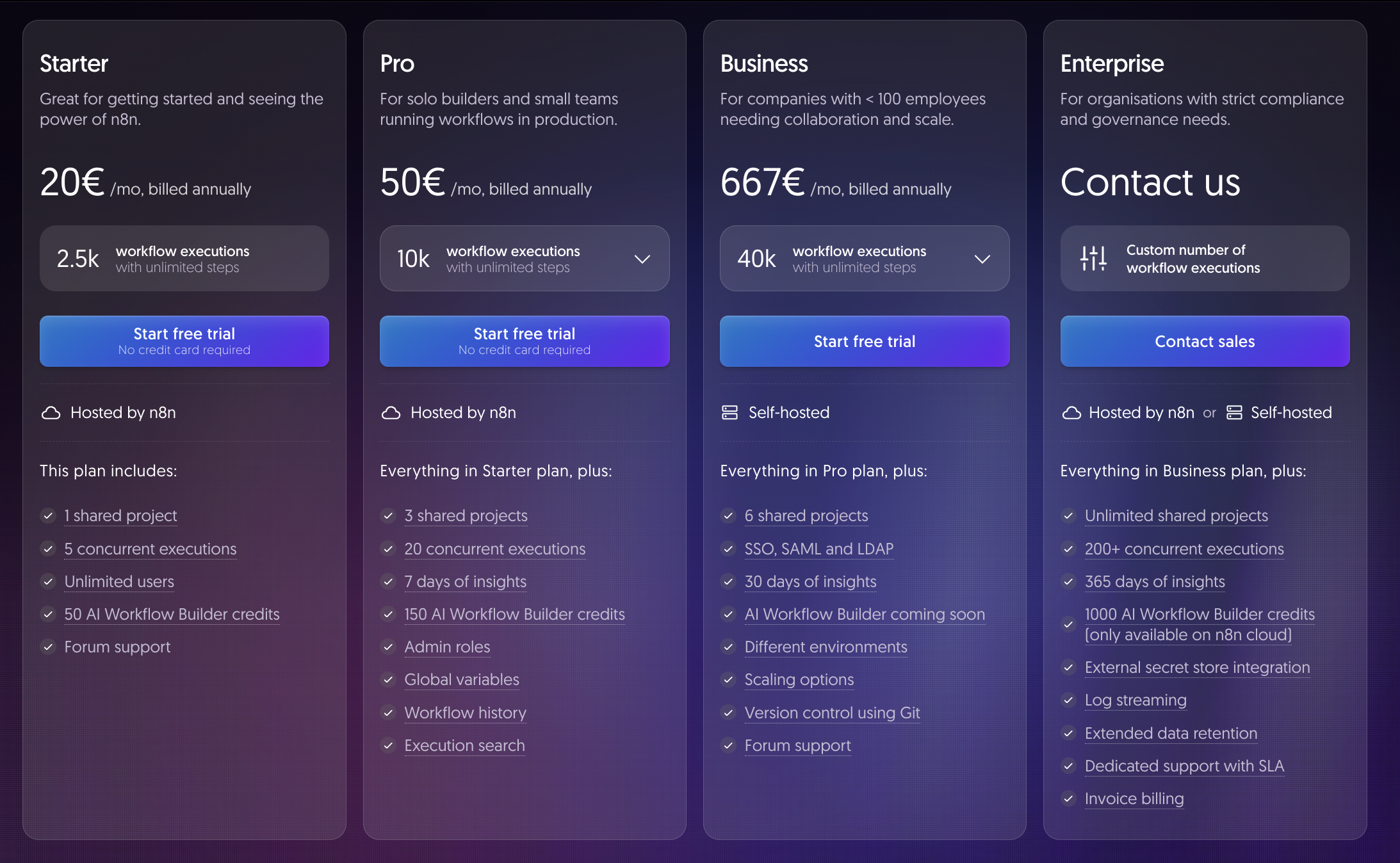
Price: €20/month billed annually, or €24/month on a monthly basis
Executions: 2,500 per month | 5 concurrent executions
Hosted by: ☁️ n8n Cloud
What Do 2,500 Executions Look Like?
That works out to roughly 83 executions per day. If you have a single workflow running on a schedule, that is about one run every 17 minutes. For a handful of event-driven workflows that trigger a few times a day, this is perfectly adequate. For anything running every few minutes, or handling frequent webhooks, you will burn through these fast. With only 5 concurrent executions, this plan only allows limited ability to run multiple things at once.
What You Get
- Cloud-hosted n8n, so no servers to manage, no updates to worry about
- 1 shared project, so you can share your workflow with other team members or clients
- All integrations and nodes
- 50 AI Workflow Builder credits, which can be useful for using AI to build and improve workflows
Who Is This For?
The Starter plan is aimed at solo builders, freelancers, and indie hackers who want to get up and running with n8n without dealing with infrastructure. If you are automating a handful of internal processes, syncing data between tools on a schedule, or just testing n8n in a light production setting, Starter gives you everything you need at a low price.
It is also a good option if you want to validate n8n for your business before committing to a higher tier. The free trial does not require a credit card, so there is no risk in getting started.
Limitations
If you have clear commercial or larger scale plans, Starter may not be enough! The main constraint is execution volume. 2,500 executions can disappear quickly once you start building more workflows. Concurrency is also limited to 5, so if you have multiple workflows triggering at the same time, some may queue, causing a backlog. You also only get a single shared project, which limits collaboration.
Pro Plan
Price: €50/month billed annually, or €60/month on a monthly basis
Executions: 10,000 per month | 20 concurrent executions
Hosted by: ☁️ n8n Cloud
What Do 10,000 Executions Look Like?
That is roughly 333 executions per day, or a workflow running every 4 to 5 minutes around the clock. This is a significant step up and comfortably handles most small-to-medium production workloads. Be careful if you have ambitions to run any kind of workflow that isn't run on a schedule, for instance, a chat bot. Such workflows can spike in volume rapidly and unpredictably, leading to you running out of credits.
What You Get (On Top of Starter)
- 4x the executions (10,000) and 4x the concurrency (20)
- 3 shared projects
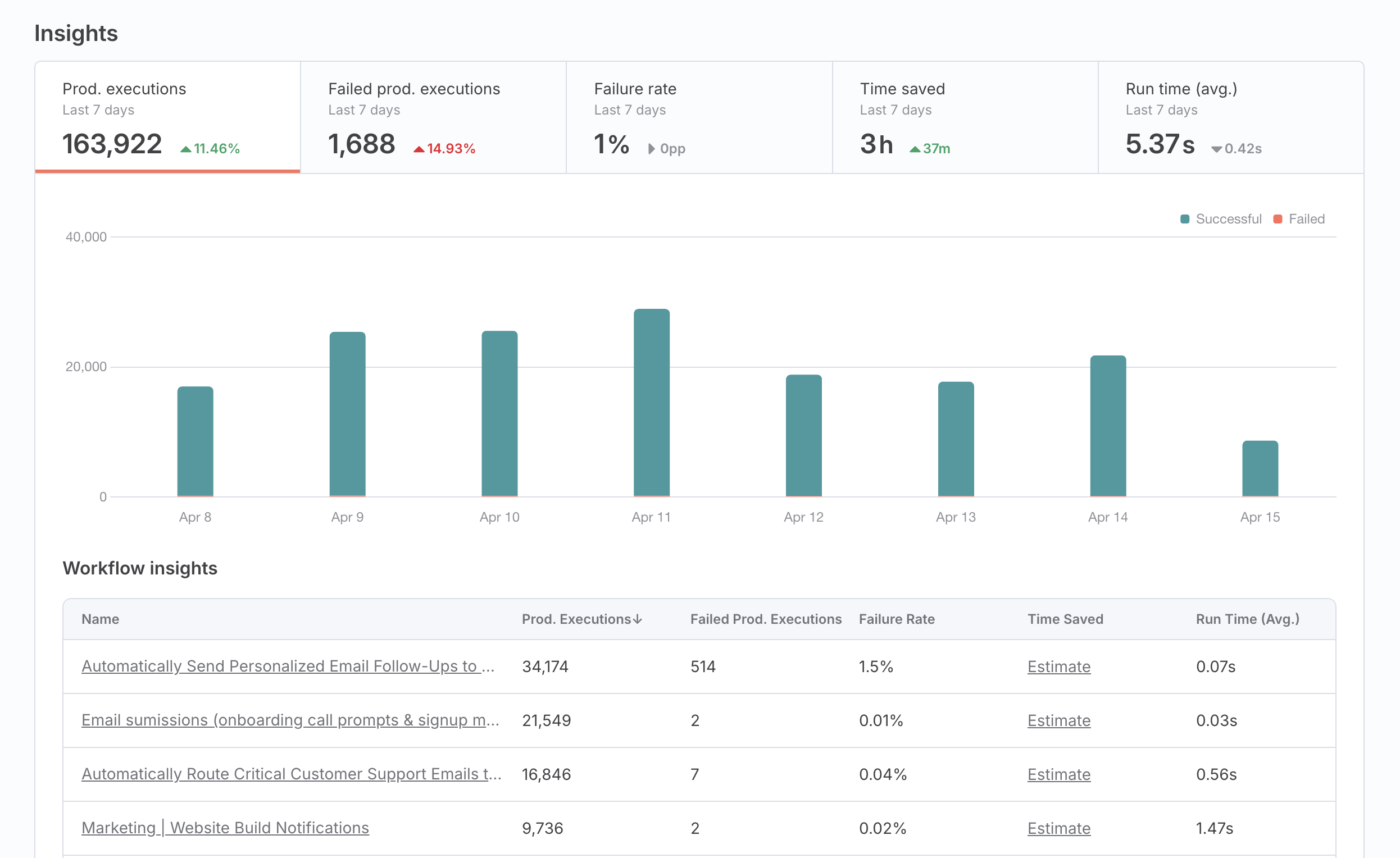
- 7 days of workflow insights
- 150 AI Workflow Builder credits
- Admin roles for team management
- Global variables
- Workflow history
- Execution search
Who Is This For?
Pro is where most small teams and agencies should be looking. If you are running client automations, have multiple people editing workflows, or have outgrown the Starter execution limits, Pro gives you the headroom and collaboration features you need. The additional quality of life features such as workflow sharing, workflow history, execution search and admin roles can be critical in running an automation business and working safely with clients.
It is also a solid choice for technical teams centralizing their automations in one managed workspace. The insights dashboard makes debugging and evaluating workflows much easier when things are running in production.
How Does It Compare to Starter?
The jump from Starter to Pro is substantial. You get 4x the executions, 4x the concurrency, and access to features like global variables, workflow history, and admin roles that become essential once more than one person is involved. For the extra €30/month, it is a significant upgrade, but only for those who are serious about automation.
Business Plan
Price: €667/month billed annually, or €800/month billed monthly
Executions: 40,000 per month | Higher concurrency
Hosted by: 🖥️ Self-hosted (with license key)
What Do 40,000 Executions Look Like?
That is roughly 1,333 executions per day, or about one execution every minute. This is comfortably in the range for company-wide automation, busy webhook-driven workflows, or chatbot systems handling moderate traffic. However, even this can get consumed given enough activity, especially in unpredictable settings such as chat bots.
What You Get (On Top of Pro)
- 4x the executions (40,000) and 10x the concurrency (200+)
- 6 shared projects
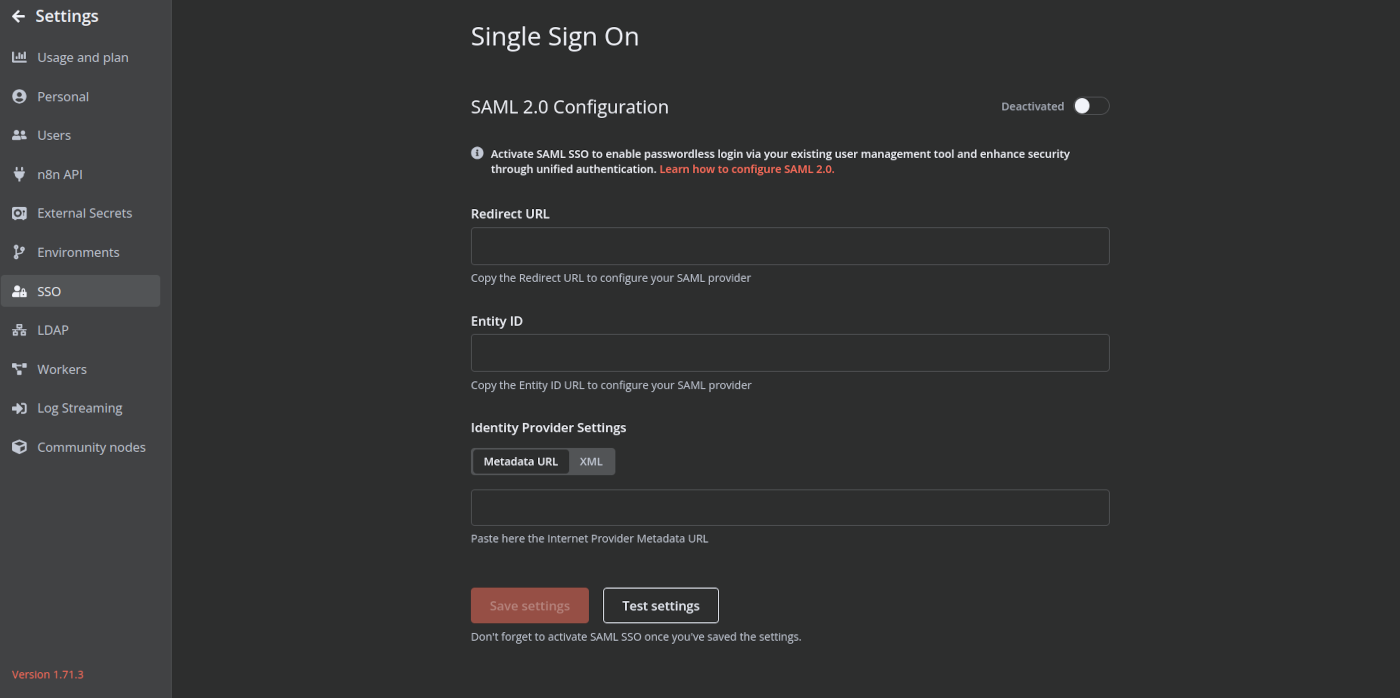
- SSO, SAML, and LDAP for enterprise authentication
- 30 days of insights
- Different environments (dev, staging, production)
- Scaling options (queue mode, multiple instances)
- Version control using Git
- Workflow diff
The Self-Hosted Twist
Here is where things get slightly more interesting. The Business plan is self-hosted, meaning you run n8n on your own infrastructure and servers. You still pay n8n for the license (based on executions), but you also pay for your servers. Some in the community have questioned this development, due to the fact that it requires you to manage the hosting yourself and still pay for the license. However, in most larger scale business agreements this kind of setup is not uncommon, and arises from the specific legal and operational needs these entities have.
One thing that it is important to note, is that self-hosting gives you full control over your data, the ability to deploy in your own cloud or on-premises, and the flexibility to scale your infrastructure as you see fit. For companies in regulated industries such as legal or healthcare, or those with strict data residency requirements, this is often a necessity rather than a preference.
The Startup Discount
If your company has fewer than 20 employees, you may qualify for n8n's Startup Plan , which gives you 50% off the Business plan. That brings the effective cost down to roughly €333/month billed annually, which is a much easier pill to swallow for smaller teams that need the advanced features. Keep in mind though, once you grow past 20 employees you may need to upgrade.
Who Is This For?
Business is designed for companies with under 100 employees that need n8n as a serious internal automation platform. This is obvious from the additional "enterprise" features that come included. Single Sign On (SSO) is crucial for business to manage their employee logins and permissions, making it a highly sought after feature. The addition of different staging environments and version control mean that this is an option for a serious endeavour, and a professional business.
If you need the boring (yet critical!) enterprise features for a reasonable cost, this is where you need to be. It is also the right choice if your execution volume has outgrown Pro.
How Does It Compare to Pro?
The price jump from Pro to Business is steep (roughly 13x), but you are also moving into a fundamentally different category. Business adds enterprise-grade security, governance features, environment management, and the ability to self-host with scaling options. If your organization needs any of these, Pro simply will not cut it.
Enterprise Plan
Price: Custom (contact sales)
Executions: Custom
Hosted by: ☁️ n8n Cloud or 🖥️ Self-hosted
What You Get (On Top of Business)
- Unlimited shared projects
- 200+ concurrent executions
- 365 days of insights
- 1,000 AI Workflow Builder credits (cloud only)
- External secret store integration
- Log streaming (e.g., to Datadog)
- Extended data retention
- Dedicated support with SLA
- Invoice billing
How Much Could It Actually Cost?
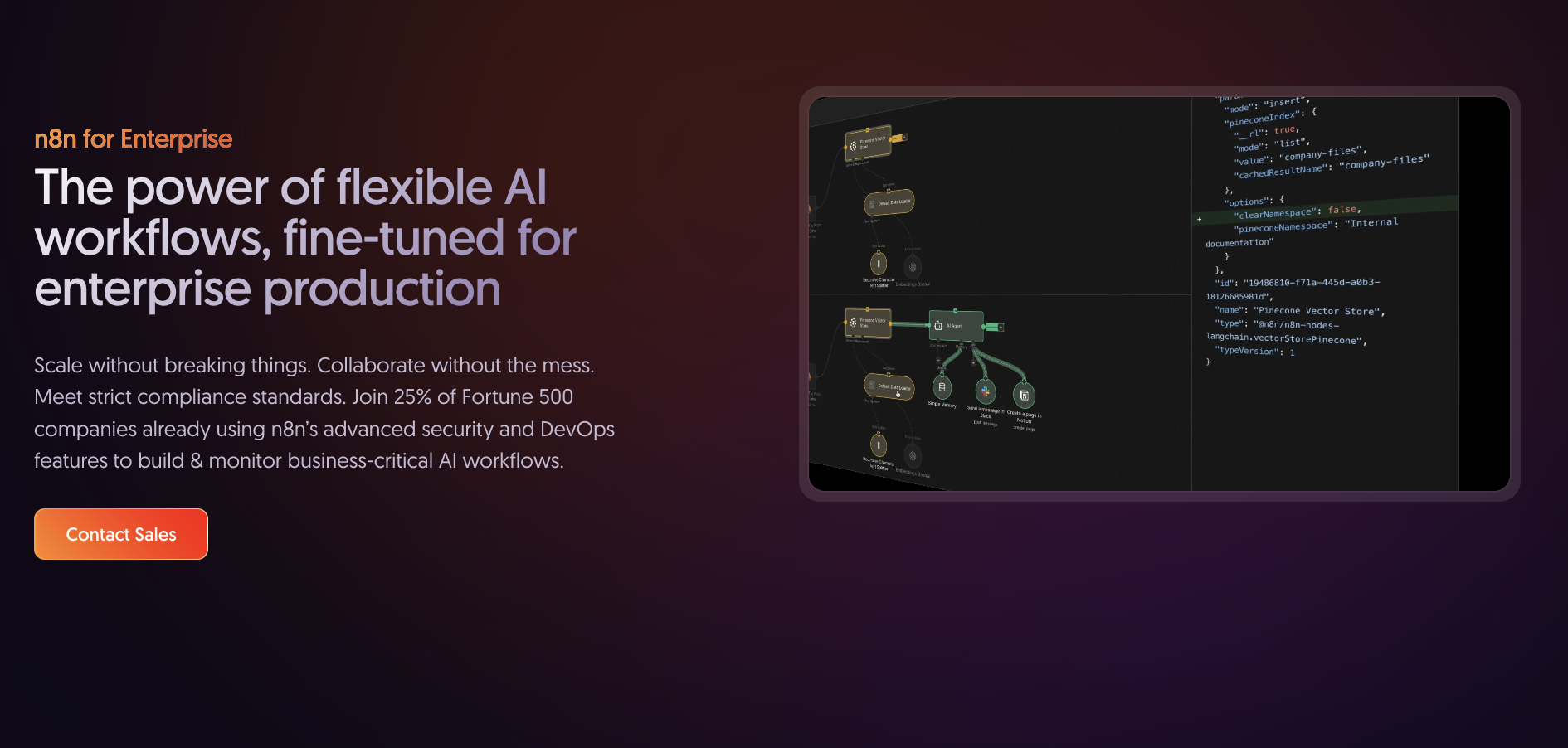
Enterprise pricing is not publicly listed. While there are some public discussions from community members sharing their experiences, there is no specific or reliable pricing information available. Costs will vary significantly based on your execution volume, hosting model, and support requirements, so the best approach is to contact n8n's sales team directly for a quote tailored to your needs.
Who Is This For?
Enterprise is for large organizations (100+ employees) or companies in regulated industries with strict compliance, audit, and governance requirements. If you need dedicated infrastructure, guaranteed SLAs, log streaming, or a dedicated customer success manager, this is the tier.
It is also worth considering if you are migrating from a large Zapier or Make deployment and want to control long-term costs at scale. At very high execution volumes, n8n Enterprise can be significantly more cost-effective, but you will need to discuss pricing with the sales team directly.
Questions to Ask Sales
If you are considering Enterprise, here are some questions worth asking upfront:
- How exactly are executions counted and billed for self-hosted Enterprise?
- Is there a base fee plus per-execution charges, or just per-execution?
- What happens if you exceed your execution quota?
- How does pricing scale as you add more users or executions?
- Are upgrades/downgrades possible without long-term contracts?
Community Edition (Self-Hosted)
Price: Free
Executions: Unlimited
Hosted by: You (🖥️ Self-Hosted)
What You Get
The Community Edition is the free, self-hosted version of n8n, available on GitHub. It runs under a "fair-code" license and gives you access to the core automation platform with unlimited workflows, unlimited executions, and all integrations.
You can use it commercially. Build automations for your business, run client workflows, power internal tooling. The main restriction is that you cannot resell n8n itself as a hosted product or use it to provide a competing automation service. For the full details, see the Sustainable Use License on GitHub.
The Hidden Costs
While the license is free, running n8n yourself is not. Here is what you should budget for:
- Server costs: A small VPS (DigitalOcean, Hetzner, etc.) runs €5–20/month for light to moderate workloads. Heavier usage will need more resources.
- Database: n8n needs a Postgres database. You can run one on the same server, or use a managed database service for better reliability.
- DevOps time: You will need to set up Docker or docker-compose, configure DNS, TLS certificates, and a reverse proxy. Ongoing maintenance includes upgrades, security patches, monitoring, and backups.
- Scaling: If your workloads grow, you will need to manage queue mode, worker instances, and potentially Kubernetes.
A reasonable estimate for a small-to-medium self-hosted setup is €10–30/month in infrastructure, plus a few hours per month in maintenance time. If you value your time at €50–100/hour, the "free" version might cost you more than Starter or Pro in practice.
The Middle Ground: Railway
If managing your own server feels like overkill, a PaaS like Railway can be a good compromise. Railway lets you deploy n8n from a Docker image or template, handles TLS and networking, and offers managed Postgres as an add-on. You keep the unlimited executions of the Community Edition without the sysadmin work.
A typical n8n deployment on Railway runs roughly $5–15/month depending on usage, which is comparable to a basic VPS but with significantly less ongoing maintenance. Having said that, it is still not as hands off as a cloud deployment, as you will need to manage and secure n8n itself.
What You Don't Get
The Community Edition does not include features reserved for paid tiers:
- No SSO, SAML, or LDAP
- No Git-based version control
- No multi-environment support
- No advanced insights dashboard
- No dedicated support or SLA
- No workflow diff, versioning, or audit trails
For many users, especially solo developers and small teams, these are not dealbreakers. But if you need any of them, you will need to step up to a paid plan. For most businesses who are not explicitly technical, these are often a hard stop.
Security Considerations
When you self-host, you are responsible for security. That means keeping n8n updated, patching vulnerabilities, securing your server, managing credentials properly, and handling backups. If your n8n instance handles sensitive data or customer information, a misconfiguration could have serious consequences. While it may seem initially easy, this is not a task that should be underestimated!
Cloud-hosted plans offload this responsibility to n8n's team, which is a meaningful benefit for teams without dedicated DevOps resources.
Who Is This For?
Community Edition is ideal for developers and technical teams who are comfortable managing their own infrastructure. It is the best option if you:
- Have high execution volume but a low budget
- Need full control over your data and hosting environment
- Are prototyping or building internal tools where occasional downtime is acceptable
- Want to evaluate n8n thoroughly before committing to a paid plan
Quick Comparison
| Starter | Pro | Business | Enterprise | Community | |
|---|---|---|---|---|---|
| Price | €20/mo | €50/mo | €667/mo | Custom | Free |
| Executions/mo | 2,500 | 10,000 | 40,000 | Custom | Unlimited |
| Per day | ~83 | ~333 | ~1,333 | Custom | Unlimited |
| Concurrency | 5 | 20 | 200 | 200+ | Unlimited |
| Hosting | Cloud | Cloud | Self-hosted | Cloud or Self | Self-hosted |
| SSO/SAML | No | No | Yes | Yes | No |
| Git Integration | No | No | Yes | Yes | No |
| Support | Forum | Forum | Forum | Dedicated + SLA | Community |
Prices shown are annual billing rates. Annual billing saves roughly 17% compared to monthly.
All cloud plans include a free trial - get started here.
Summary: Which Tier Should You Pick?
Choosing the right n8n tier really comes down to three things: how many executions you need, whether you can self-host, and what governance features matter to you.
- Just getting started or experimenting? Start with the Community Edition if you are comfortable with Docker, or Starter if you want zero infrastructure hassle. If you want a full build-along first, use our n8n workflow tutorial.
- Solo builder or freelancer in production? Starter or Pro, depending on your volume. If you are running more than a couple of active workflows, Pro is probably worth the upgrade.
- Small team or agency? Pro is the sweet spot. You get enough executions for most use cases, plus the collaboration features to work as a team.
- Company standardizing on automation? Business is your tier. The SSO, environment management, and Git integration are essential for any serious organizational deployment. Check the Startup discount if you are under 20 employees.
- Large organization with compliance needs? Enterprise is unavoidable. Talk to sales early and come prepared with the questions listed above.
- High volume on a tight budget? Community Edition with your own infrastructure will always be the cheapest per-execution option, but budget for the time and expertise to manage it properly.
Whatever you choose, the good news is that n8n makes it relatively straightforward to migrate between tiers as your needs evolve. Start your free trial today, and scale up when the time comes.
Frequently Asked Questions
What is an n8n execution and how is it counted?
An execution is a single run of your entire workflow, from the trigger node to the last node, regardless of how many steps it contains. A workflow with 3 nodes counts as 1 execution. A workflow with 100 nodes also counts as 1 execution. This is fundamentally different from tools like Zapier or Make, which charge per individual action or step. For workflows with many steps, n8n's execution-based model is significantly more cost-efficient.
How much does n8n cost per month?
The n8n Starter plan starts at €20/month (billed annually) for 2,500 executions, hosted on n8n's cloud. The Pro plan is €50/month for 10,000 executions. The Business plan at €667/month is self-hosted and geared at companies needing enterprise features like SSO and environment management. Self-hosting the Community Edition is free, with your only cost being server infrastructure (typically €5–20/month). All cloud plans include a free trial with no credit card required.
Is n8n free to self-host?
Yes. The n8n Community Edition is free to self-host with no execution limits, no workflow limits, and no restrictions on the number of users. You can use it commercially. The only costs are your server infrastructure and the time required to set it up and maintain it. If you want the convenience of managed hosting without n8n's cloud subscription price, a platform like Railway lets you run the Community Edition for around $5–15/month.
What is the difference between the n8n Starter and Pro plans?
The main differences are scale and team features. Starter gives you 2,500 executions/month with 5 concurrent executions and 1 shared project. Pro gives you 10,000 executions/month, 20 concurrent executions, 3 shared projects, plus admin roles, global variables, workflow history, and 7-day insights. For solo builders testing n8n, Starter is enough. For small teams running production workflows with multiple collaborators, Pro is usually the right step up.
What does the n8n Business plan include that Pro doesn't?
The Business plan is self-hosted and adds enterprise-grade features: SSO/SAML/LDAP authentication, Git-based version control, multiple deployment environments (dev, staging, production), workflow diff, and 30-day insights. It also comes with 40,000 executions and 200+ concurrent executions. These features are generally non-negotiable for larger organisations or teams with serious governance, compliance, or DevOps requirements.
Does n8n offer a discount for startups?
Yes. If your company has fewer than 20 employees, you may qualify for n8n's Startup Plan, which gives you 50% off the Business plan. That brings the effective cost down to roughly €333/month billed annually, making enterprise features accessible for smaller teams that need SSO, version control, or multi-environment support before they have grown to the size where the full Business price is easy to absorb.
What happens if I run out of n8n cloud executions?
On n8n Cloud, if you exhaust your monthly execution allowance, your workflows pause until your billing period resets or you upgrade your plan. Cron jobs, webhooks, and any scheduled automations all stop. This is worth keeping in mind for workflows with unpredictable volume, such as chatbots or event-driven automations that can spike. The self-hosted Community Edition has no such limit, which is one of its key advantages for high-volume use cases.