- Published on
The Automation Trilemma - n8n vs Make vs Zapier (2026)
- Authors

- Name
- Chris
- @molehillio
Introduction
When it comes to automation platforms, most people start with Zapier because it is easy. You connect Gmail to Slack, magic happens, and you wonder why you ever did anything manually. Then the bill arrives. What started as a neat productivity trick now might be costing $300 a month, and you are not entirely sure why.
When choosing an automation platform, you can generally pick two out of three: Simplicity, Low Cost, and Power.
- Low Cost + Power = n8n (but more technical)
- Simplicity + Low Cost = Make (but with trade-offs at scale)
- Simplicity + Power = Zapier (but expensive)
In this article, we cut through the marketing pages and compare these three platforms on the things that actually matter: pricing, builder experience, AI and agent capabilities, and data privacy. Whether you are a solopreneur, an ops manager, or a CTO mapping out a long-term automation stack, this guide is designed to help you make the right call.
This article contains affiliate links. If you sign up through our links, we may earn a commission at no extra cost to you.
Quick Verdict
- n8n — Best for developers, CTOs, and AI-focused teams. Self-hosting, native LangChain integration, and execution-based pricing that does not penalise complex workflows. Free if you self-host (though there are hidden costs).
- Make — Best for visual builders and operations teams. Strong branching logic and visual debugging at roughly a third the cost of Zapier.
- Zapier — Best for non-technical teams who need fast setup. The largest app library (8,000+) and simplest interface, but the most expensive at scale.
| n8n | Make | Zapier | |
|---|---|---|---|
| Pricing model | Per execution | Per credit | Per task |
| Free tier | Unlimited (self-hosted) | 1,000 credits/mo | 100 tasks/mo |
| Best for | Developers, AI agents, high volume | Complex visual logic, ops teams | Simple workflows, non-technical |
| Self-hosted | Yes | No | No |
Platform Overview
What is n8n?
n8n (pronounced "nodemation") is a workflow automation platform built for technical users. It offers a visual node-graph editor with the ability to write custom JavaScript or Python directly inside workflows. Key differentiators: execution-based pricing (a 100-step workflow counts as one execution), a self-hosted Community Edition with no usage limits, and deep AI agent integration via LangChain with memory, tool use, and vector stores.
The trade-off is a steeper learning curve. For pricing details, see our Complete n8n Pricing Guide. We also have an n8n Reddit scraper tutorial if you want a hands-on starting point.
What is Make?

Make (formerly Integromat) is a visual automation platform with around 2,000 integrations. You build workflows as flowcharts on a drag-and-drop canvas, with routers for branching, iterators for looping, aggregators for combining data, and dedicated error-handling routes. It uses a credit-based billing model, significantly cheaper per unit than Zapier.
Make is cloud-only (no self-hosting). We have a Make Reddit scraper tutorial if you want a hands-on starting point.
What is Zapier?
Zapier is the most widely known automation platform, with 8,000+ app integrations. Non-technical users can set up a working automation in minutes. The trade-off is cost and flexibility: per-task billing gets expensive as workflows grow, and complex branching logic is limited compared to n8n and Make. Zapier has also expanded into AI Agents, Tables, Forms, and MCP (Model Context Protocol).
Pricing
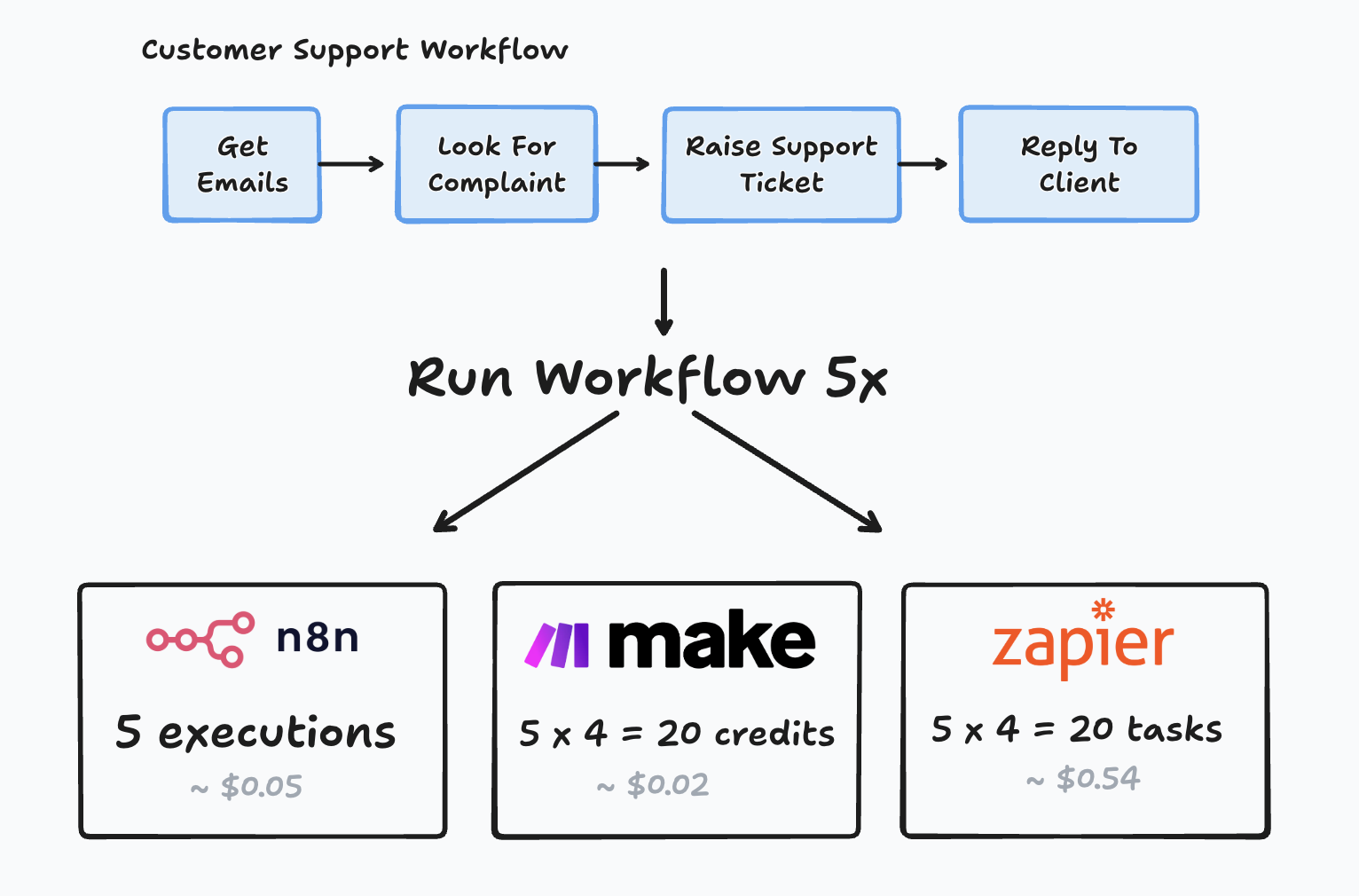
The three platforms measure usage in fundamentally different units — tasks vs credits vs executions — so comparing prices without understanding the billing model is misleading.
n8n (Per Execution)
n8n charges per execution, which is a single run of your entire workflow, regardless of how many steps it contains. A workflow with 5 nodes that runs once? That is 1 execution. A workflow with 100 nodes that runs once? Still 1 execution.
The cloud Starter plan is €20/month (billed annually) for 2,500 executions. Pro is €50/month for 10,000. Self-hosting the Community Edition gives you unlimited executions for free — server costs are typically ~$20/month on a VPS, though there are other complexities with self-hosting to consider. See our Complete n8n Pricing Guide for a full tier breakdown.
This execution-based model becomes a massive advantage for complex workflows. The more steps your automation has, the bigger the gap between n8n and the per-action pricing of Zapier and Make.
Make (Per Credit)
Make recently transitioned from "operations" to credits. Each module action consumes one credit, so a 5-step workflow running 2,000 times uses 10,000 credits.
Make is significantly cheaper per unit than Zapier. The free tier gives 1,000 credits/month (vs Zapier's 100 tasks), and the Core plan at $9/month gives 10,000 credits. Pro ($16/month) and Teams ($29/month) add custom variables, collaboration, and priority execution.
Note: Make's AI modules can consume more credits than standard actions, so AI-heavy workflows cost more than you might expect.
Zapier (Per Task)
Zapier charges per task — every action after the trigger. A workflow that checks Gmail, creates a Notion page, sends a Slack message, and updates a Google Sheet uses 5 tasks per run. At 2,000 runs/month, that is 10,000 tasks, pushing you into higher pricing tiers.
The free tier offers 100 tasks/month with two-step Zaps only. Professional starts at $19.99/month (billed annually) with multi-step workflows. Teams starts at $69/month with shared workspaces.
Costs scale with both volume and complexity — adding one more step to a workflow increases your bill.
Real-World Cost Comparison
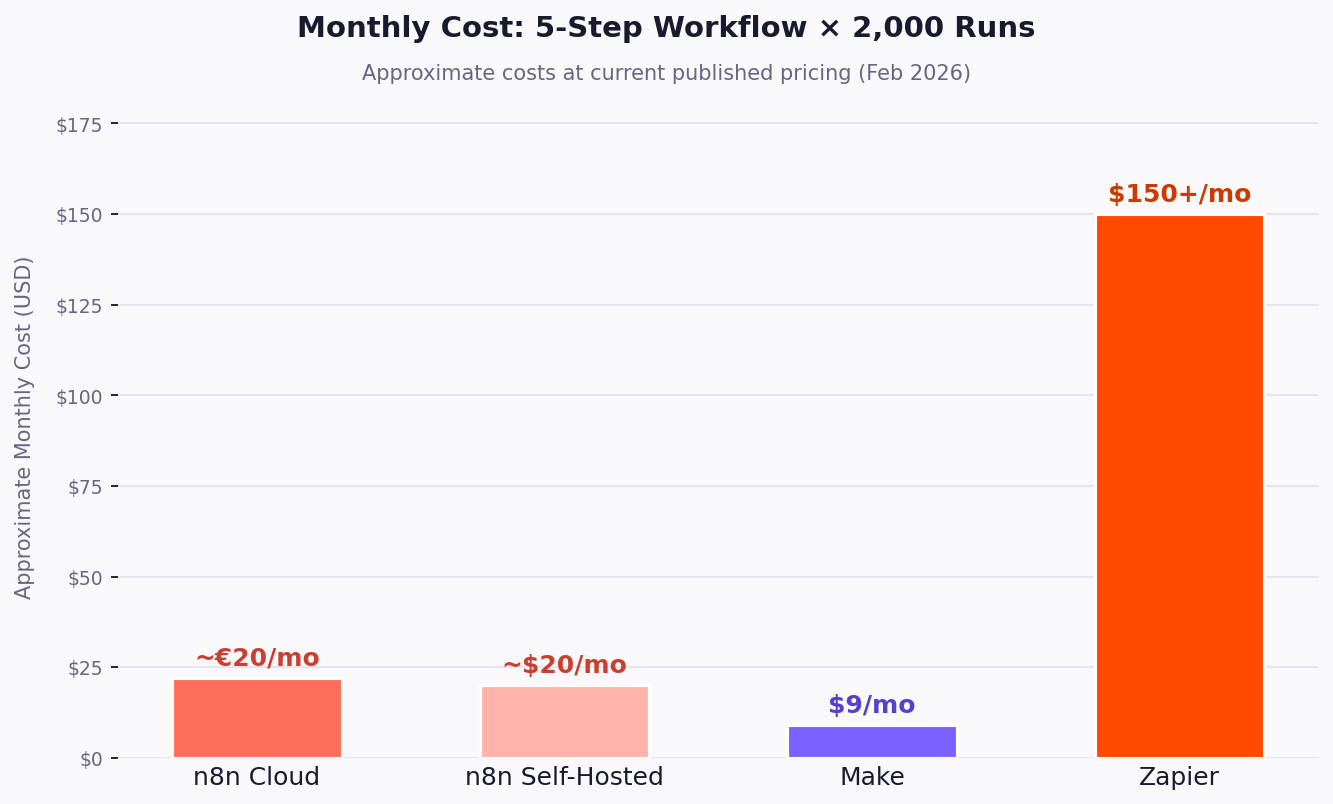
Imagine a 5-step workflow running 2,000 times per month:
| Platform | Billing unit | Units consumed | Approximate monthly cost |
|---|---|---|---|
| n8n Cloud | Execution (per workflow run) | 2,000 executions | ~€20/mo (Starter plan) |
| n8n Self-Hosted | N/A | Unlimited | ~$20/mo (server costs) |
| Make | Credit (per module) | 10,000 credits | $9/mo (Core plan) |
| Zapier | Task (per step) | 10,000 tasks | $150+/mo (Professional) |
Scaled up — a 10-step workflow running 10,000 times per month:
| Platform | Units consumed | Approximate monthly cost |
|---|---|---|
| n8n Cloud | 10,000 executions | ~€50/mo (Pro plan) |
| n8n Self-Hosted | Unlimited | ~$20/mo |
| Make | 100,000 credits | ~$100/mo (with overage credits) |
| Zapier | 100,000 tasks | $300+/mo |
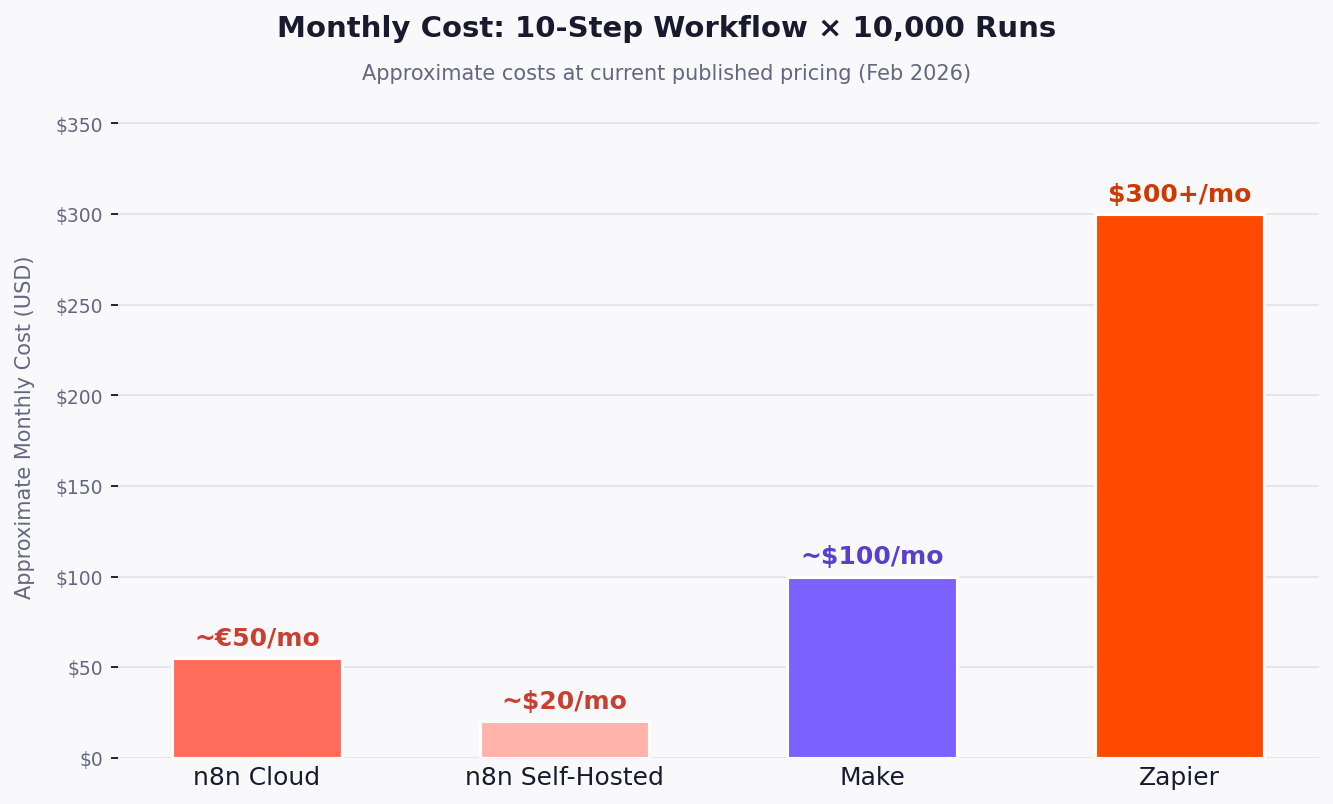
At low volume, all three are affordable, but costs diverge quickly as complexity or volume increases. n8n's execution model generally becomes cheaper than Make once workflows exceed ~10 steps.
So which one to choose? n8n for high volume, complex workflows, or anyone who wants predictable costs. Make for medium volume with budget awareness. Zapier for low volume, simple workflows.
NOTE
Pricing can change. Always verify current rates on the official pricing pages for Zapier, Make, and n8n before making a decision.
The Builder Experience
Each platform takes a different approach to building and debugging workflows, and those differences shape who can use the tool effectively.
n8n
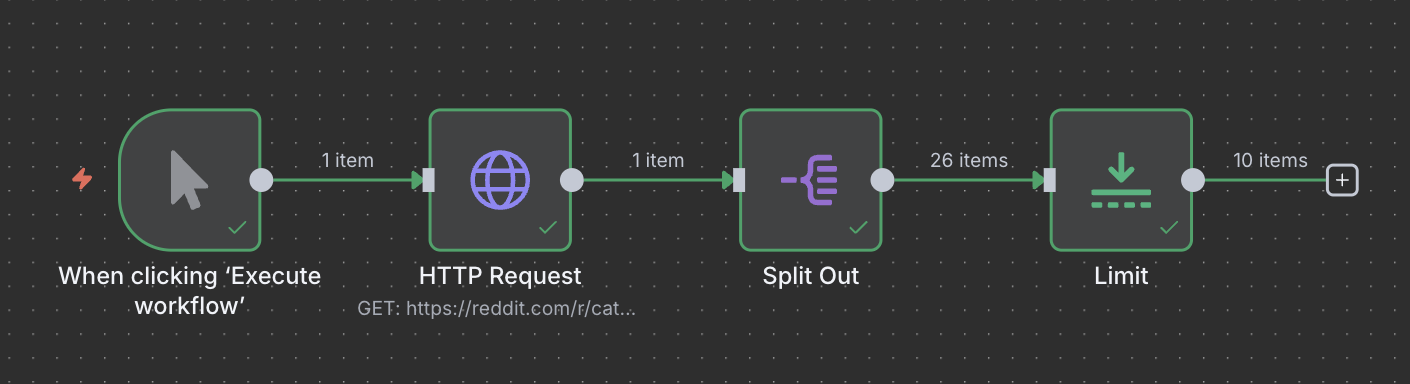
n8n's editor resembles a subway map — nodes in a directed graph where you can merge data streams, fork paths, loop freely, and write JavaScript or Python in Code nodes. It is closer to a visual IDE than a no-code tool.
The Code node handles cases where built-in nodes fall short, and the HTTP Request node calls any REST API directly, so you are never limited to pre-built integrations. See this in action in our n8n Reddit scraper tutorial. An AI-powered workflow builder now generates basic structures from plain English, but getting the most out of n8n still means being comfortable with JSON and some JavaScript.
Best suited for developers, data engineers, and technically-minded ops people.
Make
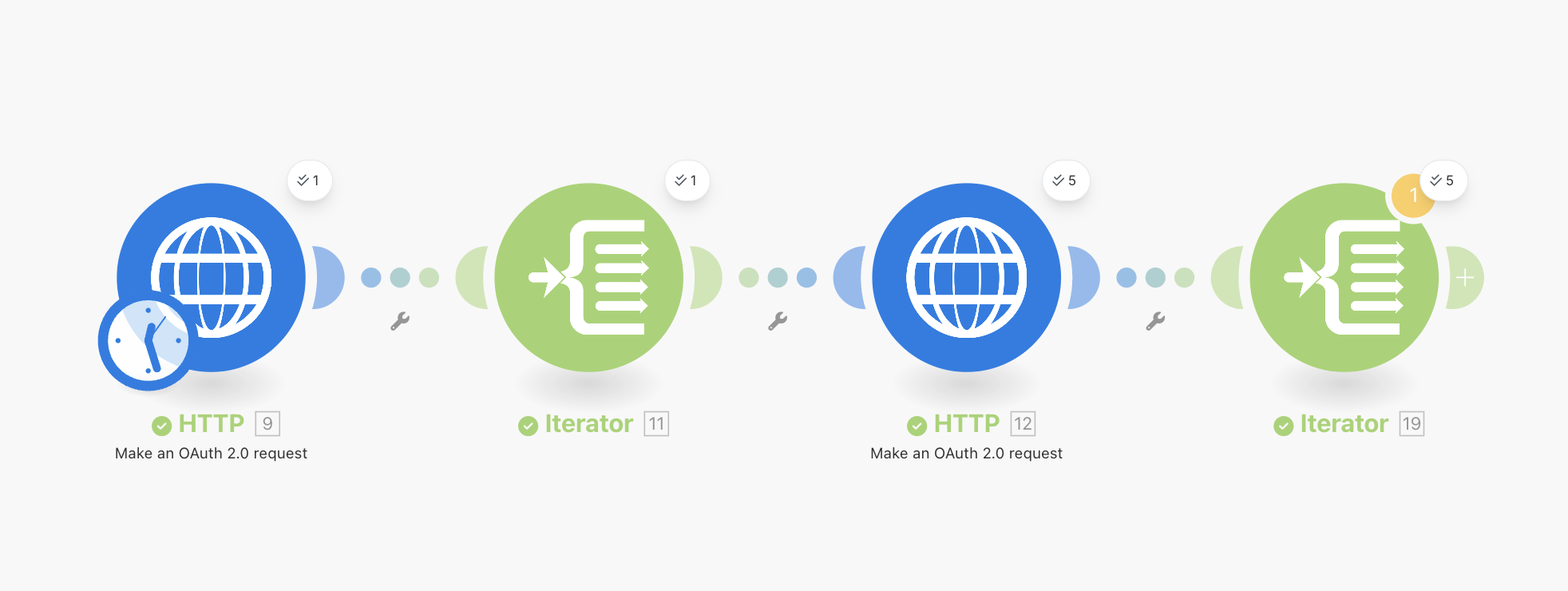
Make's workflow lives on a visual canvas where modules appear as connected bubbles. You can watch data flow through each step during execution, seeing exactly where things succeed or break. When a module fails, you click it and inspect every piece of data that passed through. Routers handle branching; iterators and aggregators handle looping. See it in action in our Make Reddit scraper tutorial.
In some cases, the interface can feel overwhelming for total beginners — routers, iterators, and aggregators have a learning curve. For technical users, Make's attempts to simplify technical concepts can sometimes make them harder to grasp because they deviate from common conventions.
Best suited for operations professionals and visual thinkers building workflows with complex branching or error handling. Less technical than n8n, but less flexible too.
Zapier
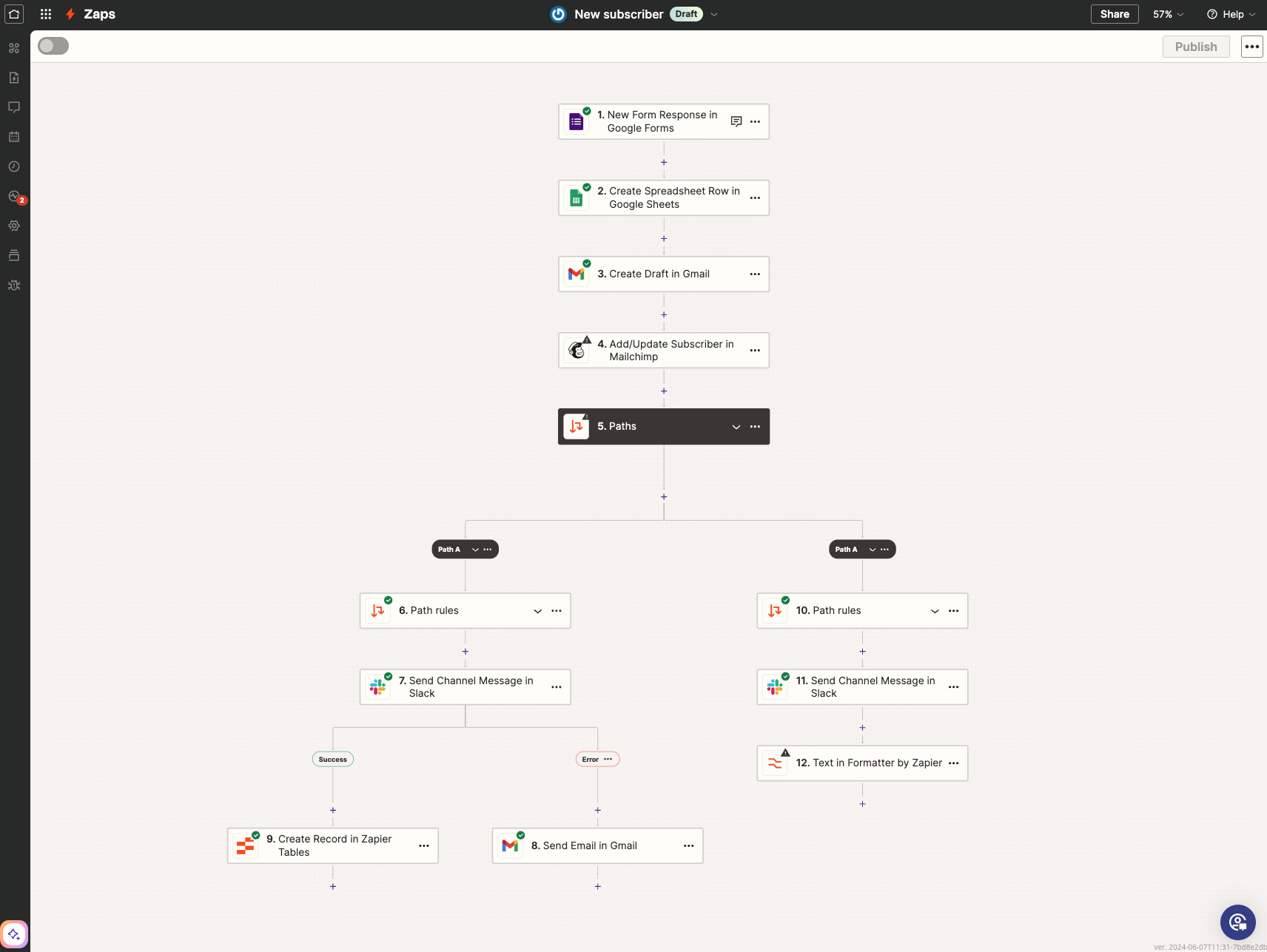
Zapier follows a strict trigger → action → action pattern. For straightforward workflows this linear flow is simple and fast to set up. The trade-off appears with branching logic. Zapier supports Paths (if/else), but complex multi-branch workflows become hard to visualise and maintain compared to Make or n8n.
Best suited for non-technical users, marketing teams, and sales ops running simple automations.
Handling Complexity and Logic

The real test is what happens when you need to iterate through 1,000 rows, call an API for each, handle errors, and aggregate the results.
n8n
n8n handles this natively with its node-based flow. Nodes automatically process arrays of items, so an incoming batch of 1,000 rows flows through the subsequent nodes without needing an explicit iterator in most cases. When you do need custom loop logic, the Code node gives you full programmatic control.
The pricing advantage is enormous here. Those 1,000 iterations? Still one execution. Whether your workflow processes 1 item or 10,000 items in a single run, n8n counts it the same way.
Make
Make's Iterators and Aggregators handle this well — Iterators process each item individually, Aggregators collect results. The visual canvas shows how data fans out and recombines, and dedicated error handler routes define fallback behaviour per module.
The credit cost is still per-module though. Iterating through 1,000 items with 3 modules in the loop means 3,000 credits consumed, same as Zapier in principle, though significantly cheaper per credit.
Zapier
Zapier handles basic looping with its Looping action and supports data transfer with dedicated tools. However, there are limits. For truly complex data processing, you often hit walls. Each iteration step counts as a separate task, so looping through 1,000 rows with a 3-step process inside the loop burns through 3,000 tasks. That gets expensive fast.
AI and Agents
AI integration has gone from a "nice to have" to the centrepiece of automation strategy. All three platforms offer AI capabilities, but they approach it very differently.
n8n
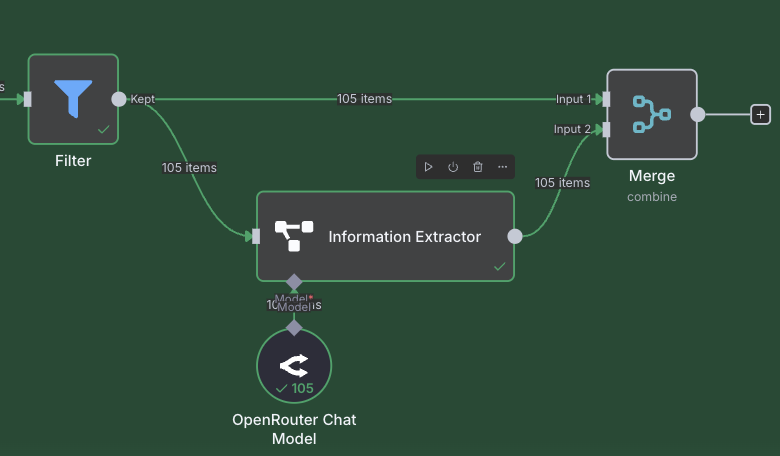
This is where n8n truly shines. n8n has deep, native integration with LangChain, the popular framework for building AI agents. The AI Agent node supports:
- Tool-using agents that call external services, query databases, and perform actions
- Memory nodes for conversation context across interactions
- Vector store integration for RAG (Retrieval-Augmented Generation) workflows
- Multiple LLM providers including OpenAI, Anthropic, Google, and open-source models
See our AgentKit vs n8n comparison for more on n8n's AI approach vs dedicated agent frameworks.
The pricing advantage matters here: an AI agent that loops 50 times while reasoning through a problem is still one execution on n8n. On Make, that is 50+ credits. On Zapier, 50+ tasks.
Make
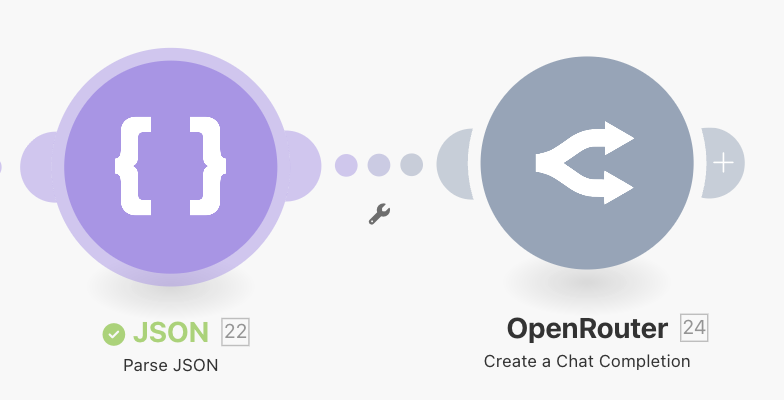
Make integrates with OpenAI, Anthropic, and other providers through dedicated modules, and the visual canvas makes debugging AI workflows straightforward.
The drawback is cost: if an AI agent loops 50 times (calling tools, evaluating results, deciding next steps), that is 50+ credits for a single interaction. AI modules also can consume more credits than standard actions, so sophisticated agents can get expensive.
Zapier
Zapier treats AI as another action in your workflow — summarise text, generate content, or classify data. Zapier Central and the AI-assisted Copilot help non-technical users build workflows faster. This works well for simple AI tasks, but complex agent loops require fitting tightly into the Zapier ecosystem.
Data Privacy and Hosting

Privacy and data policies can often be an afterthought, but they can matter more than most people realise until it is too late.
Zapier and Make (Cloud Only)
Both Zapier and Make are strictly SaaS. Your workflows run on their servers, and your data (API credentials, customer records, processed content) passes through their infrastructure. Both companies invest heavily in security, and for many businesses this is perfectly fine.
But for organisations handling healthcare data (HIPAA), financial records, European personal data (GDPR), or anything that falls under strict data sovereignty requirements, "trust us, it's secure" is not enough. Compliance officers want to know exactly where data lives and who can access it.
n8n (Self-Hosted)
n8n is the only major automation platform that offers a fully self-hosted option. You can run it on your own servers using Docker, deploy it to AWS, Google Cloud, Azure, or spin it up on a VPS for around $20/month. Your data never leaves your infrastructure.
For hospitals, banks, and government agencies, self-hosting is often a legal requirement. Providers like Railway offer one-click n8n deployments if you want managed hosting on infrastructure you control. See our n8n Pricing Guide for the full self-hosted vs cloud trade-off breakdown.
Integration Ecosystems
- n8n — 400+ official integrations plus community nodes. The smallest library on paper, but the HTTP Request and Code nodes mean you can connect to any REST API with a small bit of technical skill.
- Make — ~2,000 integrations. Fewer than Zapier, but connectors tend to expose more advanced features.
- Zapier — 8,000+ apps. If a SaaS tool exists, Zapier likely has a connector.
If your team can build custom integrations, n8n's smaller library is rarely a blocker. If you need plug-and-play SaaS connectors without any technical resources, Zapier's ecosystem is a reasonable choice.
Who Is It For?
| If you are a... | Use... | Because... |
|---|---|---|
| Solopreneur / Marketer | Zapier | Fast setup and the largest app library for simple workflows. |
| Ops Manager / RevOps | Make | Complex visual logic and debugging without writing code, at a fraction of Zapier's cost. |
| Developer / CTO | n8n | Full flexibility, AI agents, self-hosting, and costs that do not scale with workflow complexity. |
| Enterprise / Compliance | n8n (Self-Hosted) | Data sovereignty, GDPR/HIPAA compliance, full infrastructure control. |
| Growing Startup | Make or n8n | Room to scale without bill shock. Start with Make; move to n8n when complexity demands it. |
Platform Cheat Sheet
| Feature | n8n | Make | Zapier |
|---|---|---|---|
| Pricing model | Per execution (whole workflow) | Per credit (each module) | Per task (each action) |
| Free tier | Unlimited (self-hosted) | 1,000 credits/month | 100 tasks/month |
| Cheapest paid plan | €20/mo (2,500 executions) | $9/mo (10K credits) | ~$20/mo (750 tasks) |
| Self-hosted option | Yes (Community Edition) | No | No |
| Native integrations | 400+ (plus HTTP/Code nodes) | ~2,000 | 8,000+ |
| AI agent support | Advanced (LangChain, memory, vectors) | Good (visual AI modules) | Basic (AI steps) |
| Best for | Technical teams, high volume, AI | Visual builders, medium volume | Non-technical, low volume |
| Builder style | Node graph (visual IDE) | Visual canvas | Linear wizard |
Conclusion
The right platform comes down to your technical comfort, budget, and compliance requirements.
n8n is one of the most capable options. Execution-based pricing, AI agent support, and self-hosting make it well suited for complex or high-volume workflows and strict data residency requirements. n8n Cloud removes the self-hosting overhead if you do not need it.
Make offers a polished visual builder at pricing comparable to n8n Cloud, though per-credit costs can add up with AI-heavy workflows. No self-hosting, but a good trade-off when ease of use matters more than flexibility.
Zapier is the simplest way to connect apps, with 8,000+ integrations. Per-task pricing becomes expensive at scale, but for a few straightforward automations it is hard to fault.
For hands-on examples, see our tutorials for n8n and Make, or how n8n handles automated video creation.
Frequently Asked Questions
Is n8n really free?
Yes. The n8n Community Edition is free to self-host with no execution, workflow, or user limits. Your only cost is the server (~$20/month on a VPS or Railway). n8n Cloud plans start at €20/month. See our n8n Pricing Guide for tier details.
How do Make credits work compared to Zapier tasks?
Both count individual steps, but at different price points. On Zapier, each action is one task. On Make, each module action is one credit. Make's Core plan gives 10,000 credits for $9/month; a comparable task count on Zapier costs significantly more. Note that Make's AI modules can consume more credits than standard actions.
Can I migrate my workflows from Zapier or Make to n8n?
No automatic migration tool exists — workflows need to be rebuilt manually. The logic transfers directly (triggers → trigger nodes, actions → action nodes, conditions → IF/Switch nodes). n8n's workflow template library provides common starting points. Most teams migrate gradually, building new workflows on the target platform while keeping existing ones running.
Which platform is best for building AI agents?
n8n. It has native LangChain integration with tool-using agents, conversation memory, and vector stores for RAG. Because n8n charges per execution, an agent that loops 50 times is still one execution — on Make or Zapier that would be 50+ credits or tasks. See our AgentKit vs n8n comparison for more detail.
Can I use more than one automation tool at the same time?
Yes, and many teams do. A common pattern: Zapier for quick integrations (form → spreadsheet, email → Slack) and n8n or Make for complex, multi-step workflows. You can trigger n8n or Make workflows via webhooks from Zapier for a hybrid setup.
What happens if I exceed my plan limits?
Zapier switches to pay-per-task billing at a higher rate. Make lets you purchase additional credits (~$10 per 10,000). n8n Cloud pauses workflows until the next billing period (you can upgrade anytime). Self-hosted n8n has no limits.